
 MikroWizard
Table of Contents
Pro
What it is #
The web terminal gives SSH and Telnet in the browser, logged in for the user, filtered by policy and recorded.
Example uses
- Troubleshoot a router from a laptop without an SSH client.
- Log in to a Cisco switch with enable, without knowing the enable password.
Pro Included in MikroWizard Pro. Recorded SSH and Telnet sessions in the browser.
Before you start #
- A PAM seat, access to the device’s group and a terminal policy. See Give a user PAM access.
- The device’s SSH or Telnet service reachable from the Terminal Gateway.
Open a terminal #
Double-click a device in the Connection Manager or click its SSH / Telnet icon. Each session opens in a tab; open several at once.
How login works #
- MikroTik: when RADIUS is set up, MikroWizard logs in as your MikroWizard user with a one-time password, so the router applies your own RouterOS group and logs your name. The router needs RADIUS login on (
/user aaa use-radius=yes, done by Force RADIUS) and no local router user with the same name as your MikroWizard user. - Other devices: the device’s stored credential (password or SSH key) is used; the user never sees it. If the template has a privilege escalation command (e.g.
enable), MikroWizard sends the enable password when the device asks for it. - If the SSH service port changed on a MikroTik (
/ip service), MikroWizard uses the live port.
While you work #
- Every command is checked against your terminal policy. A blocked command is not sent to the device.
- With command expansions, short forms are turned into the full command, for example
sh lintoshow lldp neighbors. - Everything is recorded, and each command appears in Command history.
- Others can watch or join if you share the session.
Session toolbar #
| Button | What it does |
|---|---|
| Share Session | Invite someone to watch or type. See Share a live session. |
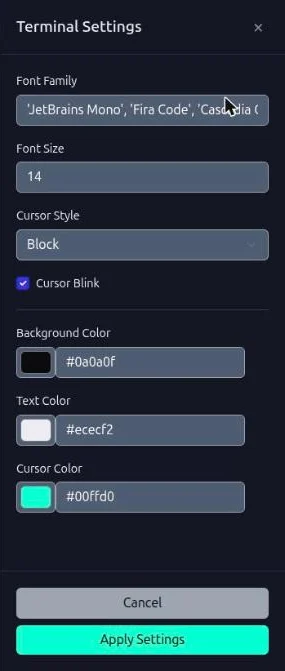
| Terminal Settings | Font, size, cursor and colours, saved for your user. |
| Disconnect Session | Ends the session. |
Common problems #
| Problem | Cause and fix |
|---|---|
| MikroTik login fails | RADIUS not set on the router, or a local router user with your name exists. See RADIUS login not working. |
| SSH service is disabled on this device (/ip service) | Enable SSH on the router, or use Telnet. |
| A command is refused | Your policy blocks it. Ask an administrator, or check Command history with Blocked. |
enable asks for a password and stops | Set the enable password on the device and the privilege escalation in its template. |


