
 MikroWizard
Free MikroTik only
What it is #
Identity verification checks that MikroWizard is talking to the same router as before, using its certificate or SSH host key. It stops a device that takes over a router’s IP from capturing the router’s credentials.
Example uses
- Protect router passwords on networks where someone could spoof an IP address.
- Get a clear stop when a router was replaced, instead of silently sending credentials.
MikroWizard logs in to your routers with stored credentials. Router Identity Verification checks that it is talking to the same router as before, so a device that takes over a router’s IP address can’t capture those credentials.
Turn it on #
Go to Settings › System Configuration › Security & Enforcement › Router Identity Verification and choose:
| Setting | Options |
|---|---|
| API-SSL | Off, Pin certificate (trust the router’s API-SSL certificate the first time it is seen, then require the same one), Verify with CA file (check the certificate against a CA file, e.g. /conf/ssl/routers-ca.pem). Applies to devices that use API-SSL. |
| SSH | Off or Pin host key (trust the SSH host key the first time, then require the same one). |
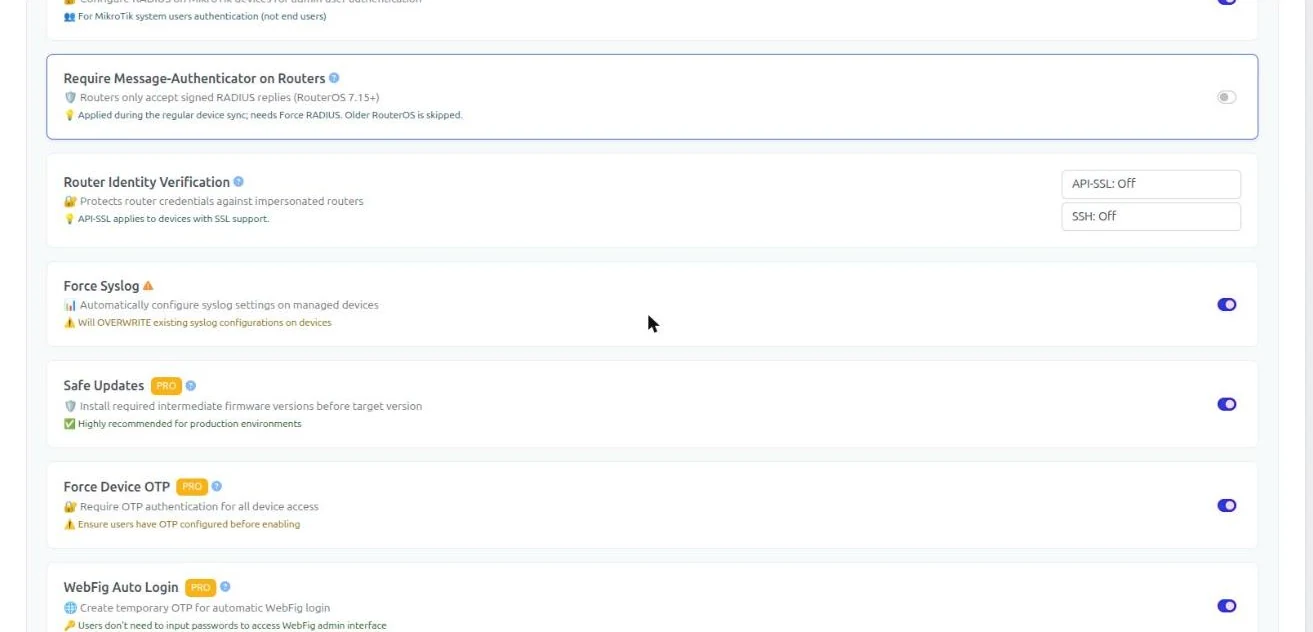
Click Save System Settings.
Trusted identity per device #
When you edit a device, Trusted router identity shows the stored API-SSL certificate and SSH host key, or not seen yet (trusted on next connection). If a router’s certificate or key changes, MikroWizard stops using its credentials until you check it.
Use Reset only after an expected change, such as a new certificate or a reinstalled router. The next connection is then trusted again.
Example #
A router is replaced with a new one at the same IP address. With Pin certificate on, MikroWizard sees a different certificate and stops using the stored credentials for it. After checking that the new router is yours, edit the device and click Reset: the next connection trusts the new certificate.
Common problems #
| Problem | Cause and fix |
|---|---|
| A router goes offline right after a RouterOS upgrade or reset | Its certificate or host key changed. Check, then Reset. See Router identity changed. |
| Verify with CA file fails for all routers | The CA file is missing or doesn’t contain the CA that signed the routers’ certificates. |


