
 MikroWizard
Table of Contents
Free MikroTik only
What it is #
RADIUS login protection blocks repeated failed logins to your routers through MikroWizard, per user and per source address, and checks that RADIUS messages are genuine.
Example uses
- Stop password guessing on WinBox and SSH logins.
- Require signed RADIUS replies on RouterOS 7.15+ routers.
Settings › System Configuration › RADIUS Login Protection.
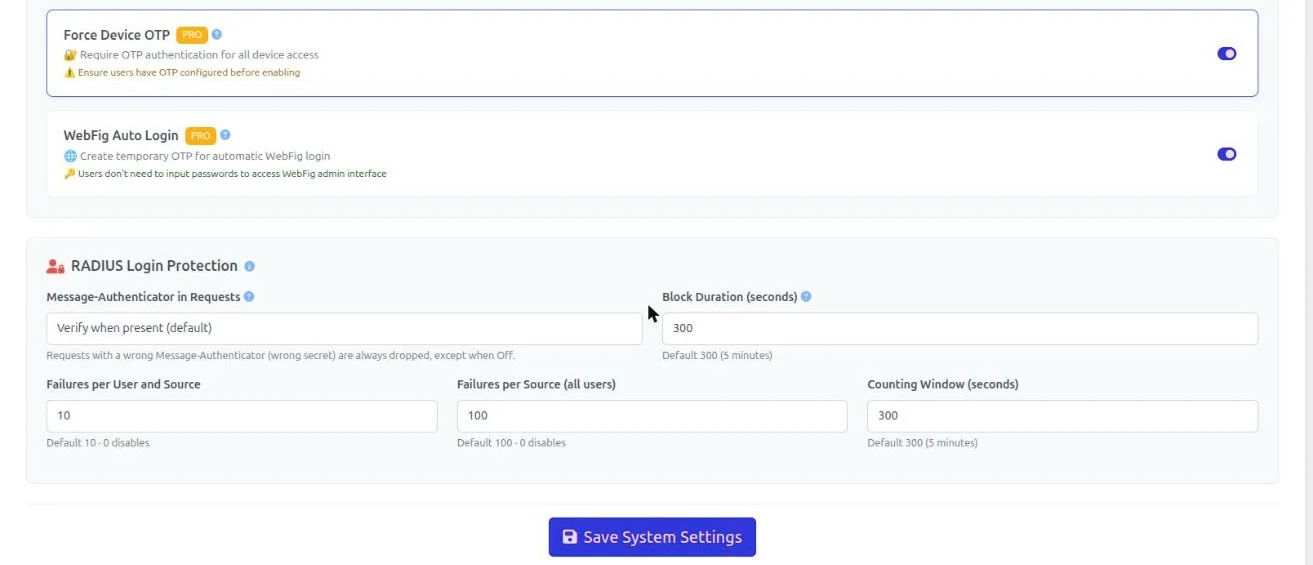
| Field | Default | What it does |
|---|---|---|
| Message-Authenticator in Requests | Verify when present | How strictly RADIUS requests from routers are checked: Verify when present, Auto: require from routers that send it, Always require (RouterOS 7.15+ only), or Off. Requests with a wrong Message-Authenticator (wrong secret) are always dropped, except when Off. |
| Block Duration (seconds) | 300 | How long a blocked user or source stays blocked. |
| Failures per User and Source | 10 | Failed logins for one user from one address before blocking. 0 disables. |
| Failures per Source (all users) | 100 | Failed logins from one address for any user before blocking. 0 disables. |
| Counting Window (seconds) | 300 | Time window in which failures are counted. |
Click Save System Settings.
See and clear lockouts #
Users Management › Locked Logins lists blocked users and sources with the number of failures and when they unlock. You can unlock by username or IP.
Example #
Someone tries passwords for the user admin from 198.51.100.7. After 10 failures within 300 seconds, logins for admin from that address are blocked for 300 seconds. Other users, and admin from other addresses, can still log in. The failures are listed in the Authentication log.
Common problems #
| Problem | Cause and fix |
|---|---|
| A whole office is blocked | Many failures from one NAT address hit Failures per Source. Unlock the IP, and raise the limit if needed. |
| A user can’t log in although the password is right | They are blocked. Unlock them in Locked Logins. |


