
 MikroWizard
Table of Contents
Free Pro
What it is #
Executions is the record of every command MikroWizard ran on a device, with status, output and duration, whoever started it.
Example uses
- Check which routers failed last night’s snippet and why.
- Re-run a command on one device after fixing its credentials.
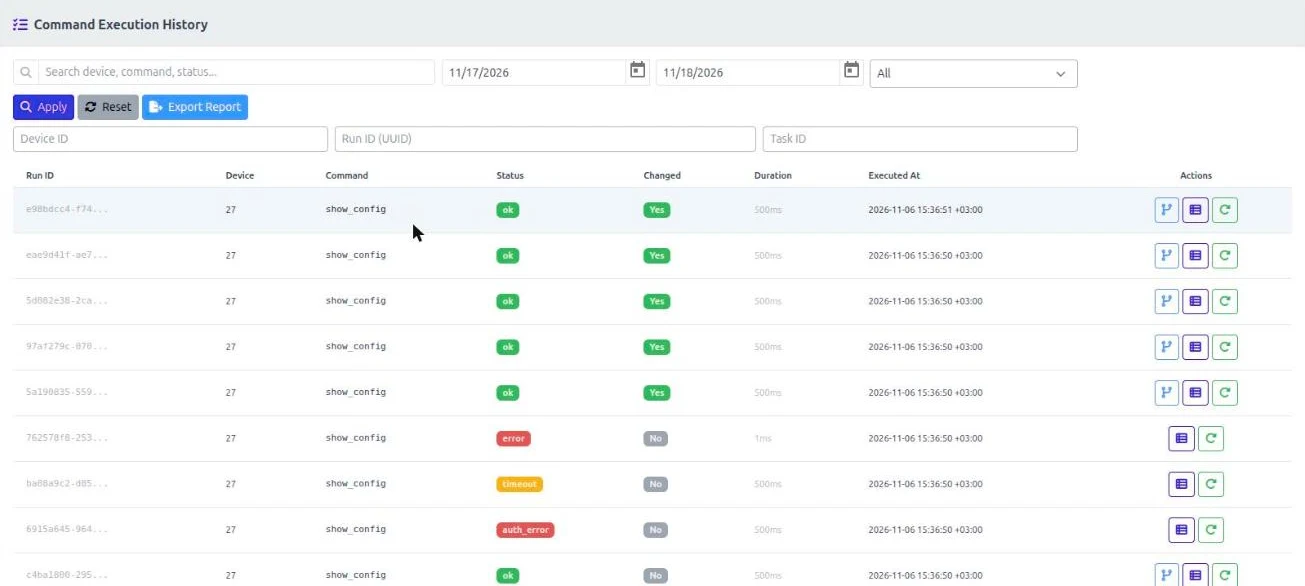
Executions (Command Execution History) lists every command and snippet MikroWizard ran on devices: by you, by tasks, by sequences and by backups.
Find runs #
Filter by text, date range and status, or by Device ID, Run ID or Task ID, then click Apply. Reset clears the filters; Export Report downloads the list.
- Run ID groups the devices of one run: a snippet started on 50 routers is one run.
- Task ID shows everything a scheduled task did.
Columns #
| Column | Meaning |
|---|---|
| Status | ok, warning (the command ran but the device answered with error lines from the template’s error patterns), error, timeout, auth_error |
| Changed | Yes when the output differs from the previous run (for example a configuration change) |
| Duration | How long the command took |
Actions #
- View results: the output per device; download it as CSV.
- View version: opens the configuration version created by this run, when there is one.
- Re-run: runs the same command again on the same device.
What each status means #
| Status | Meaning | What to do |
|---|---|---|
| ok | The command ran and no error pattern matched. | |
| warning | The command ran, but the output contains an error line. | Read the output: often a typo or a command the device doesn’t know. |
| error | MikroWizard couldn’t run the command. | See the error message in the results. |
| timeout | The device didn’t answer in time. | Check reachability and the template’s prompt patterns. |
| auth_error | The device refused the credentials. | Edit the device credentials. |
See also Device shows offline: checklist.
Executions vs. command history #
Executions are commands MikroWizard runs. Commands people type in terminal sessions are in Command history (Pro).
Executions are kept for 180 days. See Logs overview.


