
 MikroWizard
Table of Contents
Free Pro
What it is #
Bulk add imports many devices from a CSV file in one go, with a preview and checks before anything is added.
Example uses
- Move an inventory of 200 routers from a spreadsheet into MikroWizard.
- Import a list of switches with their brand, template and group.
Steps #
- Go to Devices and click Bulk Add.
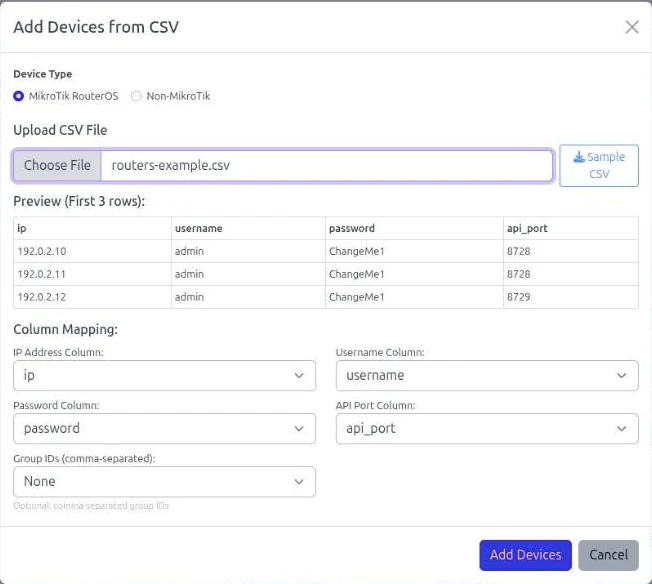
- Choose MikroTik RouterOS or Non-MikroTik.
- Click Sample CSV to download a template, fill it in and save it.
- Click Choose File and pick your CSV. The first 3 rows are shown as a preview.
- Under Column Mapping, tell MikroWizard which column holds which value.
- Click Add Devices.
Columns #
| Device type | Columns |
|---|---|
| MikroTik | IP Address, Username, Password, API Port, Group IDs (comma-separated, optional). |
| Non-MikroTik | IP Address, Username, Password, Device Type / Brand and Template ID (all required), Device Name (defaults to the IP), Device Model, Enable Password, Protocol (ssh or telnet; default ssh), Port, Group IDs. |
For non-MikroTik devices, the dialog lists the available brands and template IDs to use in the CSV, and validates every row before importing. If some rows have errors, fix the CSV and upload it again.
The import is recorded as Bulk Add in History, with the number of devices added and failed.
Example files #
The Sample CSV for MikroTik:
ip,username,password,port
192.168.88.1,admin,password,8728
10.0.0.1,user,pass,8729
The Sample CSV for other brands:
name,ip,username,password,device_type,template_id,protocol,port,enable_password,device_model
Core-Switch,10.0.0.1,admin,str0ng!,cisco,1,ssh,22,enable123,WS-C2960
Linux-Server,10.0.0.3,root,r00t!,linux,7,ssh,2222,,Ubuntu-22.04
Template IDs differ between installations: use the IDs listed in the dialog.
Common problems #
| Problem | Cause and fix |
|---|---|
| MikroTik rows fail with Connection or authentication failed | MikroWizard logs in to each router while importing. Check the API port, the service and the credentials. |
| Missing username, Missing password, Missing template_id | For other brands, IP address, username, password, brand and template ID are all required. |
| Unknown device_type … | Use a brand name from the dialog’s brand list, for example cisco or linux. |
| Template … is for brand … or does not support protocol … | The template doesn’t fit the row’s brand or protocol. Pick another template ID. |
| Template … requires enable_password | Add the enable password, or use a template without enable. |
| Endpoint … already exists in database — will be skipped | A warning: that row is skipped, the others are imported. |
| Wrong values after the import | The column mapping is wrong. Check the preview of the first 3 rows before you import. |


