
 MikroWizard
Free Pro
What it is #
Platform permissions decide what each staff user can do in MikroWizard, area by area, from no access to full control. Templates give you good starting points.
Example uses
- Give the NOC team read access to devices and full access to alerts.
- Let auditors view everything without changing anything.
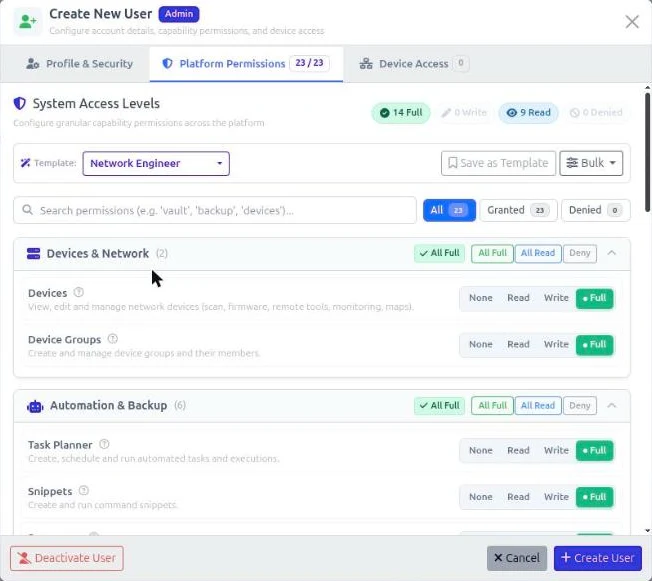
Platform permissions decide which MikroWizard pages and actions a staff user can use. They are set per user on the Platform Permissions tab of Create / Edit User.
Levels #
Each permission is None, Read, Write or Full. PAM Configuration and WireGuard Server have only None, Read and Full. Logs are Denied or Granted. The counter at the top shows how many are Full, Write, Read and Denied.
Areas #
| Group | Permissions |
|---|---|
| Devices & Network | Devices (scan, firmware, remote tools, monitoring, maps), Device Groups |
| Automation & Backup | Task Planner, Snippets, Sequences, Backups (incl. configuration versions), Sync & Cloner, Password Vault (access and reveal stored passwords) |
| Reports & Logs | Authentication Logs, Accounting Logs, Device Logs, System Logs |
| Users & Roles | User Management, Permission Profiles |
| Customer Portal | Customer Portals, Customer Tickets, Customer Chat |
| Privileged Access (PAM) | Privileged Sessions, PAM Configuration, Terminal Policies |
| System & Config | System Settings, Alerts & Notifications, WireGuard Server |
Areas for Pro features only matter when Pro is active.
Templates #
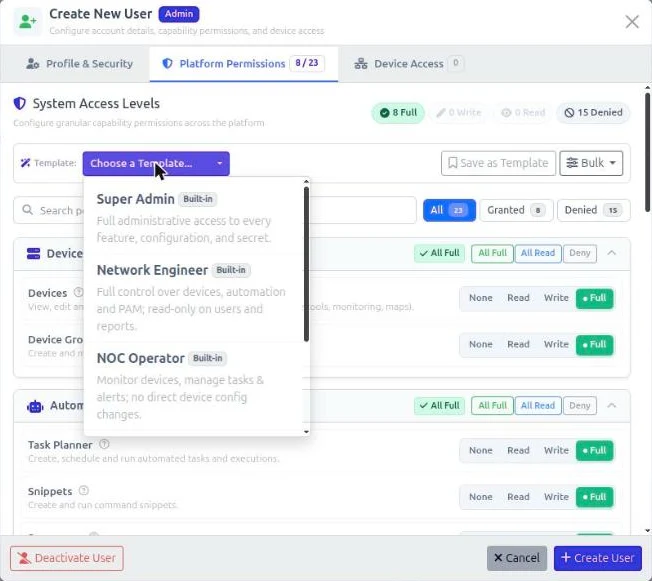
Template applies a preset in one click. You can then change single permissions, and Save as Template to reuse your own set. Bulk sets many at once; each group also has All Full, All Read and Deny.
| Built-in template | For |
|---|---|
| Super Admin | Full access to every feature, configuration and secret. |
| Network Engineer | Full control over devices, automation and PAM; read-only on users and reports. |
| NOC Operator | Monitor devices, manage tasks and alerts; no direct device configuration changes. |
| Help Desk | Customer support (tickets and chat) with read-only device and log visibility. |
| Read-only Auditor | View-only access everywhere; no changes and no secrets. |
Platform permissions vs device access #
Platform permissions control MikroWizard features. Which devices a user sees, and what they may do on the router itself, is set on Device Access.


