
 MikroWizard
Table of Contents
Free Pro
What it is #
Device access decides which device groups a user can see and what rights they get on those routers when they log in through MikroWizard.
Example uses
- An engineer gets write on branch routers and read on core routers.
- A contractor only sees the one group they work on.
A staff user only sees the devices in the groups you give them. For each group you also choose a permission profile: the RouterOS user group (for example full, write or read) the user gets when they log in to those routers through MikroWizard’s RADIUS.
Give access #
- Open Users Management, then Edit User (or + for a new user).
- Go to the Device Access tab.
- Pick a Device Group and a Permission Level (permission profile).
- Click Add Access. Repeat for more groups.
- Click Create User or save.
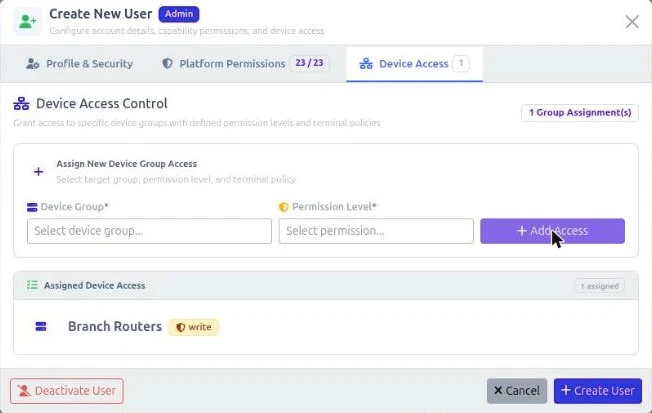
In Pro, you can also pick a Terminal Policy per group when you edit a user, to control commands in web terminal sessions.
Good to know #
- The Default group contains all devices, so access to Default means access to every device.
- A device in several groups is visible if the user has access to any of them.
- Profiles are managed under Permissions. See Permission profiles.
- With Force Permissions on, MikroWizard keeps the RouterOS groups on the routers in line with the profiles. See Security and enforcement switches.
How access is used #
| Where | What the group access decides |
|---|---|
| MikroWizard interface | Which devices the user sees in lists, logs, backups, maps and the Connection Manager. |
| Router logins (RADIUS) | Which RouterOS group the user gets on a router: the profile set for a group of that router. |
| PAM (Pro) | Which terminal policy applies on the group’s devices. |
Example #
| Group | Profile | Terminal policy (Pro) |
|---|---|---|
| Lab | full | a policy without restrictions |
| Branch Routers | write | blacklist of destructive commands |
| Core | read | whitelist of print and monitor commands |
The engineer works freely in the lab, can change branch routers but not reset them, and can only look at the core.
Common problems #
| Problem | Cause and fix |
|---|---|
| The user doesn’t see a device | No access to any group of the device. |
| Router login refused with Unable to verify group | Force Permissions is on and the user has no access to a group of that router. |
| The user gets different rights than expected | They have different profiles on two groups of the same router. Give one profile per device. |


