
 MikroWizard
Pro MikroTik only
What it is #
The vault changes the passwords of router users on a schedule and keeps them encrypted, so no long-lived shared passwords remain on your routers.
Example uses
- Rotate all local router passwords every month.
- Reveal a router password in an emergency, with the reveal logged.
Pro Included in MikroWizard Pro. Automatic password rotation for MikroTik router users.
Before you start #
- Edition: Pro, MikroTik RouterOS only. Other devices in the groups are skipped and listed in the report with the reason.
- Your permission: Password Vault Read to see settings and reports, Write to change settings and run it, Full to reveal passwords.
- Test on a small group first: rotation changes real router passwords.
Settings #
Go to Password Vault, Settings tab.
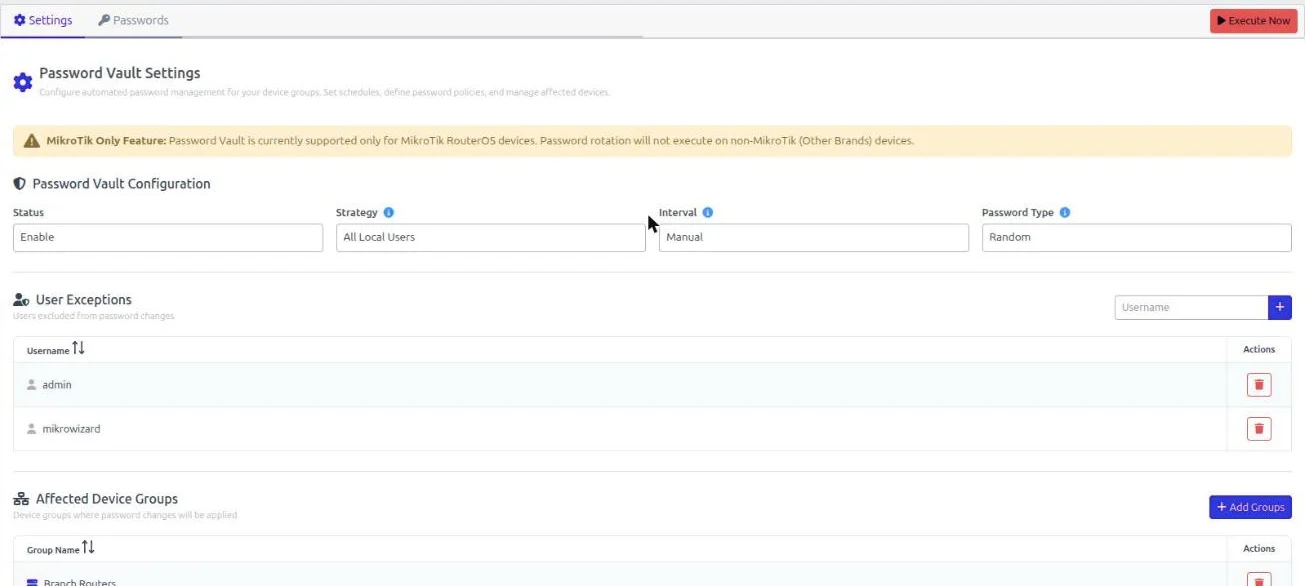
| Setting | Options |
|---|---|
| Status | Enable or Disable. |
| Strategy | All Local Users: every user on the router except the exceptions. MikroWizard Users Only: only the user MikroWizard logs in to the router with. |
| Interval | Daily, Weekly, Monthly, Yearly, Manual (only when you run it), or Custom (a cron expression such as 0 3 0). |
| Password Type | Random: 12 characters from upper and lower case letters, digits and symbols. Pre-defined: one password picked from your own list. |
| User Exceptions | Router users that are never changed, for example admin or an emergency account. |
| Affected Device Groups | The groups whose routers are changed. |
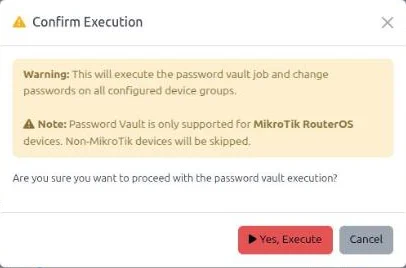
Click Save Configuration. Execute Now runs the rotation once after a confirmation.
How a rotation works #
For each router in the groups, MikroWizard:
- logs in with the device’s stored credential and reads the local users (
/user), - picks one new password for this router (random, or one from your list),
- sets it for every user the strategy selects, skipping the exceptions,
- stores each changed password encrypted in the vault.
If the user MikroWizard logs in with is changed, MikroWizard also saves the new password as the device’s credential, and for PAM connections too, so management keeps working.
Reports #
Each run is listed under Execution Reports with, per router, the users changed and any failure, for example Connection Failed or Skipped: device_type=cisco (not MikroTik).
Stored passwords #
The Passwords tab lists device, user and last change. Reveal shows a password, copy copies it. Every reveal is recorded in the System logs, and you can only reveal passwords of devices in your groups.
Example: monthly rotation for branch routers #
- Strategy All Local Users, exceptions
adminandbreak-glass. - Interval Monthly, Password Type Random.
- Affected Device Groups: Branch Routers.
Engineers then log in to the branch routers with their own MikroWizard user (see RADIUS login for routers); the local passwords change every month and are kept in the vault for emergencies.
Common problems #
| Problem | Cause and fix |
|---|---|
| Connection Failed in the report | MikroWizard couldn’t log in to the router. Check the device credential and that the API service is reachable. |
| A user wasn’t changed | It’s in User Exceptions, or the strategy is MikroWizard Users Only. |
| Pre-defined passwords: all routers got the same one | The list has one entry. Add more; each router picks one at random. |


