MikroWizard Logo MikroWizard Logo MikroWizard
  • Product
    • Zero-Trust Remote Access & PAM
    • Configuration Automation & Diffing
    • NOC Wallboard & Maps
    • WireGuard & MikroSpeed
    • 5-Tier Audit Suite & Logs
    • White-Label Subscriber Portal
  • Solutions
    • For NOC Engineers
    • For ISPs & WISPs
    • For Security Auditors & CISOs
    • For MSPs & Multi-Tenant
  • MikroTik
  • Compare
  • Pricing
  • Resources
    • Engineering Blog
    • Documentation ↗
    • Community Forums ↗
    • Platform FAQ
    • Contact Us
  • Login
  • Register
Star on GitHub Register Device Request Demo
Star GitHub Request Demo Register

Introduction

3
  • MikroWizard Overview
  • Overview of the software
  • Target audience

Getting started

8
  • System requirements
  • Install the MikroWizard docker (recommended)
  • install MikroWizard (manual)
  • Register Serial number
  • Network and Firewall Requirements
  • Install MikroWizard WireGuard docker server
  • Installing MikroSpeed Addon
  • Installing terminal gatway Addon

General

1
  • Understanding MikroWizard Automatic Update & Registration System

Devices, Users & Permissions

4
  • Add New Devices
  • Create and Managing Device Groups
  • Add New User in MikroWizard
  • Manage Permissions in MikroWizard

Tasks, Backups & Snippets

3
  • Managing Snippets
  • Task Planner 
  • Backups

Development

1
  • Development env for backend (mikroman)

Reports

4
  • Authentication
  • Device Logs
  • System Logs
  • Accounting

Firmware Manager

1
  • Firmware Manager
View Categories
  • Home
  • Docs
  • Tasks, Backups & Snippets
  • Backups

Backups

show backups #

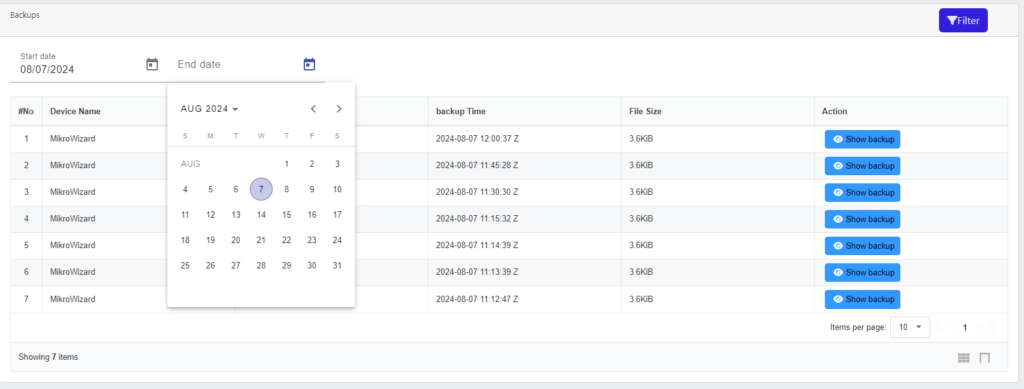
The Backups section displays a list of all backups created through the tasks defined in the Task Planner.

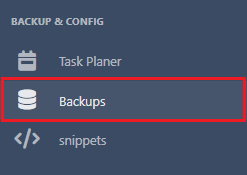
Select the “Backups” option from the left menu.
A list of all backups taken by the tasks will be displayed

Filter by Date: Optionally, you can filter the list based on a desired date to view specific backups by click on button .

View Backup Contents: Click on any backup to see its contents for review or restoration.

Backup Strategy: Establish a backup strategy that includes regular intervals and stores backups securely to prevent data loss.

Updated on August 9, 2024

What are your Feelings

  • Happy
  • Normal
  • Sad

Share This Article :

  • Facebook
  • X
  • LinkedIn
  • Pinterest
Task Planner Managing Snippets
Table of Contents
  • show backups
MikroWizard Logo MikroWizard Logo MikroWizard

Enterprise Zero-Trust Network PAM & Fleet Automation platform engineered specifically for MikroTik RouterOS networks.

v2.0.0 Release Production Ready

Platform & PAM

  • Zero-Trust Remote Access & PAM
  • Config Automation & Diffing
  • NOC Wallboard & Maps
  • WireGuard & MikroSpeed
  • 5-Tier Audit Suite
  • Subscriber Portal

Solutions

  • For NOC Engineers
  • For ISPs & WISPs
  • For Security Auditors
  • For MSPs & Multi-Tenant
  • MikroTik RouterOS Spotlight
  • Platform Comparison

Resources

  • Pricing Calculator
  • Engineering Blog
  • Documentation ↗
  • Community Forums ↗
  • Platform FAQ
  • Contact Us

© 2026 MikroWizard. All rights reserved. Built for MikroTik RouterOS v6 & v7 fleets.

Privacy Policy EULA Sales Agreement Return Policy

Product Screenshot Inspection

Screenshot Zoom Preview