
 MikroWizard
Pro
What it is #
Alert channels decide which notification services users can send alerts to, and hold the global credentials some services need.
Example uses
- Send critical alerts to a Telegram group and PagerDuty.
- Switch off all alert sending during a maintenance window.
Pro Included in MikroWizard Pro. Send alerts to chat apps, push services and on-call tools.
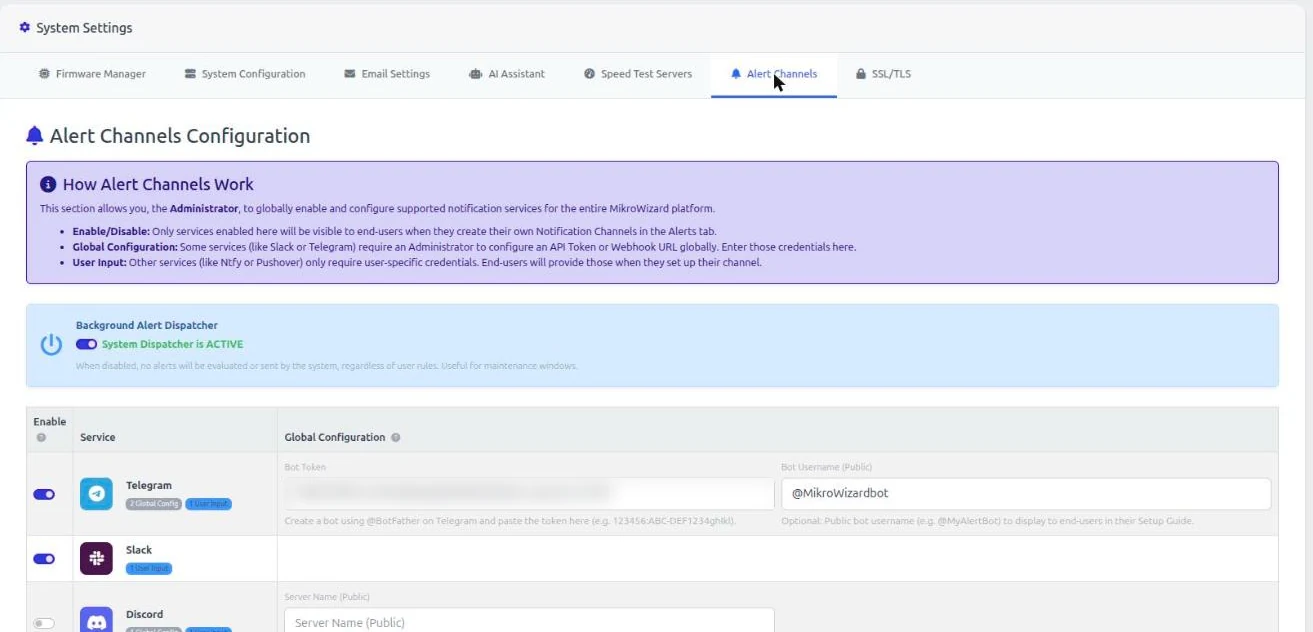
Settings › Alert Channels.
How it works #
- Enable/Disable: only the services you enable here can be chosen by users when they create their own channels under Alerts & Notifications.
- Global Configuration: some services (like Telegram or Slack) need a token or webhook set once by the administrator.
- User Input: others (like ntfy or Pushover) only need each user’s own details.
Built-in services: Telegram, Slack, Discord, Pushover, ntfy, Gotify, Mattermost, Microsoft Teams, Opsgenie, PagerDuty and a custom Apprise URL. Email uses the SMTP settings.
Background Alert Dispatcher #
Switch it off to stop all alert evaluation and sending, for example during a maintenance window.
Click Save Alert Settings. Alert rules are created in Alerts & Notifications.
Example #
Enable Telegram and enter the bot token once in its global configuration. Each engineer then adds a Telegram channel with their own chat ID under Alerts & Notifications, and uses it in their alert rules.


