

MikroWizard Logo MikroWizard Logo MikroWizard
  • Product
    • Zero-Trust Remote Access & PAM
    • Configuration Automation & Diffing
    • NOC Wallboard & Maps
    • WireGuard & MikroSpeed
    • 5-Tier Audit Suite & Logs
    • White-Label Subscriber Portal
  • Solutions
    • For NOC Engineers
    • For ISPs & WISPs
    • For Security Auditors & CISOs
    • For MSPs & Multi-Tenant
  • MikroTik
  • Compare
  • Pricing
  • Resources
    • Engineering Blog
    • Documentation ↗
    • Community Forums ↗
    • Platform FAQ
    • Contact Us
  • Login
  • Register
Star on GitHub Register Device Request Demo
Star GitHub Request Demo Register

Introduction

3
  • MikroWizard Overview
  • Overview of the software
  • Target audience

Getting started

8
  • System requirements
  • Install the MikroWizard docker (recommended)
  • install MikroWizard (manual)
  • Register Serial number
  • Network and Firewall Requirements
  • Install MikroWizard WireGuard docker server
  • Installing MikroSpeed Addon
  • Installing terminal gatway Addon

General

1
  • Understanding MikroWizard Automatic Update & Registration System

Devices, Users & Permissions

4
  • Add New Devices
  • Create and Managing Device Groups
  • Add New User in MikroWizard
  • Manage Permissions in MikroWizard

Tasks, Backups & Snippets

3
  • Managing Snippets
  • Task Planner 
  • Backups

Development

1
  • Development env for backend (mikroman)

Reports

4
  • Authentication
  • Device Logs
  • System Logs
  • Accounting

Firmware Manager

1
  • Firmware Manager
View Categories
  • Home
  • Docs
  • Firmware Manager
  • Firmware Manager

Firmware Manager

Firmware Manager #

The Firmware Manager section allows you to manage firmware versions for your devices efficiently. You can access this section from the left menu under Settings.
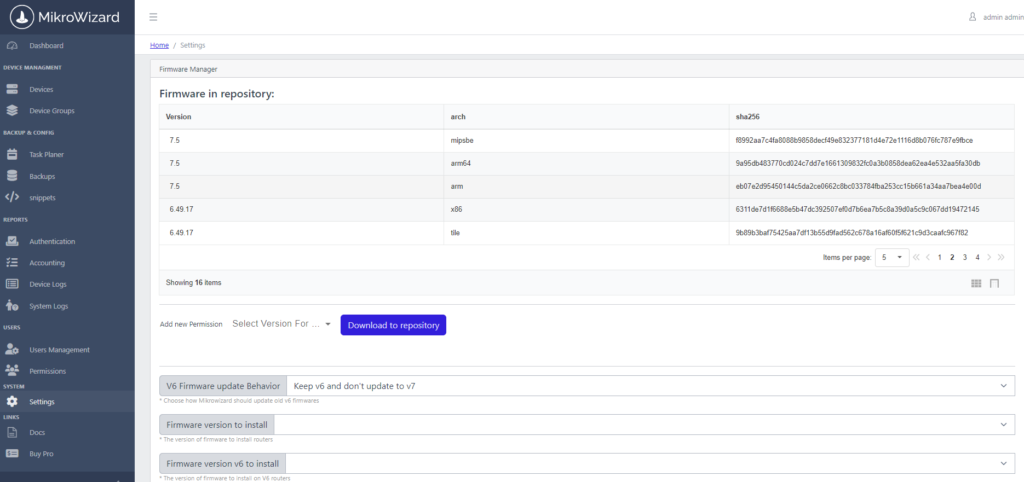
Features of the Firmware Manager #
  • Firmware Repository:
    • In this section, you will find a Firmware Repository where you can store all necessary firmware versions related to your devices. This centralized location ensures that you have easy access to the firmware you require.
  • Firmware Versions Selection:
    • You can select and download all available MikroTik firmware versions from Version 6 and Version 7 to the repository. This function enables you to keep your firmware library up-to-date for easy installation.
  • Installation of Firmware:
    • After downloading firmware versions to the repository, you have the option to select and install any required version directly from the repository.
    • The system automatically detects the architecture of each device, ensuring that the correct firmware compatible with the device is installed without any manual intervention.

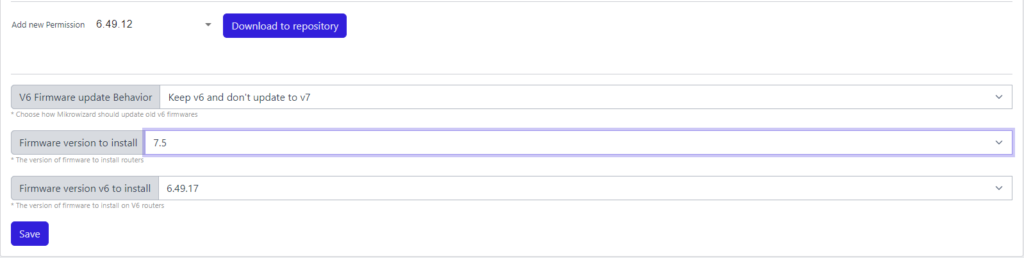
Additional Benefits #

  • Ease of Use:
    • The user-friendly interface allows for straightforward navigation and management of firmware, making it accessible even for users with limited technical expertise.
  • Automatic Architecture Detection:
    • By automatically identifying the device architecture, the system simplifies the firmware installation process and minimizes the risk of compatibility issues.

Regular Updates: Regularly check for new firmware updates in the repository to ensure all your devices are running on the latest and most secure firmware versions.
Backup: It’s advisable to backup current firmware versions before making any changes to ensure you can revert if necessary.

By utilizing the Firmware Manager, you can effectively manage and maintain the firmware for your devices, ensuring optimal performance and security within your MikroWizard network.

Updated on August 18, 2024

What are your Feelings

  • Happy
  • Normal
  • Sad

Share This Article :

  • Facebook
  • X
  • LinkedIn
  • Pinterest
Firmware ManagerFirmware Manager
Table of Contents
  • Firmware Manager
  • Features of the Firmware Manager
  • Additional Benefits
MikroWizard Logo MikroWizard Logo MikroWizard

Enterprise Zero-Trust Network PAM & Fleet Automation platform engineered specifically for MikroTik RouterOS networks.

v2.0.0 Release Production Ready

Platform & PAM

  • Zero-Trust Remote Access & PAM
  • Config Automation & Diffing
  • NOC Wallboard & Maps
  • WireGuard & MikroSpeed
  • 5-Tier Audit Suite
  • Subscriber Portal

Solutions

  • For NOC Engineers
  • For ISPs & WISPs
  • For Security Auditors
  • For MSPs & Multi-Tenant
  • MikroTik RouterOS Spotlight
  • Platform Comparison

Resources

  • Pricing Calculator
  • Engineering Blog
  • Documentation ↗
  • Community Forums ↗
  • Platform FAQ
  • Contact Us

© 2026 MikroWizard. All rights reserved. Built for MikroTik RouterOS v6 & v7 fleets.

Privacy Policy EULA Sales Agreement Return Policy

Product Screenshot Inspection

Screenshot Zoom Preview