
 MikroWizard
Pro MikroTik only
What it is #
Port forwarding lets customers publish a device behind the router (a camera, a game console, a server) without asking support to change the router.
Example uses
- Forward port 8080 to an IP camera to watch it from outside.
- Open a game server port for a console.
Pro Included in MikroWizard Pro. Customers open ports for cameras, game consoles or servers without calling support.
Add a rule #
- Go to Port Forwarding and click Add Port Forward.
- Optionally pick a Preset Template: Web (80), Secure Web (443), SSH (22), Win RDP (3389), FTP (21), Minecraft (25565), Plex (32400).
- Fill in the rule:
| Field | What to enter |
|---|---|
| Rule Identifier / Name | A name, e.g. Camera1. |
| Protocol | TCP or UDP. |
| Incoming Source (Optional) | Limit the rule to an interface or interface list. Default: any incoming traffic. |
| External Port (Router Port) | The port used from outside. Ranges like 2000-3000 work. |
| Internal IP Address (Target LAN IP) | The device inside the network. |
| Internal Port (Target Service Port) | The port the service listens on. |
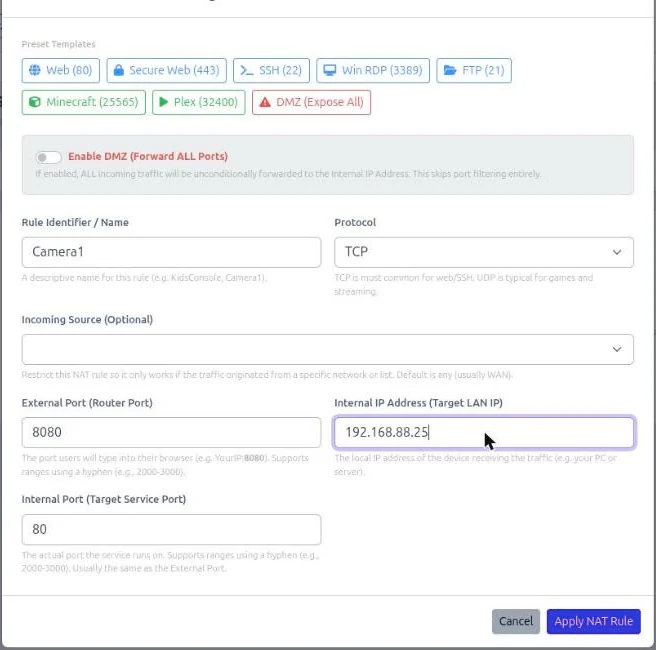
- Click Apply NAT Rule. The rule is created on the router.

In the list, customers can switch a rule on or off, move it up or down, or delete it.
DMZ #
DMZ (Expose All) or Enable DMZ (Forward ALL Ports) forwards all incoming traffic to one internal IP address.
A DMZ bypasses the router’s firewall for that device. Use it only if the device has its own firewall.
Example: a security camera #
The camera has the address 192.168.88.25 and its web page on port 80. Add a rule Camera1, TCP, external port 8080, internal IP 192.168.88.25, internal port 80. The camera is then reachable from outside at the router’s public address, port 8080.
Common problems #
| Problem | Cause and fix |
|---|---|
| The rule exists but nothing answers from outside | The router has no public IP (CGNAT), or the provider blocks the port. Test from outside your own network. |
| Saving the rule fails | The customer’s profile doesn’t allow writing. See Assign routers and permissions. |


