
 MikroWizard
Pro MikroTik only
What it is #
Sync and Clone keeps chosen configuration sections the same on many routers, copying from a master router or between members, on demand, on a schedule or live.
Example uses
- Keep the same firewall address lists on all branch routers.
- Change a script on the master router and have it copied to every site.
Pro Included in MikroWizard Pro. Replicate configuration from a master router, on demand, on a schedule or live.
Keep firewalls, address lists, scripts or routes the same on many routers: change them once on the master, and MikroWizard applies the change to the members.
Before you start #
- Edition: Pro, MikroTik only.
- Live Mode needs router logs: turn on Force Syslog, so routers send their system logs to MikroWizard.
- Test with two routers first.
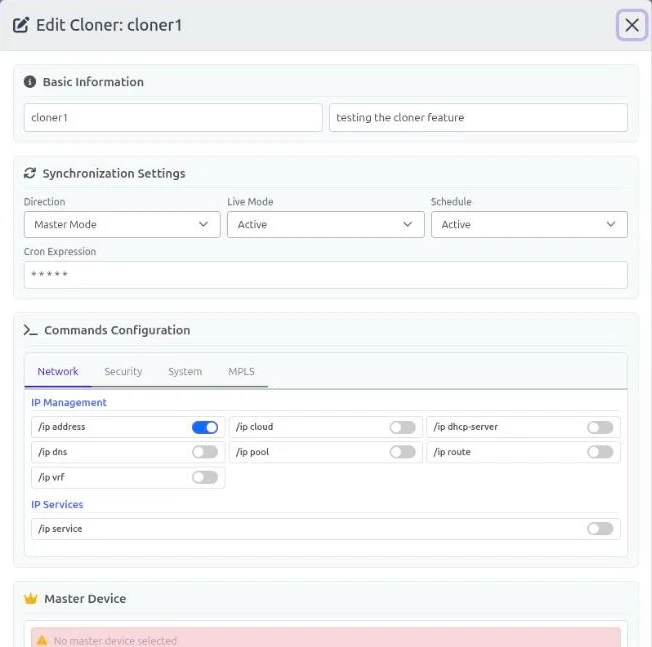
Go to Sync and Cloner and click + (or edit an existing cloner).
Settings #
| Setting | Options |
|---|---|
| Direction | Master Mode: the master router’s sections are copied to the members. Two Way Sync: changes on any member are synced to the others. |
| Live Mode | Active: changes made in WinBox, SSH, API or WebFig are replicated as they happen. |
| Schedule | Active with a cron expression, for regular syncs. |
Sections #
Choose what to sync on the tabs:
- Network:
/ip address,/ip cloud,/ip dhcp-server,/ip dns,/ip pool,/ip route,/ip vrf,/ip service - Security: firewall (address-list, filter, nat, mangle, raw, layer7, service-port, calea, connection) and IPsec
- System:
/system script,/system scheduler, NTP,/system clock,/radius - MPLS:
/mplsand VPLS
Members #
Choose the Master Device (Master Mode) and add members with Add Members. Members can be devices or groups. Click save.
How it applies changes #
- On demand and scheduled: MikroWizard compares each selected section of the master with each member and sends only the minimal changes.
- Live: when a router logs a configuration change, MikroWizard sends the same command to the other routers, if the section is selected.
- Changes made by MikroWizard itself are ignored, so changes don’t bounce back and forth.
- Lines with the comment
#mwestay local and are never synced.
Example: one blocklist on all branch firewalls #
- Master Mode, master HQ-FW, members: group Branch Routers.
- Section Security › address-list only.
- Live Mode Active.
Add an address to the list blocklist on HQ-FW in WinBox: within seconds it is on every branch router. An entry with comment #mwe stays only on the router where you add it.
Common problems #
| Problem | Cause and fix |
|---|---|
| Live changes aren’t copied | Force Syslog is off, or the router doesn’t log the change. Check Syslog from routers not arriving. |
| A member differs after a sync | The section isn’t selected, or the lines carry #mwe. |


