RouterOS v6 & v7 · Remote Management · Remote Winbox · Zero-Trust PAM

The Only Platform
Purpose-Built for MikroTik RouterOS

Centralized, private self-hosted remote management: Secure remote access & Zero-Trust PAM with remote Winbox 2FA, WebFig reverse proxy without public IPs, MNDP topology discovery, offline NPK firmware repository, DHCP lease tracking, WireGuard QR provisioning, and Rust btest-rs line-rate benchmarking.

Request Live Demo View Pricing & Plans Free Edition on GitHub ↗
Tested & Compatible With: RouterOS v6.43+ RouterOS v7.x Long-Term CHR (Cloud Hosted Router) CCR / CRS / hEX / RB Series RouterOS API (port 8728/8729) RouterOS REST API (v7.1+) Winbox 3.x & 4.x MikroTik CAPsMAN
Security & Authentication

Native Remote Winbox, SSH & WebFig 2FA via Embedded RADIUS Mule Daemon

MikroWizard solves what RouterOS cannot do alone: TOTP 2FA for native remote Winbox desktop access. The embedded RADIUS Mule daemon (radius.py on port 1812/1813) intercepts native remote Winbox, SSH, and WebFig MS-CHAPv2 authentication packets and validates dynamic 6-digit TOTP tokens before granting access — enabling secure remote Winbox management without VPNs or firewall modifications.
  • MS-CHAPv2 Hash Interception: Full RADIUS protocol validation — simply point your RouterOS RADIUS client at MikroWizard.
  • Winbox 3.x & 4.x Native: Compatible with all standard Winbox desktop releases without requiring router plugins or custom firmware.
  • Dual OTP Protection: RFC 6238 TOTP for MikroWizard web portal + dynamic RADIUS OTP for native RouterOS logins.
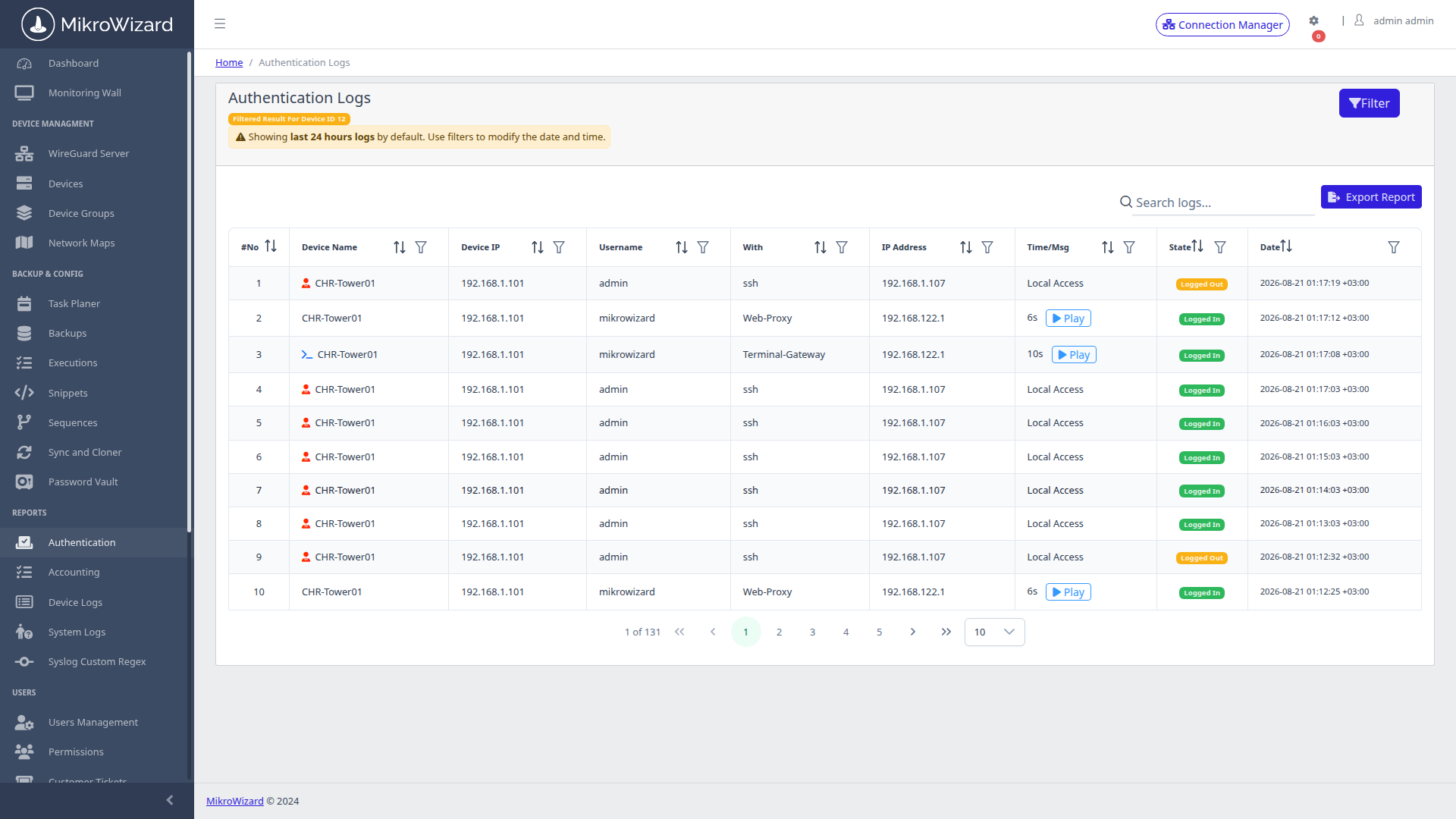
  • RADIUS Audit Trail: Every authentication attempt (success/denied) recorded in the 5-tier audit system with IP, user, and device metadata.
RADIUS Mule Trace (Port 1812) — Winbox MFA
[RADIUS-MULE] Auth-Request from 10.0.10.1 (CCR2004-16G-2S+)
[RADIUS-MULE] MS-CHAPv2 User: "noc-admin"
[RADIUS-MULE] Validating TOTP token: [392814] → OK
[RADIUS-MULE] Access-Accept sent → Winbox session granted
RADIUS 2FA System Configuration
Inspect High-Res Screen

RADIUS 2FA Setup: Central panel configuring RADIUS Secret and System URL — one-time setup to activate Winbox 2FA across your fleet.

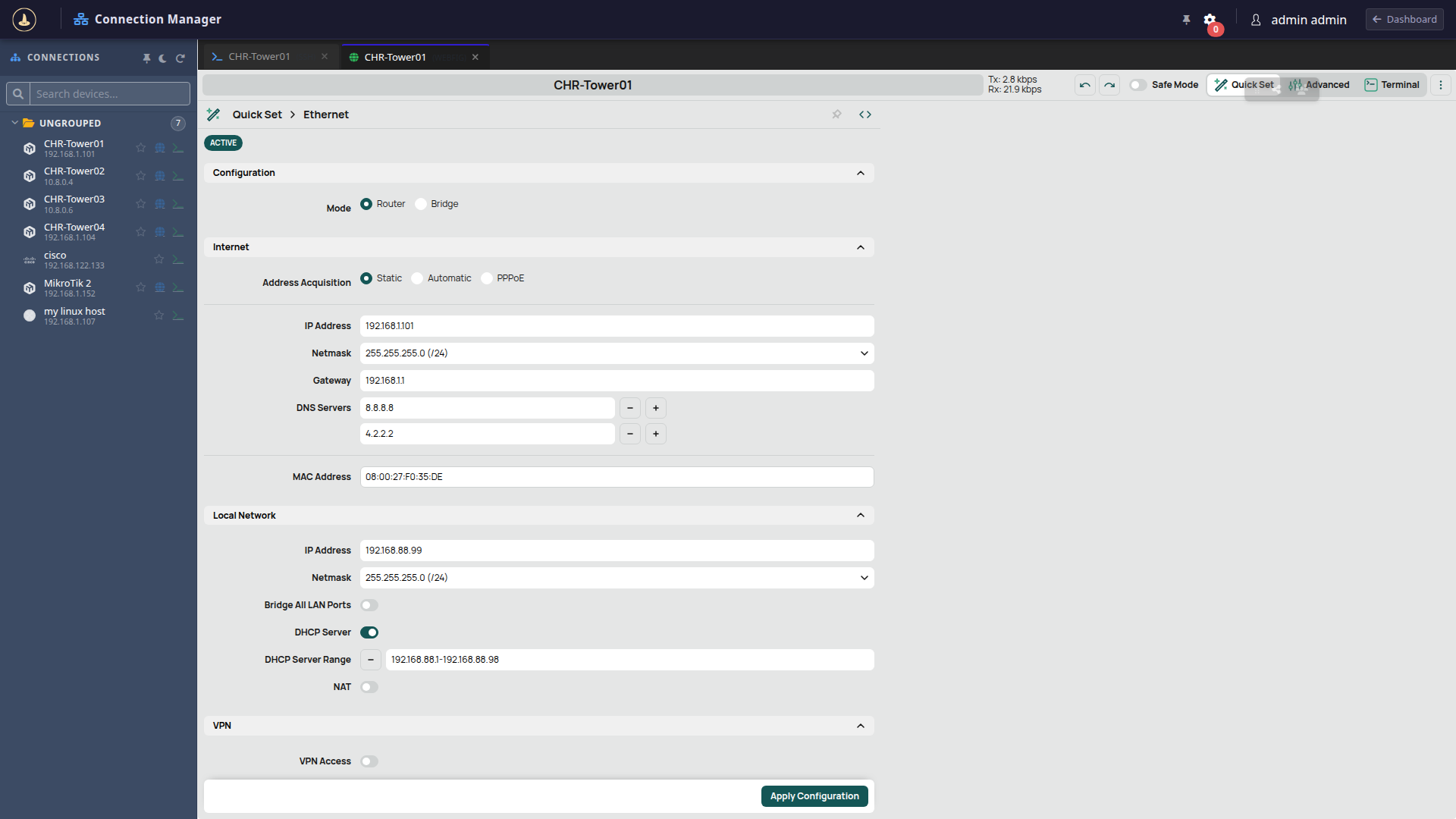
Reverse-Proxied WebFig GUI
Inspect High-Res Screen

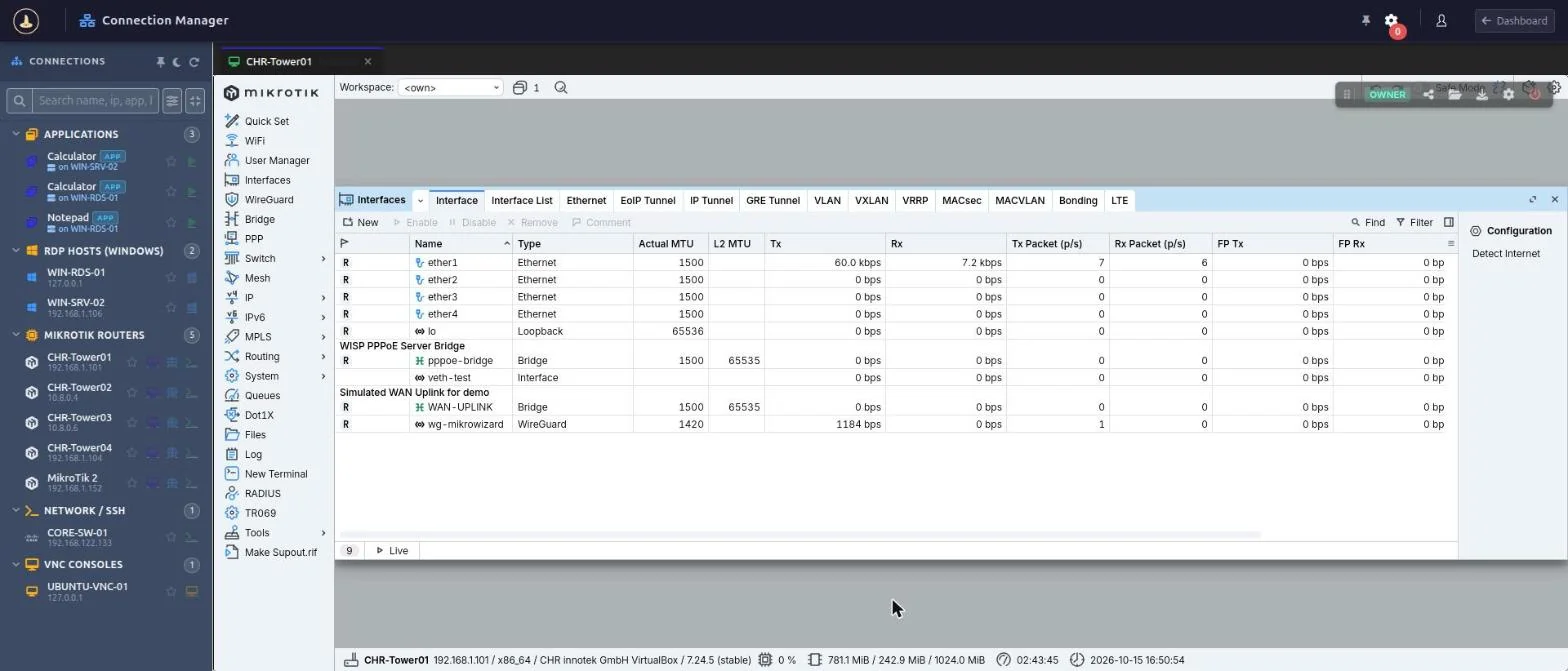
WebFig Proxy: Full MikroTik WebFig GUI in-browser via reverse proxy — no public IP, no port forwarding, no VPN required for CHR-Tower01.

WebFig Reverse Proxy

Secure Remote Access & WebFig Reverse Proxy — Full GUI Without a Public IP or Open Port

Get secure remote access to the complete MikroTik WebFig graphical configuration interface for any router — even behind double-NAT, CGNAT, or private networks — without exposing HTTP port 80/8080 or configuring public IPs. MikroWizard's HTTP/WebSocket reverse proxy (api_proxy.py) securely tunnels remote management sessions on demand.

  • Zero Port Exposure: Router management ports stay closed to the internet — all WebFig traffic is multiplexed through MikroWizard's single HTTPS endpoint.
  • Vault Auto-Login: Encrypted credentials injected automatically — operators gain WebFig access without knowing device passwords.
  • RouterOS v6 & v7: Fully compatible with legacy WebFig and the new Jia UI revamp introduced in RouterOS v7.
  • Session Audited & Killable: Real-time session monitoring in PAM Active Sessions with duration tracking and instant 1-click killswitches.
Zero-Client Terminal

Zero-Client In-Browser CLI — SSH & Telnet to RouterOS Without Installing Software

Connect to any MikroTik router via SSH or Telnet directly inside your web browser — no PuTTY, WinBox SSH tab, SecureCRT, or local SSH key management. The xterm.js WebSocket terminal gateway (port 8201) delivers full RouterOS CLI capabilities with ANSI colors, interactive command menus, and tab completion.
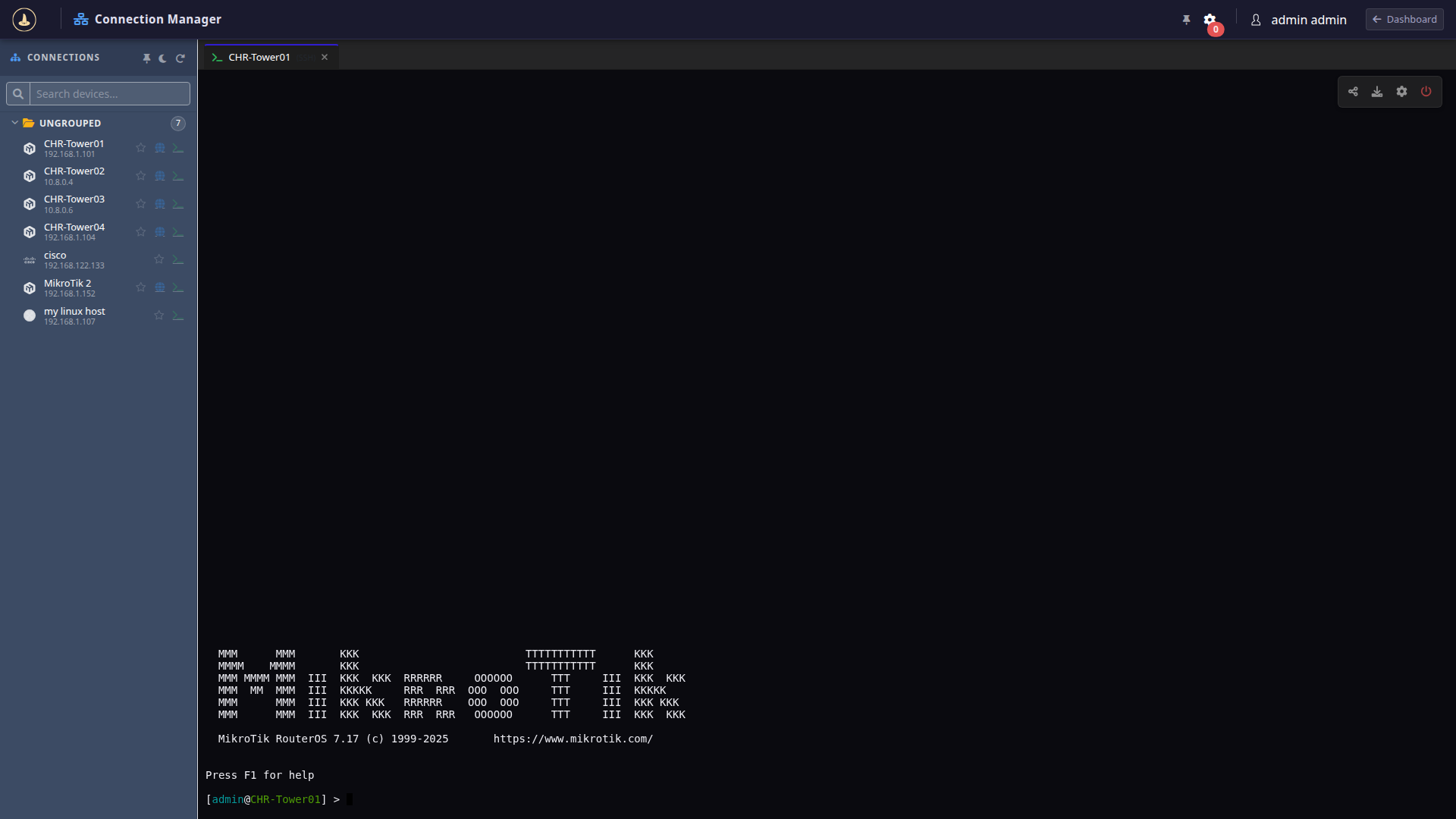
  • Native xterm.js Emulation: Renders authentic RouterOS banners, color syntax, and interactive pagers.
  • Full Keystroke Recording: Every terminal session recorded in compressed Asciinema v2 format for instant replay and compliance audit.
  • Kernel Command Policy: Intercepts and blocks dangerous Linux target commands (such as rm -rf /) via ptrace before execution.
  • Collaboration Rooms: Share live sessions with colleagues or external vendors as Observer or Collaborator via temporary secure tokens.
In-Browser Terminal on RouterOS CHR-Tower01
Inspect High-Res Screen

In-Browser Terminal: Live xterm.js session connected to MikroTik CHR-Tower01 running RouterOS 7.17 — zero client software installed.

MikroTik MNDP / LLDP Topology Map
Inspect High-Res Screen

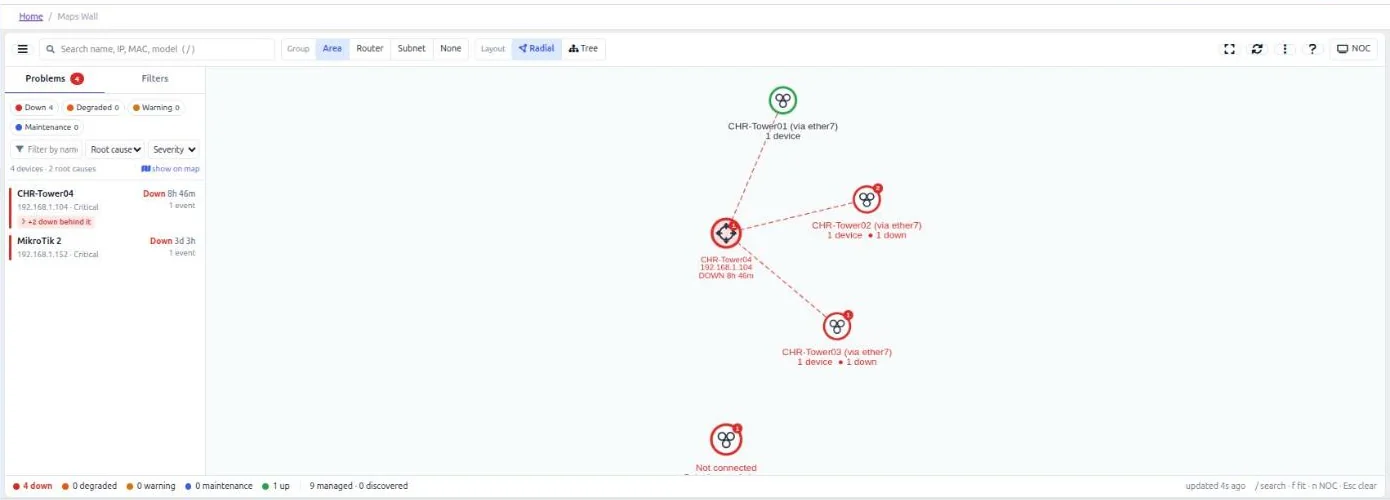
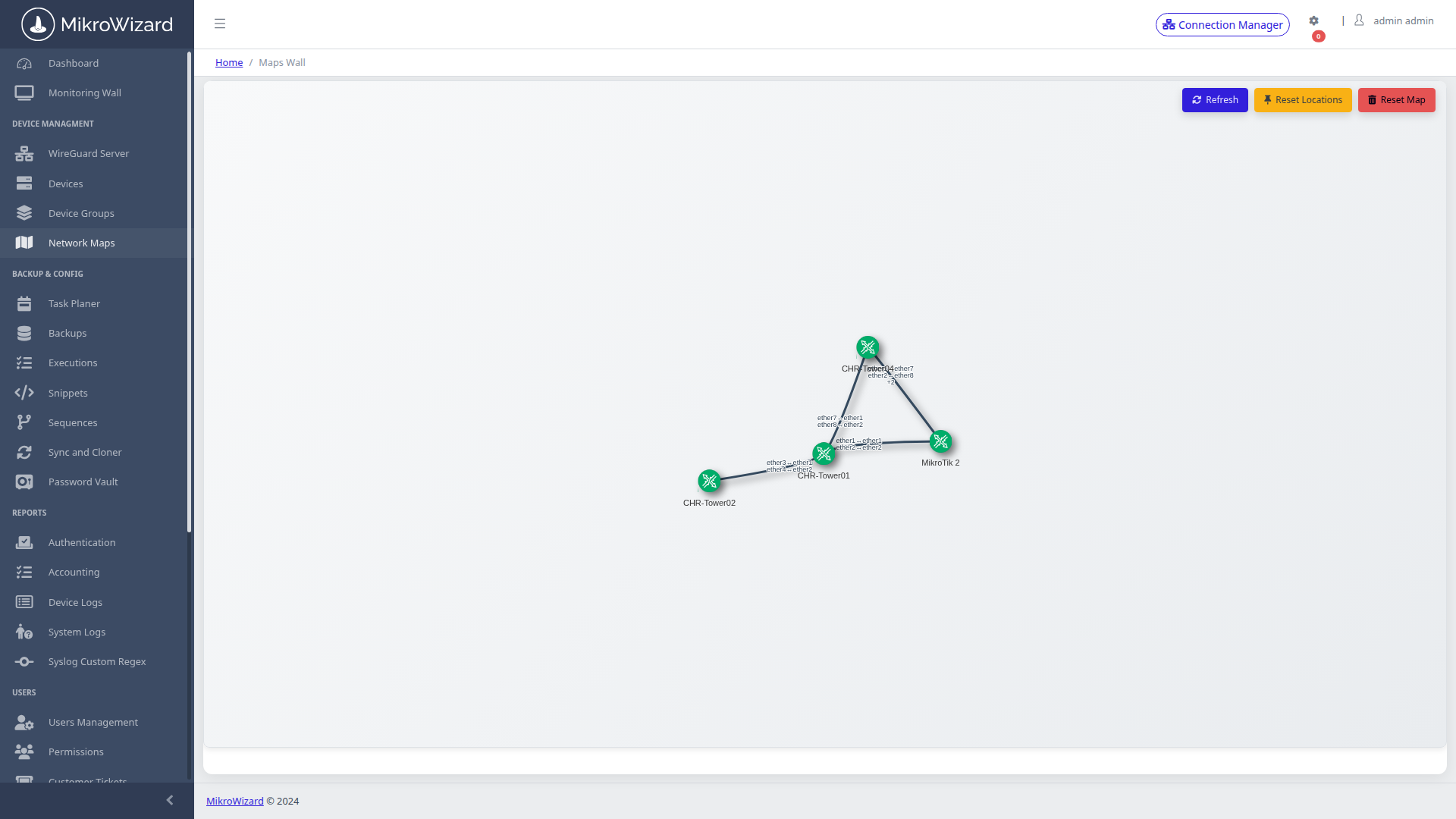
MNDP Topology Map: Physics-based vis-network graph auto-generated from MikroTik MNDP + LLDP + CDP neighbor tables — rendered live in the browser.

MikroTik MNDP Discovery

Layer-2 MNDP / LLDP / CDP Topology Discovery & Vis-Network Map

MikroWizard automatically discovers your entire network topology by harvesting MikroTik MNDP (MikroTik Neighbor Discovery Protocol) tables alongside LLDP and Cisco CDP data. It dynamically constructs an interactive physics-based vis-network graph without requiring manual map maintenance.

  • MikroTik MNDP Native: Auto-discovers RouterOS neighbors, device identity, board models, and connected interface ports.
  • Multi-Vendor Interconnects: Integrates Cisco CDP and standard LLDP switches seamlessly alongside MikroTik equipment.
  • Interactive Physics Engine: Drag, pan, zoom, and organize nodes with real-time connection link indicators.
  • 1-Click Quick Triage: Click any router node in the map to instantly launch in-browser Terminal or WebFig proxy.
RouterOS Firmware

Offline NPK Firmware Repository & Air-Gapped Fleet Upgrades

MikroWizard maintains a local offline cache of RouterOS NPK firmware packages across all hardware architectures, enabling automated fleet-wide firmware upgrades even in completely air-gapped or isolated network segments.
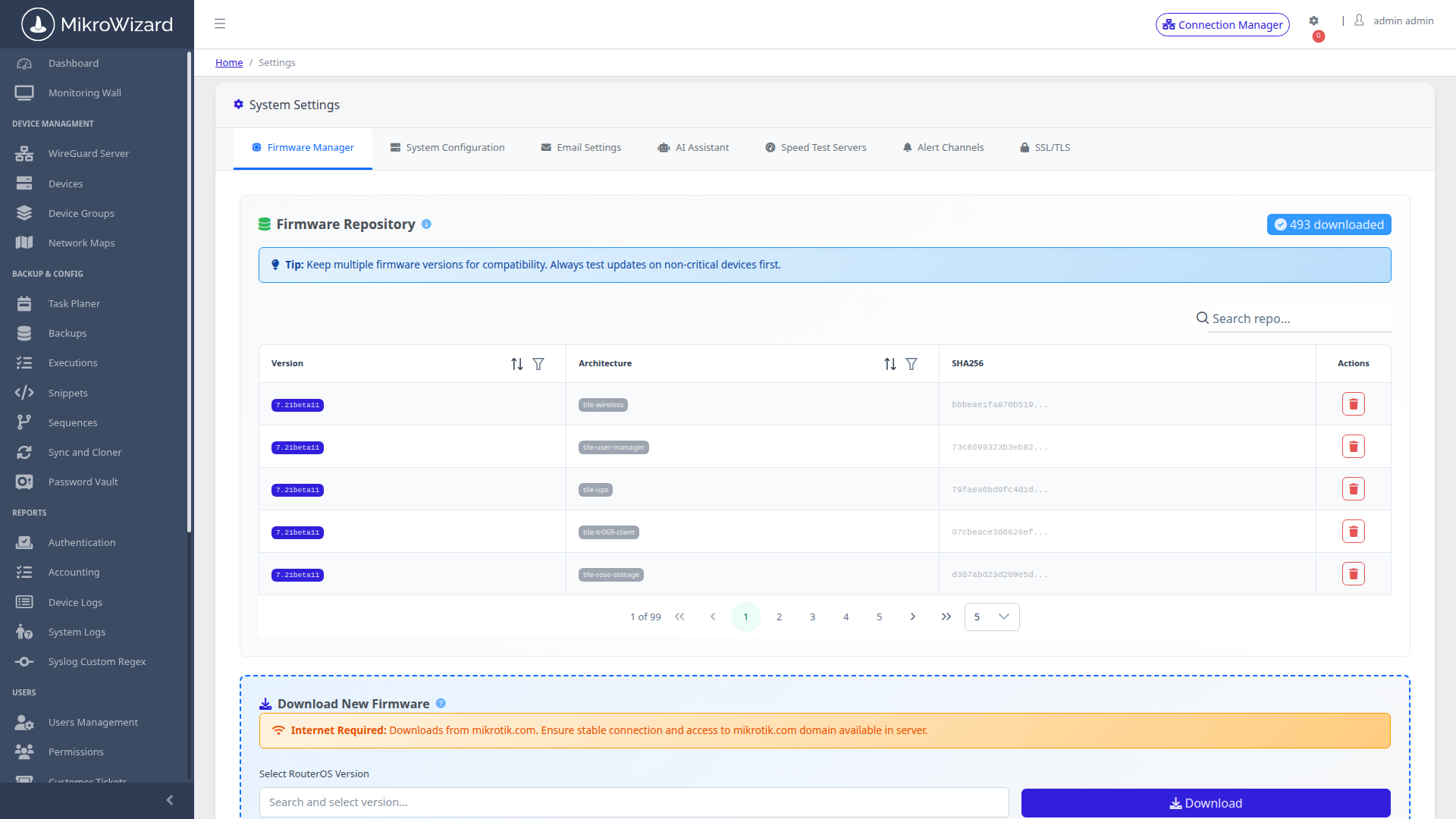
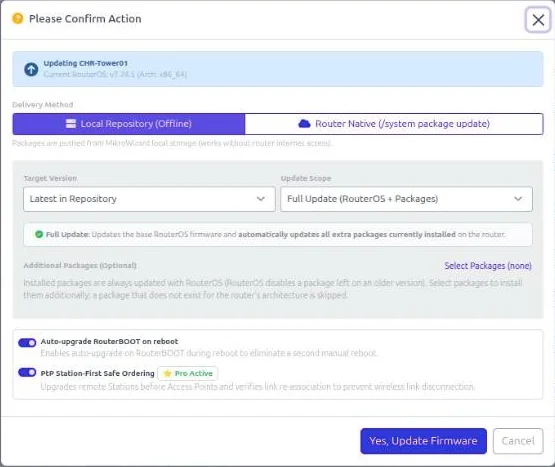
  • NPK Package Repository: Cache routeros, wireless, zerotier, and container NPK packages locally across stable, long-term, and development channels.
  • Air-Gapped Operation: Upgrade edge routers that have zero internet access — essential for mission-critical ISP and industrial deployments.
  • Staged Fleet Rollouts: Schedule bulk firmware pushes using Task Planner to safely update hundreds of routers overnight.
  • Pre-Upgrade Snapshot: Automatically triggers config backups prior to package push for instant 1-click recovery.
  • Architecture Coverage: Supports mipsbe, arm, arm64, x86, tile, and mmips hardware architectures.
RouterOS NPK Firmware Repository
Inspect High-Res Screen

NPK Firmware Repo: Offline RouterOS package repository manager showing cached NPK bundles, channels (stable/long-term/dev), and offline upgrade triggers.

MikroTik DHCP Lease History
Inspect High-Res Screen

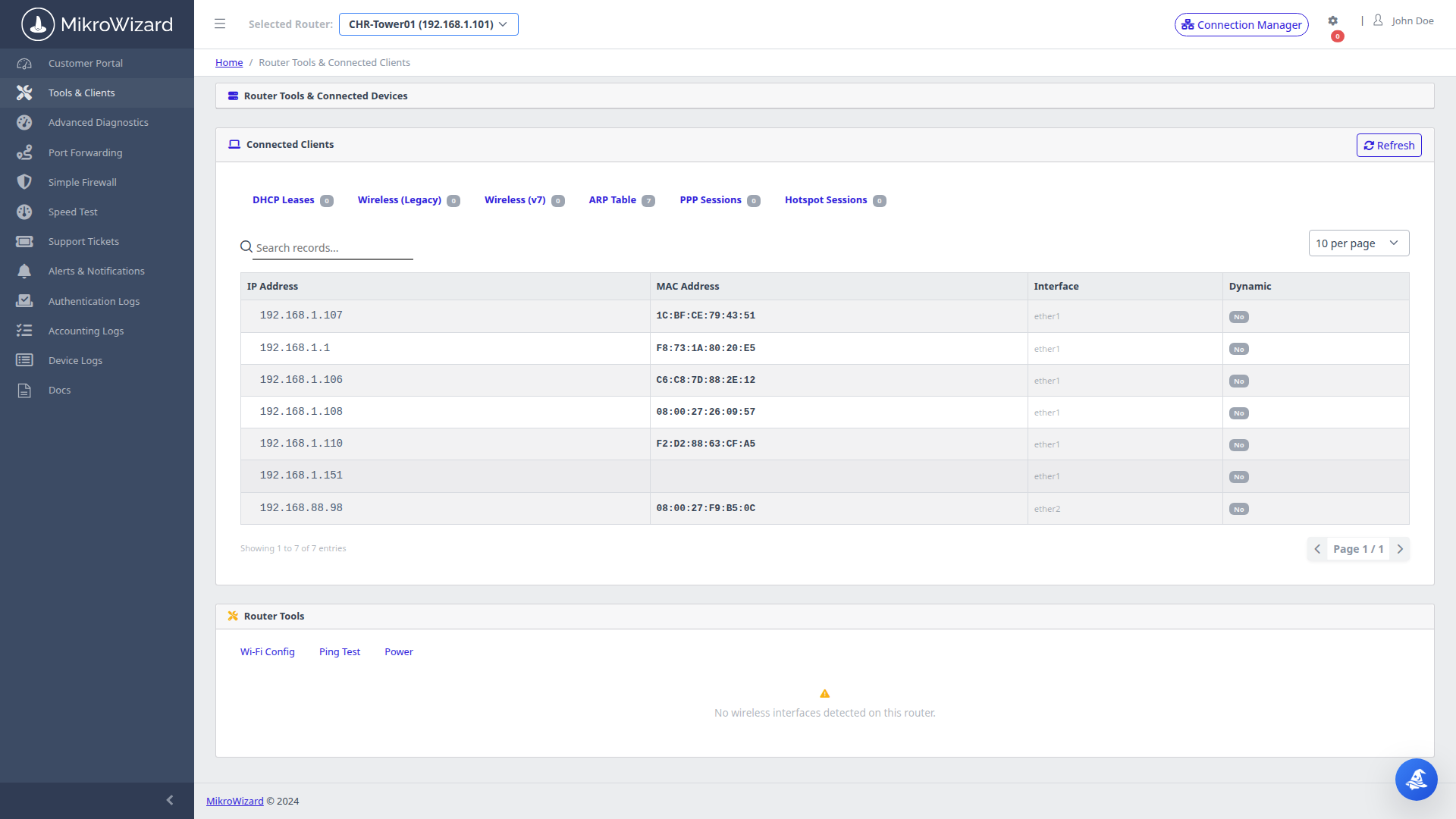
DHCP Lease Monitor: Live MAC-to-IP DHCP binding table with hostnames, interfaces, Wi-Fi signal meters, and historical IP assignment tracking.

DHCP & Network Audit

Live DHCP Lease Tracking, IP History & Connected Device Monitoring

MikroWizard continuously queries RouterOS DHCP server lease tables across all managed routers, recording MAC-to-IP binding histories, hostname records, lease durations, connection interfaces, and Wi-Fi signal metrics for audit and troubleshooting.

  • Historical IP Assignment: Track which MAC received which IP address over time for compliance, subscriber support, and dispute resolution.
  • Hostname & Wi-Fi RSSI: Device hostnames, signal RSSI levels, and interface associations recorded with every lease update.
  • Fleet & Subscriber Scopes: Monitor fleet-wide DHCP pools in NOC Wallboard or provide read-only device views in subscriber self-service.
  • Hotspot & PPPoE Counters: Real-time counts of active Hotspot and PPPoE subscribers integrated into the telemetry engine.
RouterOS Telemetry

Deep RouterOS Telemetry — CPU, RAM, Interfaces & Latency Graphs

MikroWizard queries the RouterOS API and REST API in real time to collect granular device telemetry: CPU load, free RAM, HDD usage, ping latency history, active Hotspot/PPP users, interface packet counters, TX/RX rates, and config version drift — all visualized without opening WinBox.
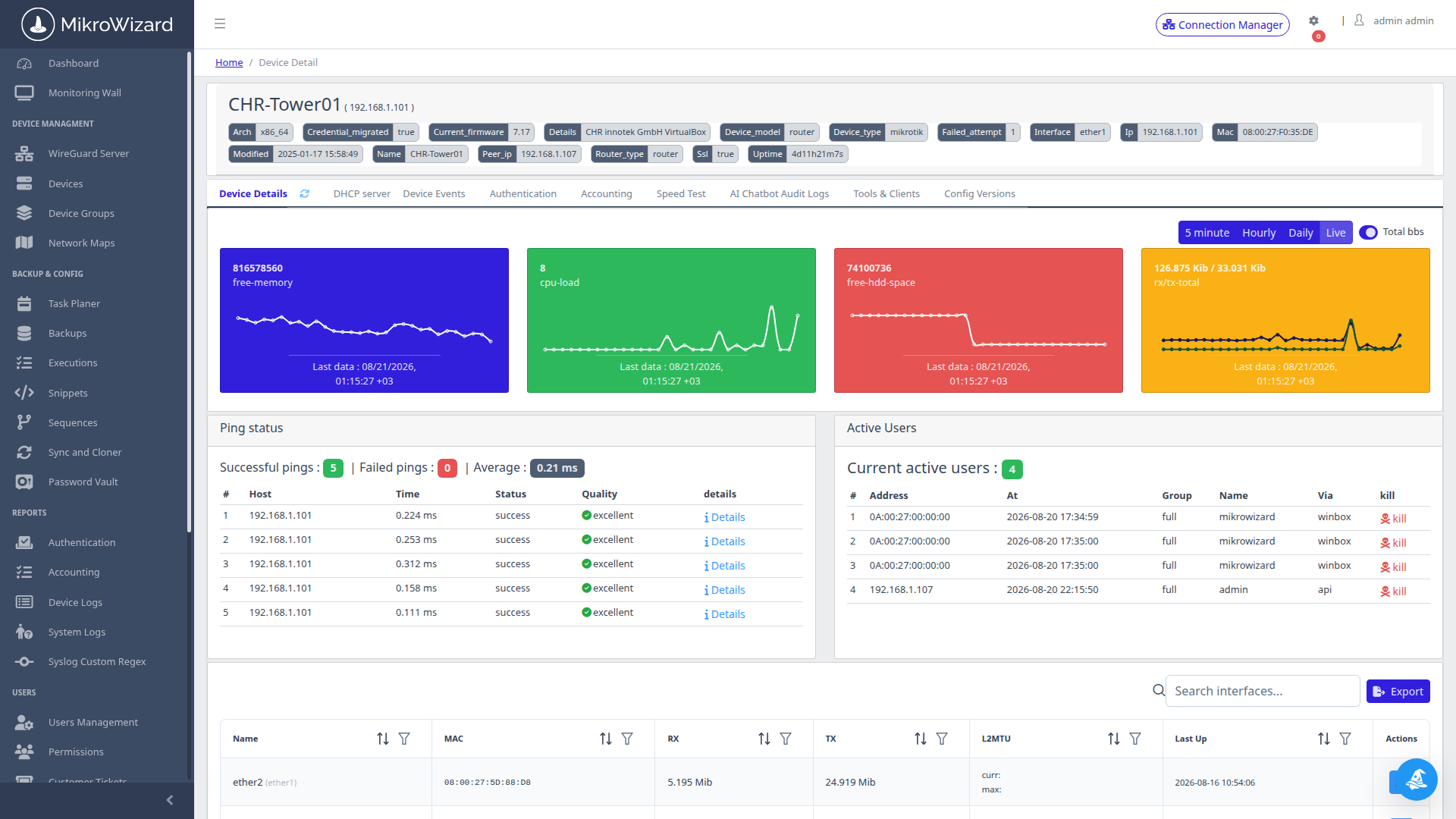
  • RouterOS API & REST API: Native integration with legacy RouterOS API (port 8728/8729) and modern RouterOS REST API (v7.1+).
  • Interface Packet Counters: Real-time TX/RX throughput, packet counters, errors, and drop metrics per interface.
  • Ping Latency History: Continuous ICMP latency graphs for SLA validation and connection quality tracking.
  • Config Drift Tracking: Version counters compared against baseline backups to highlight unauthorized on-router modifications.
RouterOS Telemetry Dashboard
Inspect High-Res Screen

RouterOS Telemetry: CHR-Tower01 deep dive — CPU load, RAM free, disk, ping latency chart, active users, interface counters, and config version drift.

MikroTik WireGuard Server Management
Inspect High-Res Screen

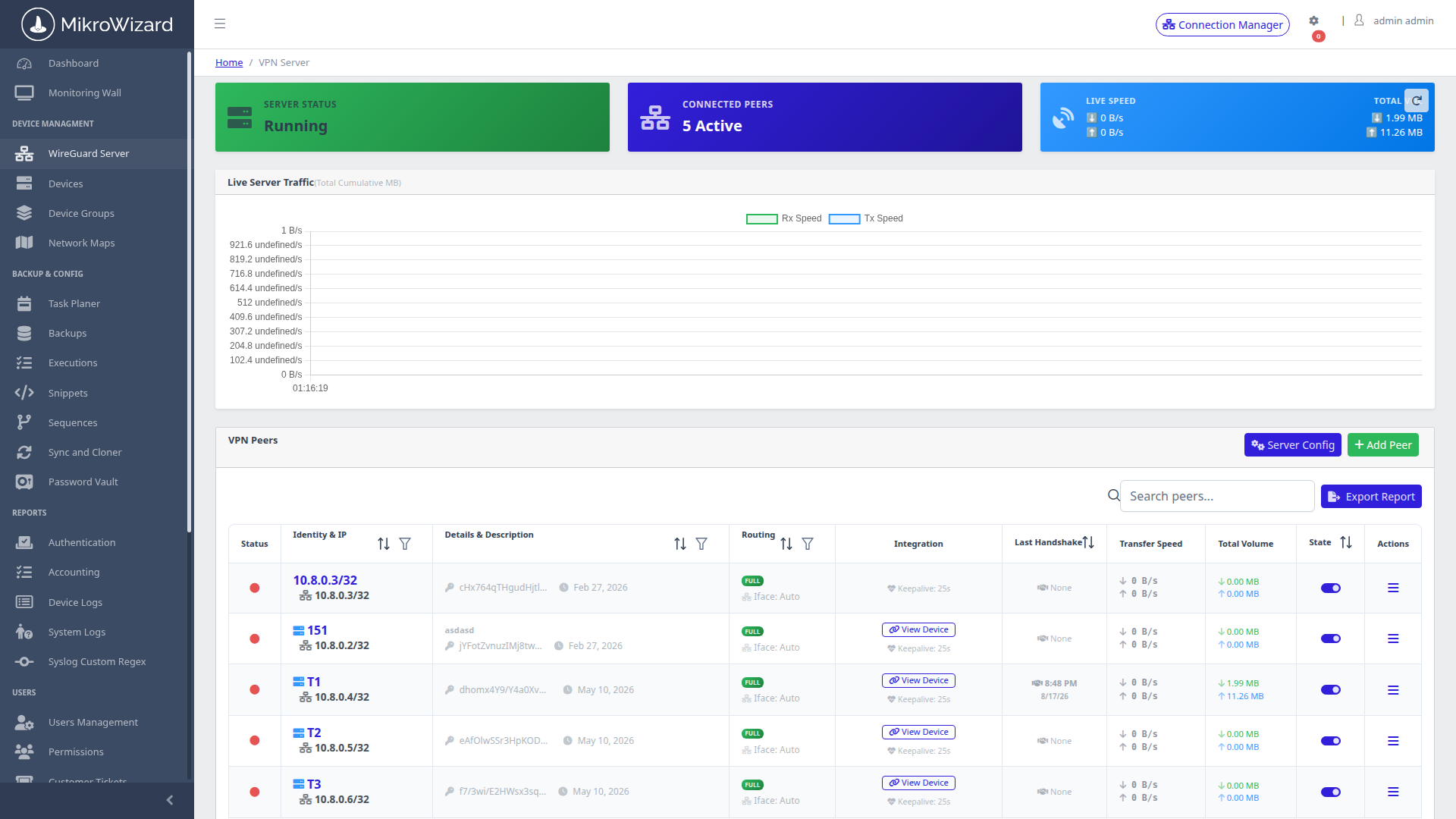
WireGuard Manager: MikroWG server list showing peer allocations, RX/TX throughput, keepalive config, and QR code generation for mobile clients.

RouterOS v7 WireGuard

WireGuard Server Management & Mobile QR Peer Provisioning (RouterOS v7)

MikroWizard's dedicated WireGuard management service (MikroWG on port 8000) configures kernel WireGuard interfaces on RouterOS v7, manages dynamic peer allocations, and auto-generates mobile client QR codes alongside RouterOS CLI peer scripts.

  • RouterOS v7 CLI Provisioning: Auto-generates ready-to-run /interface/wireguard/peers configuration scripts.
  • Instant Mobile QR Codes: Onboard iOS and Android WireGuard clients in seconds with scannable setup codes.
  • Live RX/TX Throughput: Real-time bandwidth telemetry monitored per connected WireGuard peer.
  • MSS Clamping & Keepalives: Optimized tunnel MTU and keepalive configurations to maintain resilient connectivity through NAT.
Rust btest-rs Engine

MikroSpeed: Rust btest-rs Engine for Multi-Gigabit Line-Rate BTest

Standard single-threaded bandwidth test utilities struggle to saturate multi-gigabit interfaces. MikroWizard provides btest-rs, a custom Rust-compiled RouterOS Bandwidth Test engine (containerized on port 8200) supporting Curve25519 EC-SRP5 authentication compatible with RouterOS v6.43+ and v7.
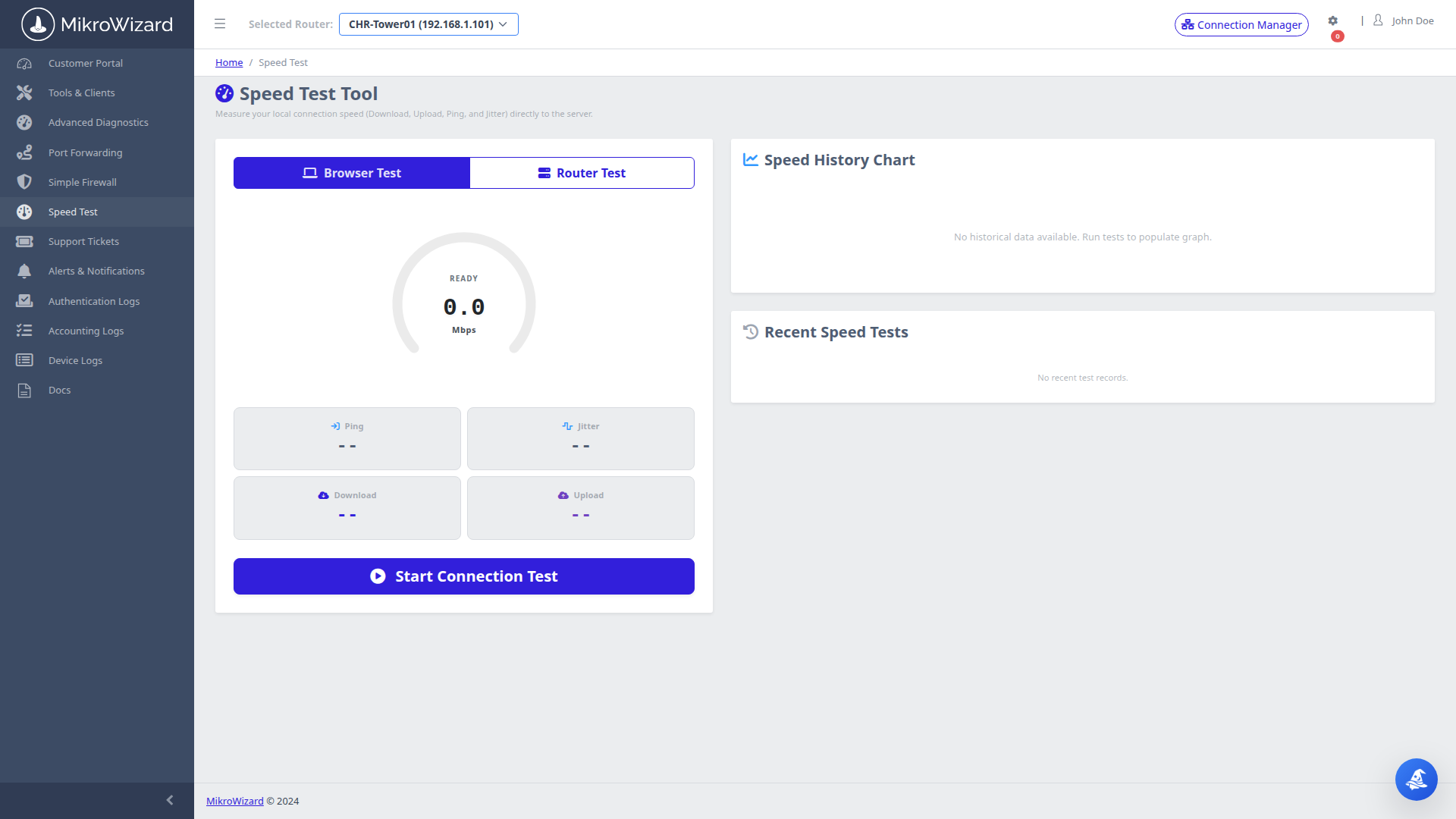
  • Curve25519 EC-SRP5: Zero-knowledge ephemeral authentication handshake fully compatible with native RouterOS protocols.
  • Line-Rate Multi-Threading: True asynchronous parallel TCP/UDP streams capable of multi-gigabit line-rate testing without CPU throttling.
  • Full Hardware Compatibility: Works across CCR2004, CCR2116, CCR2216, CRS switches, and CHR virtual appliances.
  • Subscriber Self-Service: End-users can run self-service diagnostics through the branded portal without administrator access.
MikroSpeed Rust btest-rs Bandwidth Test
Inspect High-Res Screen

MikroSpeed Gauge: Real-time download/upload speedometer powered by Rust btest-rs — accurate multi-gigabit benchmarking on any RouterOS hardware.

RouterOS Configuration Side-by-Side Diff
Inspect High-Res Screen

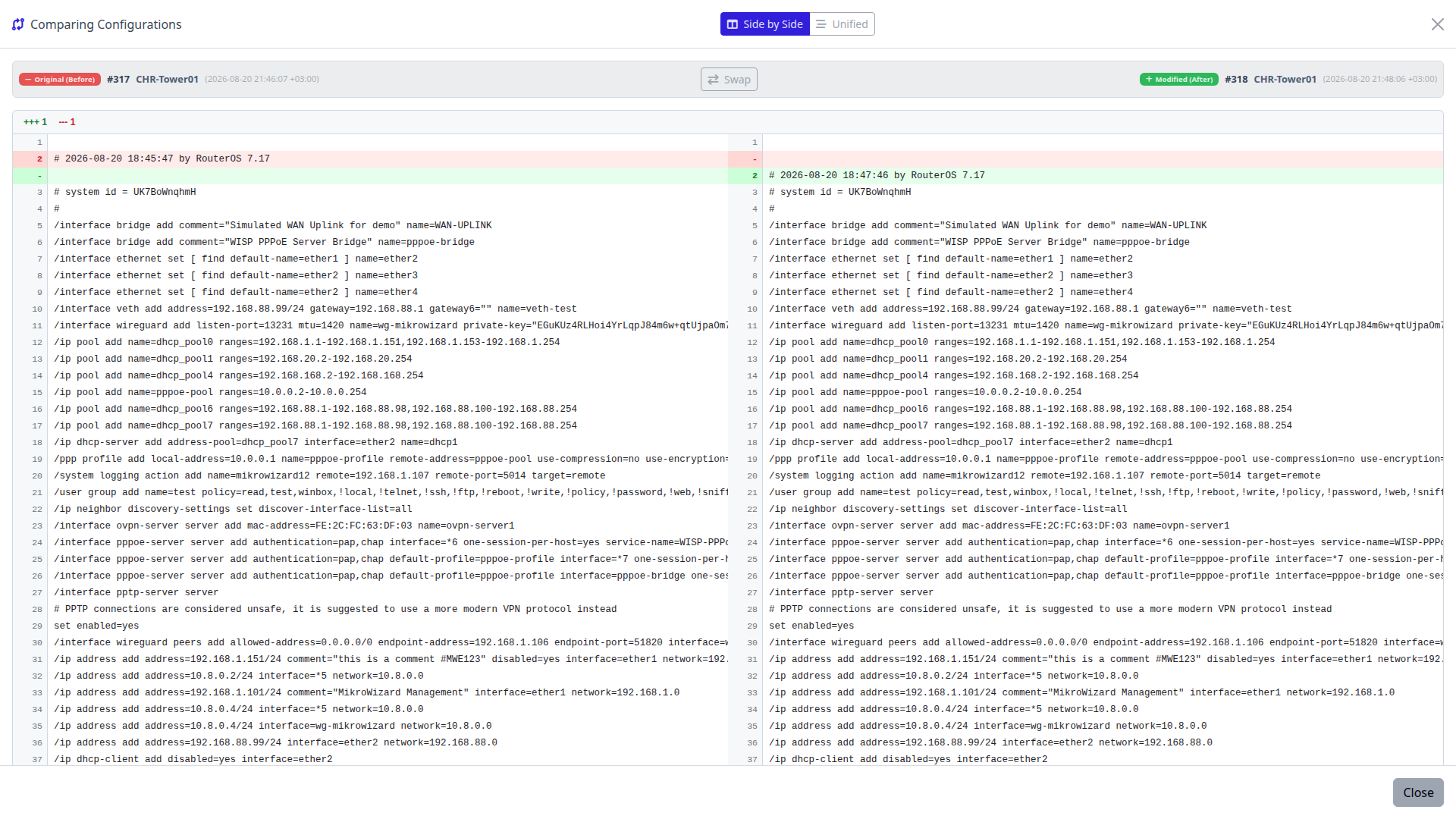
RouterOS Config Diff: Side-by-side visual diff of two RouterOS RSC configurations — additions in green, deletions in red, line numbers included.

Configuration Management

Automated RouterOS Config Backups & Git-Style Visual Diff

MikroWizard automatically backs up RouterOS RSC (/export fine) configurations on scheduled intervals and before any automated changes. Instantly compare any two snapshots using side-by-side and unified visual diff views to spot configuration drift and restore states in one click.

  • RouterOS RSC Export: Generates human-readable RSC export files that can be directly restored via /import.
  • Dual Diff Views: Choose between side-by-side visual diffing and unified patch diffing with clear color-coded indicators.
  • 1-Click Rollback: Push any previous configuration backup back to the router via API with safety checks.
  • Source Traceability: Every backup is tagged by trigger type (Scheduled, Manual, Sequence Execution, Snippet Run).
Config Replication

Golden Master Router Cloner & Two-Way RouterOS Synchronization

Designate a reference "Golden Master" router with your ideal baseline configuration, then replicate it across any number of edge or branch routers — with granular module selection and identity exclusion filters that protect device-specific IP and identity parameters.
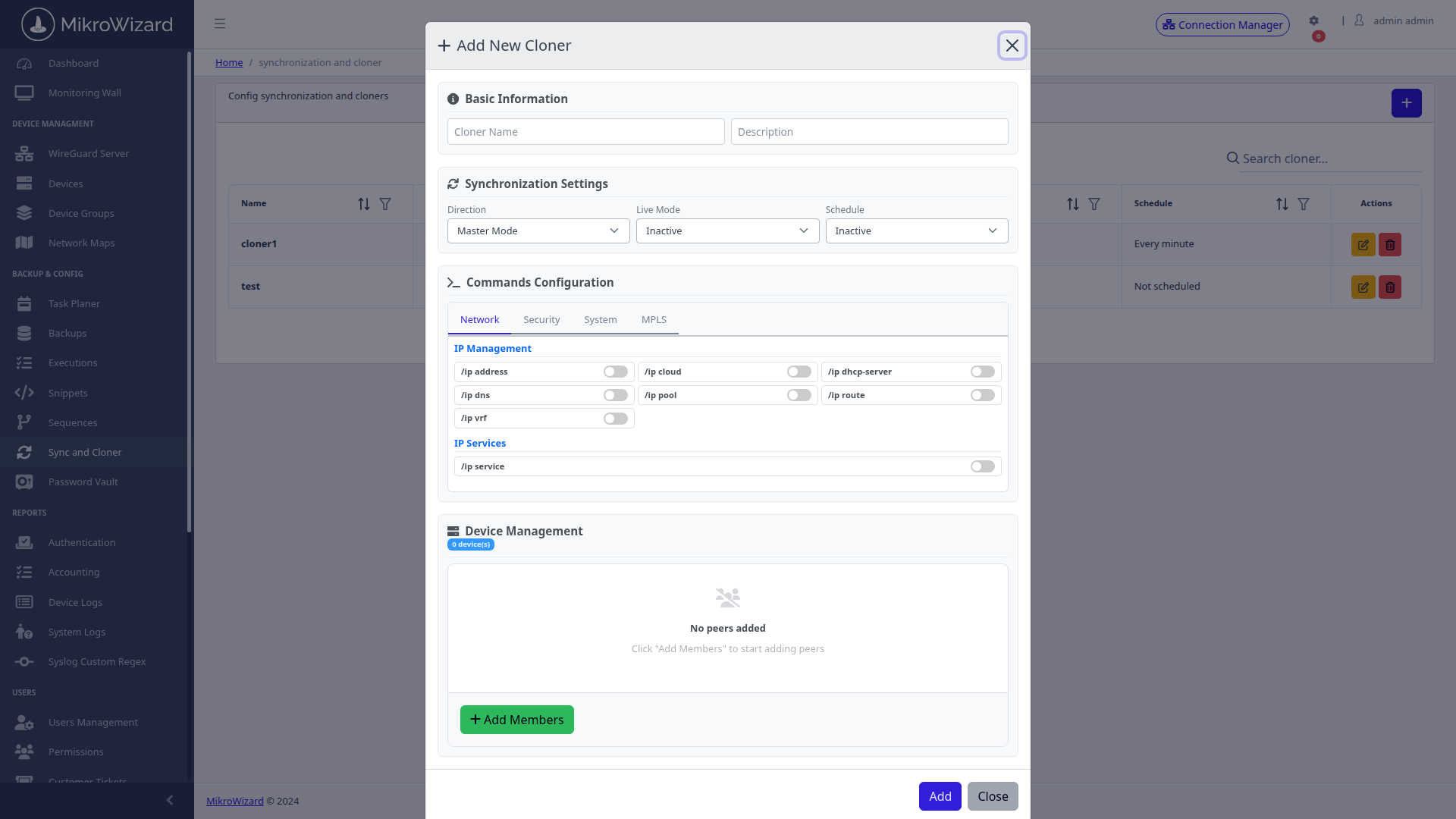
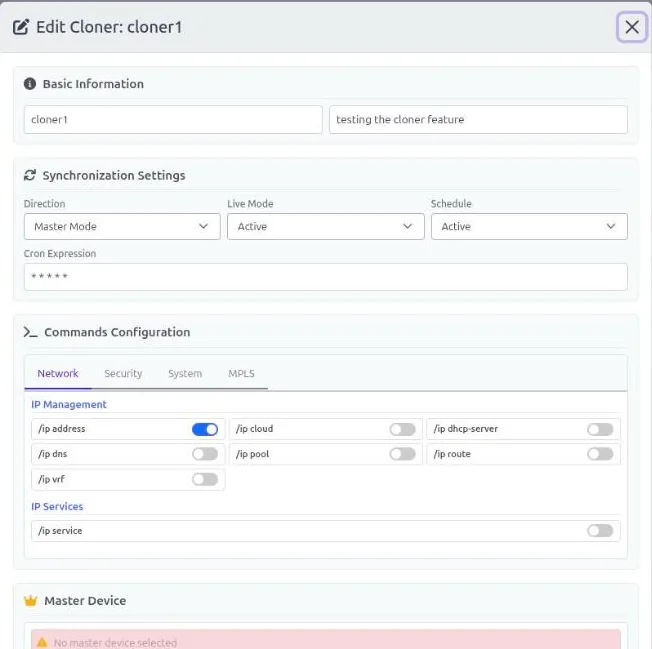
  • Flexible Sync Modes: Supports Master-to-Slave push replication and bidirectional Two-Way sync modes.
  • Granular Module Toggles: Choose specific sections to synchronize (IP, Firewall, Wireless, Users, Routing) rather than whole-image overwrite.
  • Identity Exclusion Filters: Keep device-specific attributes (system identity, WAN IP, interface MACs) intact during cloning.
  • Rapid CPE Provisioning: WISPs and ISPs can deploy standardized subscriber routers in minutes with zero-touch consistency.
Golden Master Router Cloner Wizard
Inspect High-Res Screen

Cloner Wizard: Granular module selection (IP, Firewall, Wireless, Users, Routing) with identity exclusion filters — replicate without overwriting unique device config.

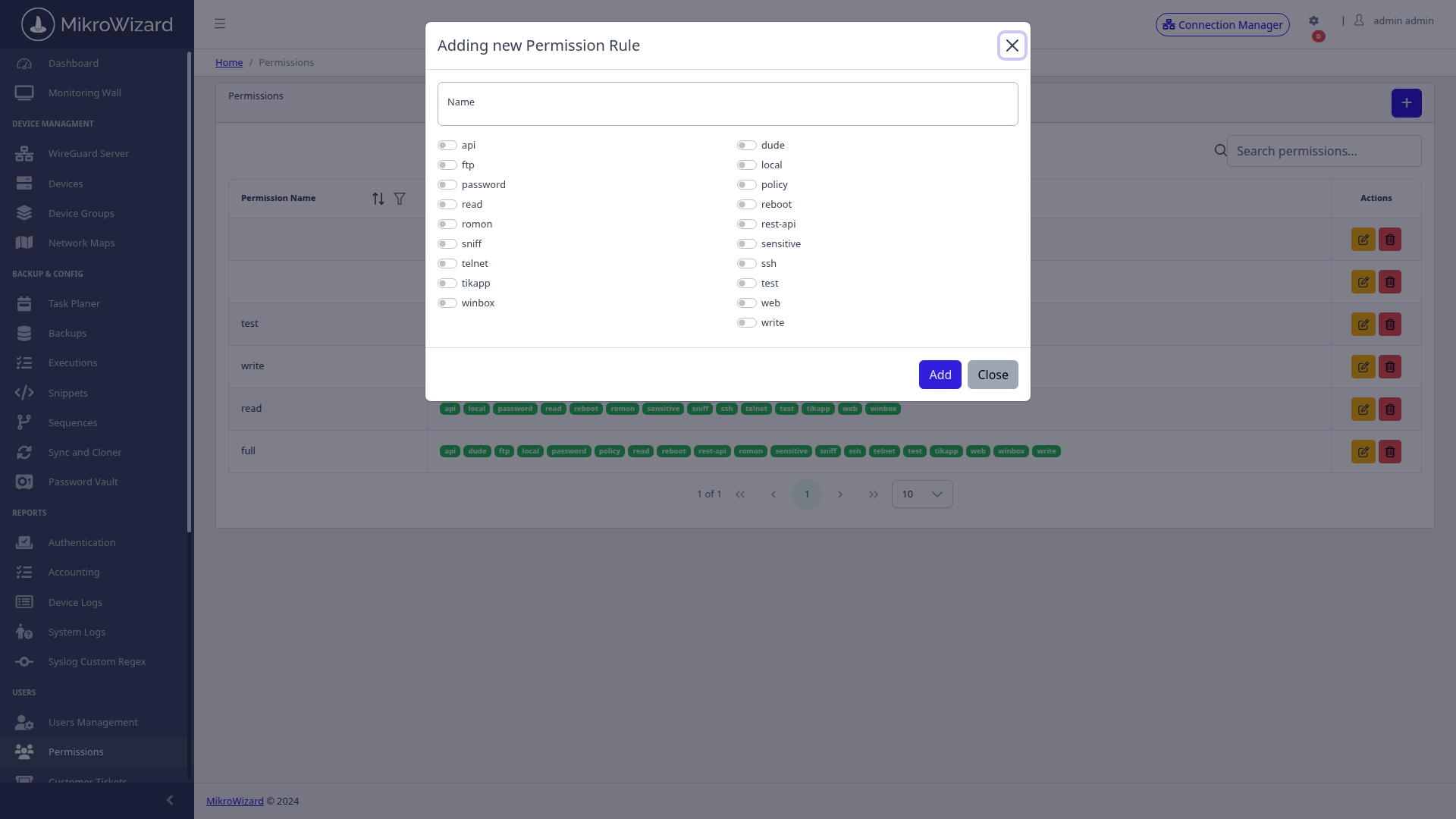
RouterOS 17-Scope Permission Matrix
Inspect High-Res Screen

RouterOS RBAC: Checkbox matrix mapping MikroWizard user roles to all 17 native RouterOS scopes — automatically synchronized to device user groups.

RouterOS Native Permissions

RouterOS-Mirrored 17-Scope RBAC — Synced Directly to Device User Groups

MikroWizard's permission profiles align directly with all 17 native RouterOS functional scopes — api, dude, ftp, local, password, policy, read, reboot, rest-api, romon, sensitive, sniff, ssh, telnet, test, tikapp, web, winbox, write — and synchronizes permissions directly with on-router user groups.

  • 17 Native RouterOS Scopes: Direct mapping ensuring consistent authorization across web UI, terminal, API, and Winbox.
  • Automatic Group Synchronization: Updates on-router /user/group policies directly upon role assignment.
  • Pre-Packaged Role Profiles: Ready-to-use profiles like NOC-ReadOnly, MSP-Admin, Operator, and Auditor.
  • Multi-Tenant Isolation: Restrict operators strictly to authorized router tags and customer domains.
Multi-Vendor Fleet Inventory

MikroTik Fleet Inventory, Subnet Scanner & Bulk CSV Onboarding

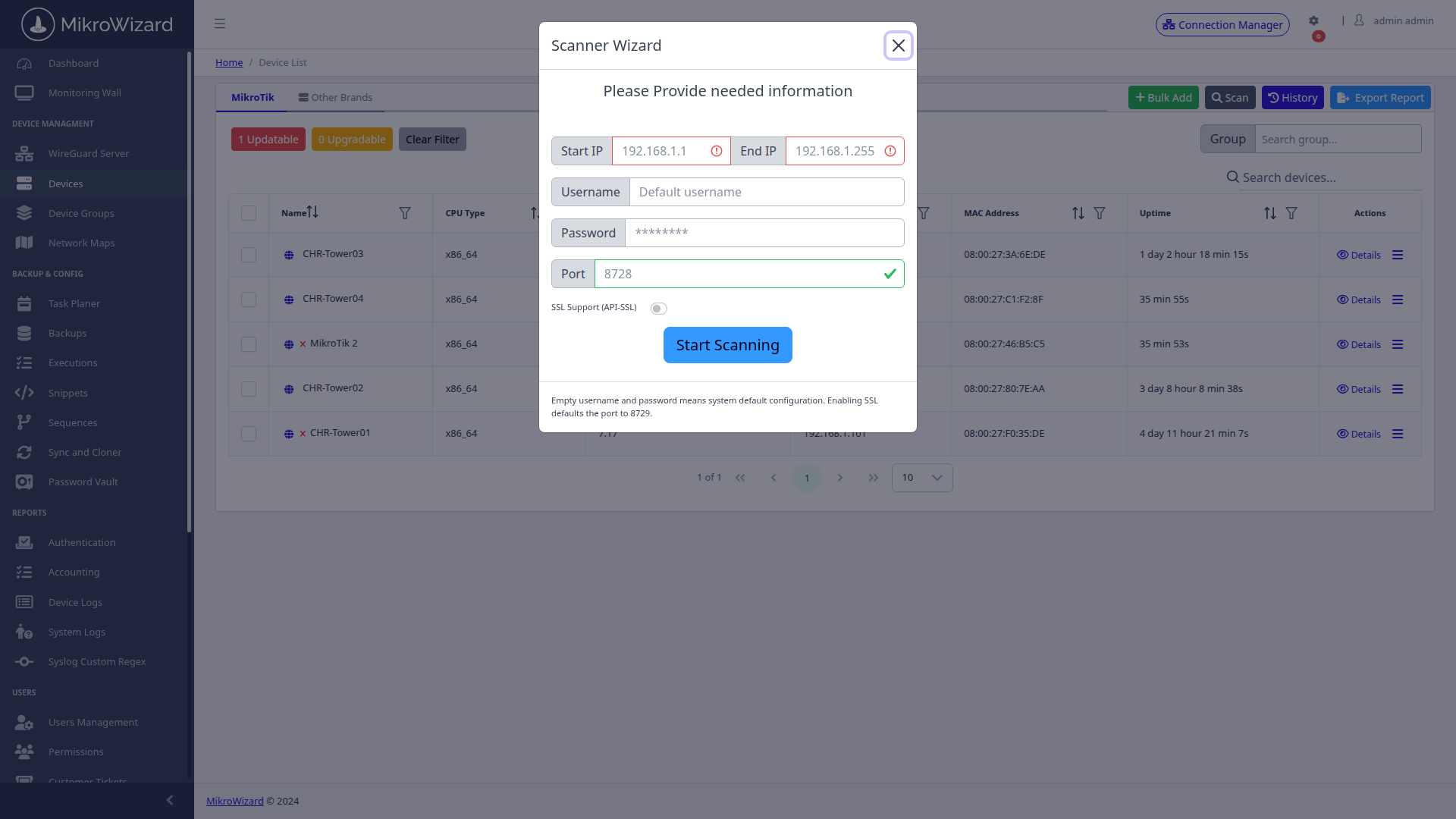
Manage your entire MikroTik fleet from a centralized inventory table: track credentials, firmware versions, RouterOS v6/v7 classification, uptime, WebFig proxy status, and API-SSL encryption. Discover unmanaged routers automatically with the subnet scanner wizard or import existing inventories in bulk via CSV.
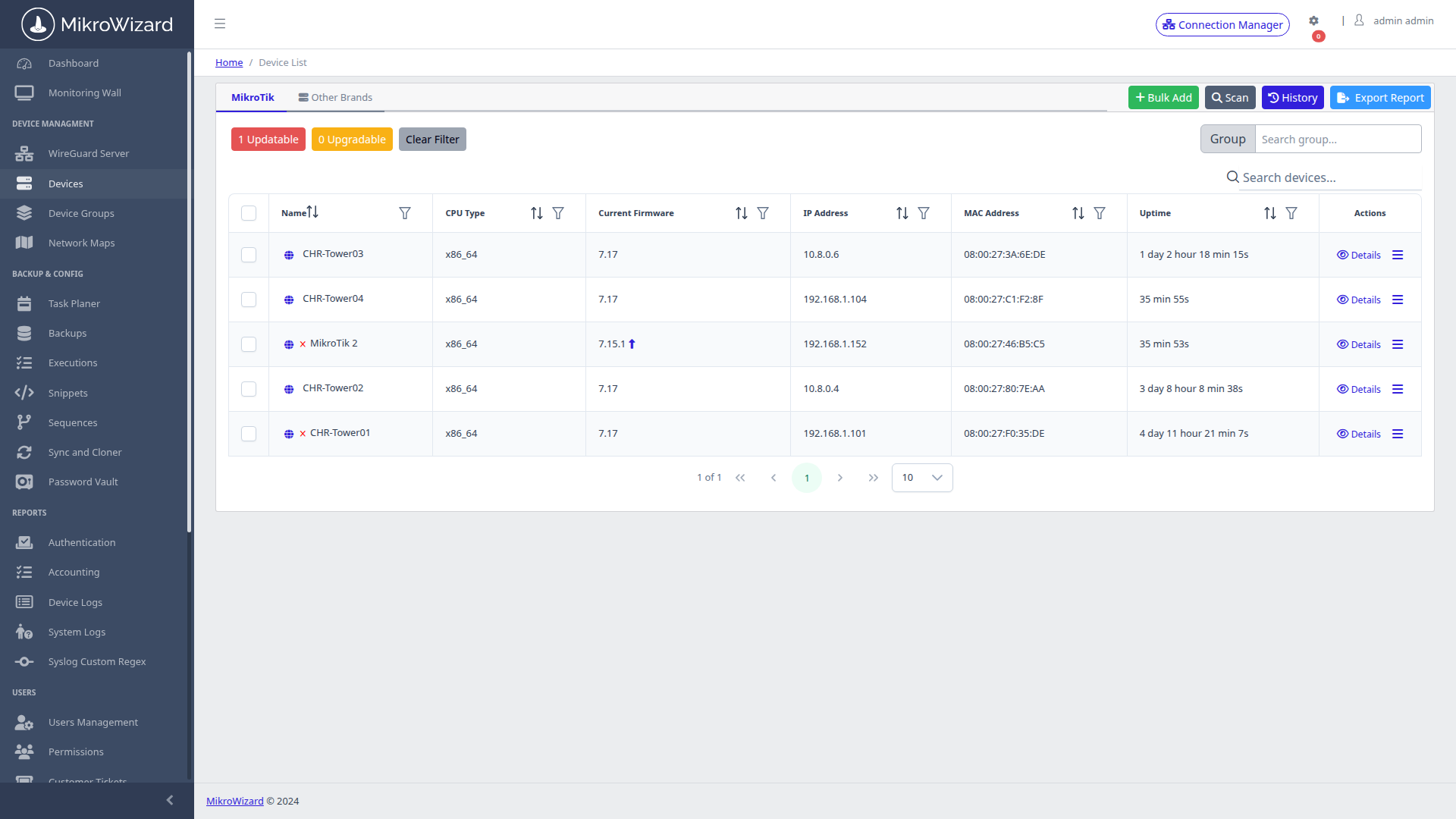
  • v6 vs v7 Fleet Classification: Visual indicators show RouterOS version distribution and highlight legacy targets for upgrade.
  • API & API-SSL Configuration: Manage secure TLS encryption ports (8729) and REST API endpoints per router.
  • Subnet Auto-Discovery Scanner: Sweep CIDR network blocks to discover new RouterOS devices with credential probing.
  • Mass CSV Import: Bulk onboard thousands of routers with pre-configured IP, port, and credential assignments.
Fleet Inventory Table
View SCR-0013 — Fleet Inventory

— Fleet inventory with RouterOS v6/v7 flags, firmware, uptime, and WebFig proxy status.

Subnet Scanner Wizard
View SCR-0015 — Subnet Scanner

— Subnet auto-discovery wizard scanning CIDR ranges for MikroTik devices with API/SSL config.

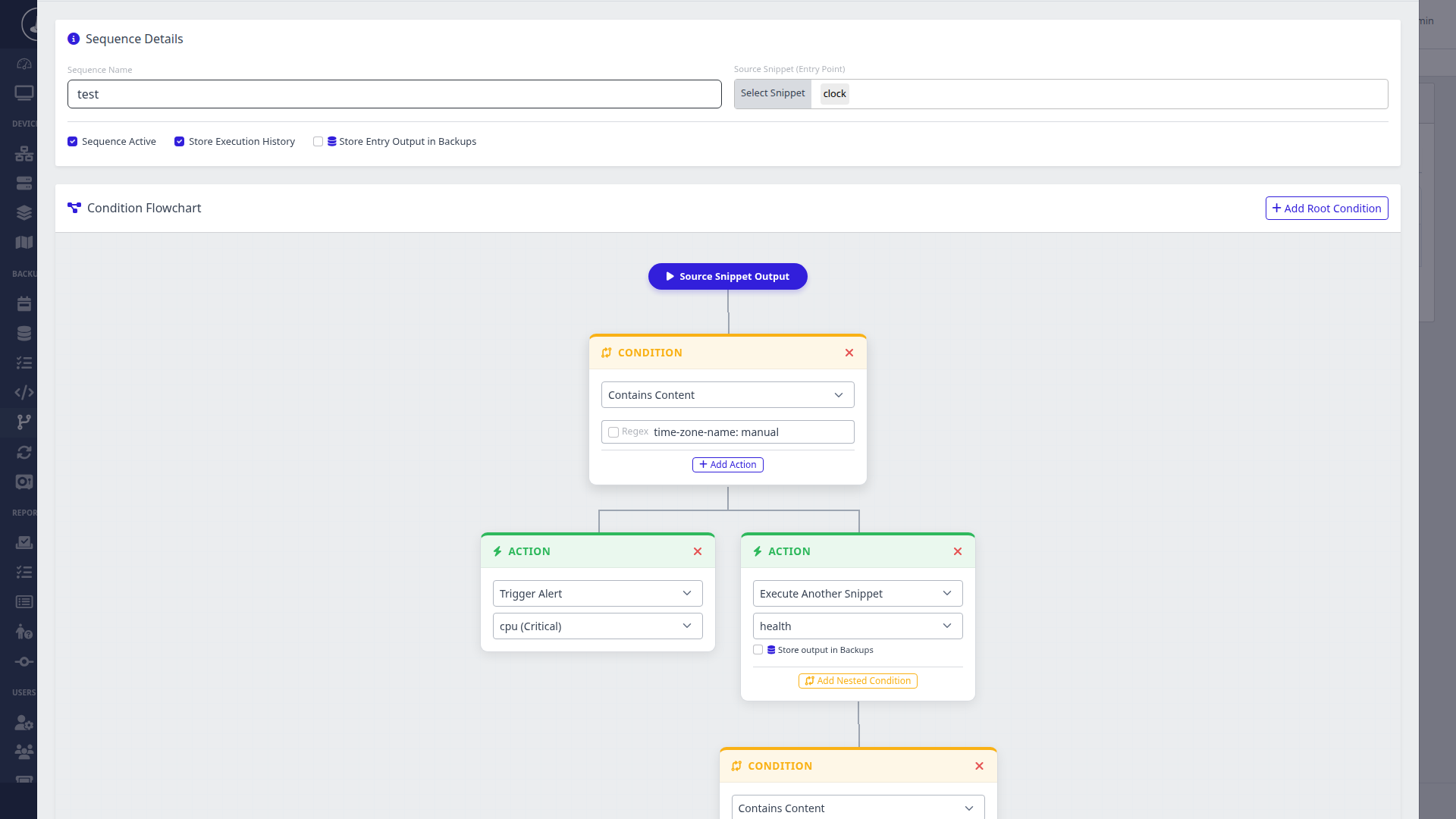
RouterOS Sequence Automation Flowchart
Inspect High-Res Screen

RouterOS Automation Flowchart: Visual multi-step sequence builder with conditional regex branching, nested alert triggers, and chained snippet executions.

RouterOS Scripting

RouterOS Scripting: Reusable Snippets & Visual Sequence Flowcharts

Replace error-prone manual CLI typing with a reusable RouterOS snippet library and visual sequence flowchart builder. Standardize repetitive tasks like firewall rule updates, interface provisioning, and routing policy adjustments with automated execution audits.

  • Reusable Script Library: Store RouterOS CLI scripts once, execute them consistently across any device group — with automatic server-address substitution via [mikrowizard].
  • Bulk Fleet Execution: Execute scripts against router groups with dry-run verification and detailed result logging.
  • Visual Sequence Flowcharts: Build complex multi-step workflows with conditional branching and automated alert triggers.
  • Task Planner Scheduling: Run periodic maintenance sequences on custom cron schedules with automatic backup generation.
Credential Security

AES-256 Encrypted RouterOS Password Vault & Automated Credential Rotation

Eliminate default passwords and static shared credentials across your MikroTik fleet. MikroWizard's AES-256 Fernet-encrypted vault generates cryptographically secure credentials and handles automated password rotation across router groups via API.
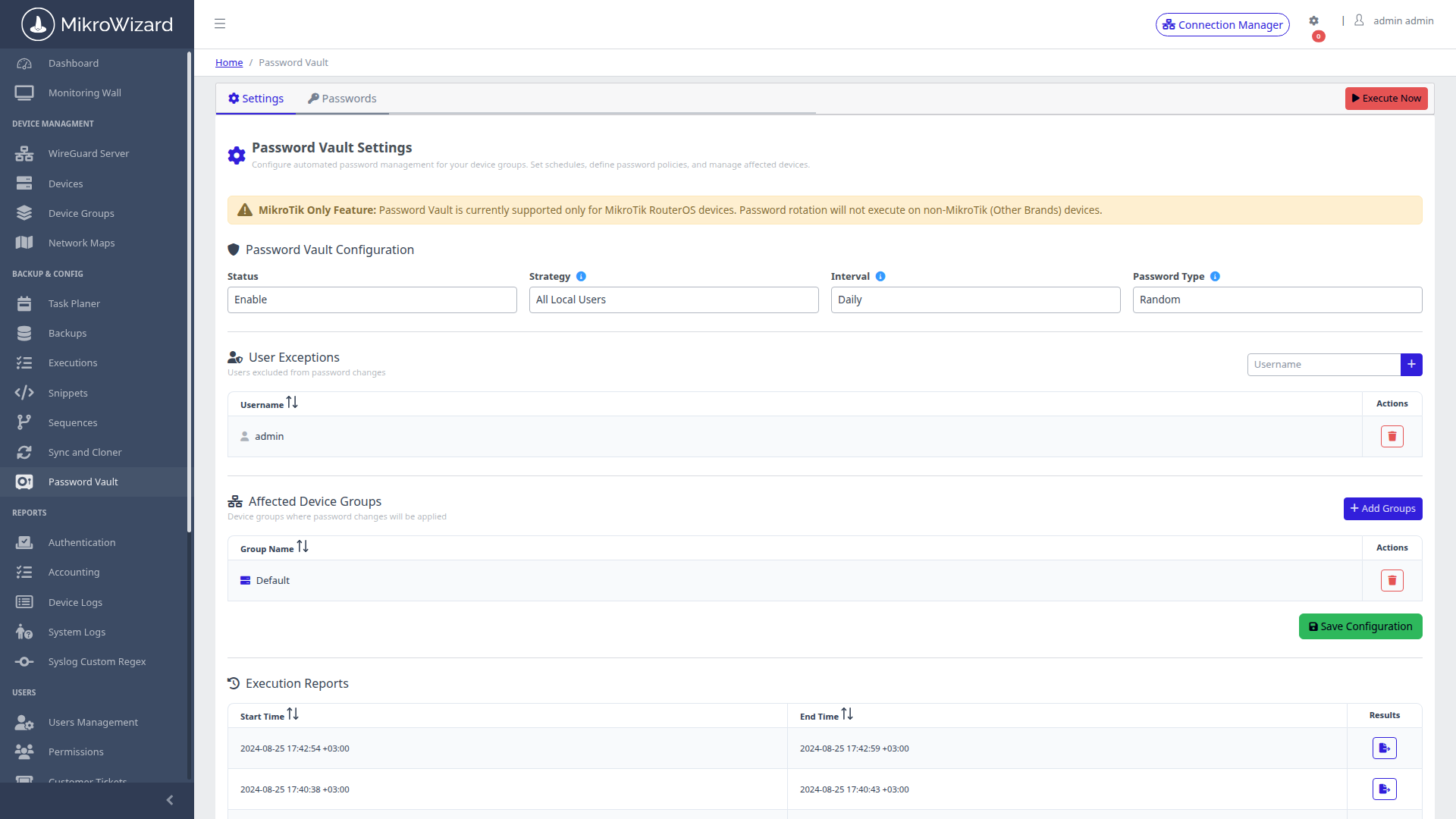
  • AES-256 Fernet KEK Envelope: Double-wrapped encryption architecture ensuring passwords remain unreadable at rest.
  • Automated Rotation Schedules: Define automated password rotation intervals per device group to meet enterprise compliance.
  • Emergency 1-Click Rotation: Instantly rotate credentials across all devices in a cluster during suspected incidents.
  • Direct RouterOS API Push: Updates on-router /user passwords directly through secure API connections without manual intervention.
Encrypted Password Vault Policy
Inspect High-Res Screen

Credential Vault: Password rotation policy engine with rotation intervals, complexity requirements, and device group targeting — MikroTik fleet-wide.

RouterOS v6 & v7 · Self-Hosted · Private

The Complete Centralized MikroTik Management Platform

Deploy MikroWizard on your own infrastructure. No cloud dependency, no data leaving your premises. Full RouterOS v6 and v7 support with native Winbox 2FA, WebFig proxy, MNDP topology, offline NPK firmware, and DHCP tracking — all in one self-hosted platform.

Request Architecture Demo See Pricing GitHub (Free Edition) ↗

Trademark Disclaimer: MikroTik® and RouterOS® are registered trademarks of SIA MikroTikls. MikroWizard is an independent management software solution compatible with MikroTik RouterOS and is not affiliated with or endorsed by SIA MikroTikls.