
 MikroWizard
Pro MikroTik only
What it is #
Custom regex rules turn any syslog message into an event or alert, with a visual builder and a live test.
Example uses
- Raise an alert when a router logs link down on an uplink.
- Store only the messages you care about and discard the rest.
Pro Included in MikroWizard Pro. Your own rules for syslog messages, with a visual builder and live test.
Go to Syslog Custom Regex and click Add New Regex.
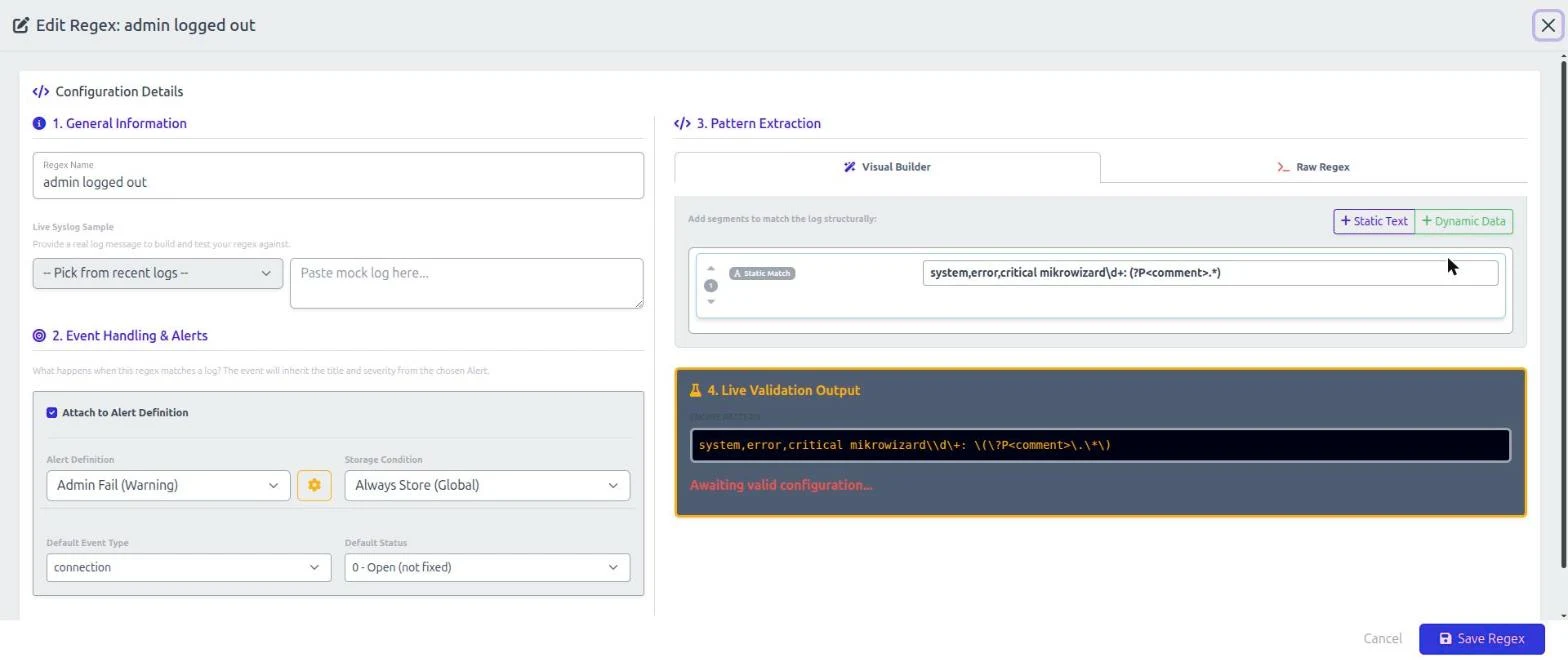
1. General information #
Give the rule a Regex Name. Under Live Syslog Sample, Pick from recent logs or paste a log line to test with.
2. Event handling and alerts #
- Attach to Alert Definition: the event takes the alert’s title and severity (Warning, Error, Critical). Manage Alerts creates definitions.
- Storage Condition: Always Store (Global), Only if String Matches (Conditional) or Discard (Do not save).
- Default Event Type: connection, config, firmware, health or state. Default Status: Open or Fixed.
3. Pattern extraction #
- Visual Builder: add Static Text and Dynamic Data segments. Dynamic data can be a word, a number, an IP address, everything to the end, or custom, and can be set as the event detail.
- Raw Regex: write a Python regular expression. Named groups such as
(?P<comment>.*)become fields.
4. Live validation #
Shows the final pattern and whether it matches your sample. Click Save Regex.
How rules are applied #
Every log line that reaches the syslog server from a managed router is tested against every rule. The pattern is searched anywhere in the line, so it doesn’t have to match from the start. A rule that matches creates an event in Device logs, unless its storage condition says otherwise.
Example: a PPPoE client keeps reconnecting #
- Pick a sample from recent logs, for example
pppoe-out1: disconnected. - Visual builder: static text
pppoe-out1:, then dynamic data everything to the end, set as the event detail. - Attach it to an alert definition WAN flapping with severity Warning.
- Check the live validation and save.
Every disconnect now shows as a Warning event, and an alert rule can notify you.
Common problems #
| Problem | Cause and fix |
|---|---|
| The rule never fires | Logs from the router don’t arrive; see Send router logs to MikroWizard. The topic of the message must be logged (critical, error or info). |
| Too many events | Use Only if String Matches with a more specific string, or make the pattern stricter. |


