
 MikroWizard
Pro MikroTik only
What it is #
A router speed test measures the bandwidth between a MikroTik router and your speed test server, from the router itself, and keeps the history.
Example uses
- Check a customer’s line after a complaint, without a site visit.
- Compare a tower router’s capacity before and after an upgrade.
The device page, Speed Test tab. It needs at least one speed test server: the MikroSpeed add-on or a remote server in Settings › Speed Test Servers.
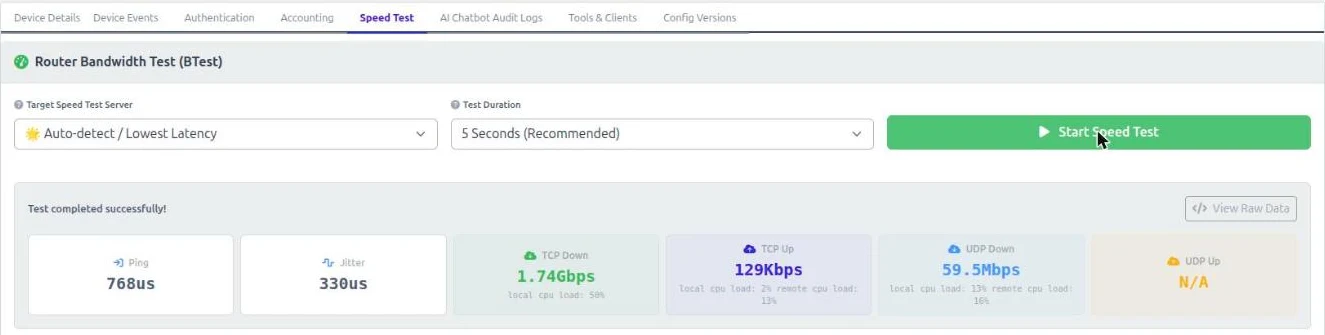
- Target Speed Test Server: Auto-detect / Lowest Latency pings every server from the router and uses the fastest one; or pick a server.
- Test Duration: 5 (recommended), 10, 20 or 30 seconds.
- Click Start Speed Test.
The router runs RouterOS /tool speed-test against the server with a one-time username and password. The result shows Ping, Jitter, TCP Down, TCP Up, UDP Down and UDP Up, with the CPU load figures RouterOS reports. View Raw Data shows the router’s full output.
History #
Each test is saved. Router Speed History Chart shows the router tests over time; Browser Speed History Chart shows tests customers ran in their browser from the customer portal. All Speed Test Records lists every test.
Running a test needs write access to the device.


