
 MikroWizard
Pro
What it is #
Command history is a searchable list of every command typed in terminal sessions, including the ones your policy blocked.
Example uses
- Find who ran
rebooton a router. - Review blocked commands to tune a policy.
Pro Included in MikroWizard Pro. Searchable command audit.
Before you start #
Commands are captured in SSH and Telnet sessions through the Terminal Gateway. RDP, VNC, WebBox and WebFig sessions are recorded as video or page recordings instead.
The list #
Command history lists commands typed in terminal sessions with time, device, user and session, and whether each one was Allowed or Blocked by the terminal policy.
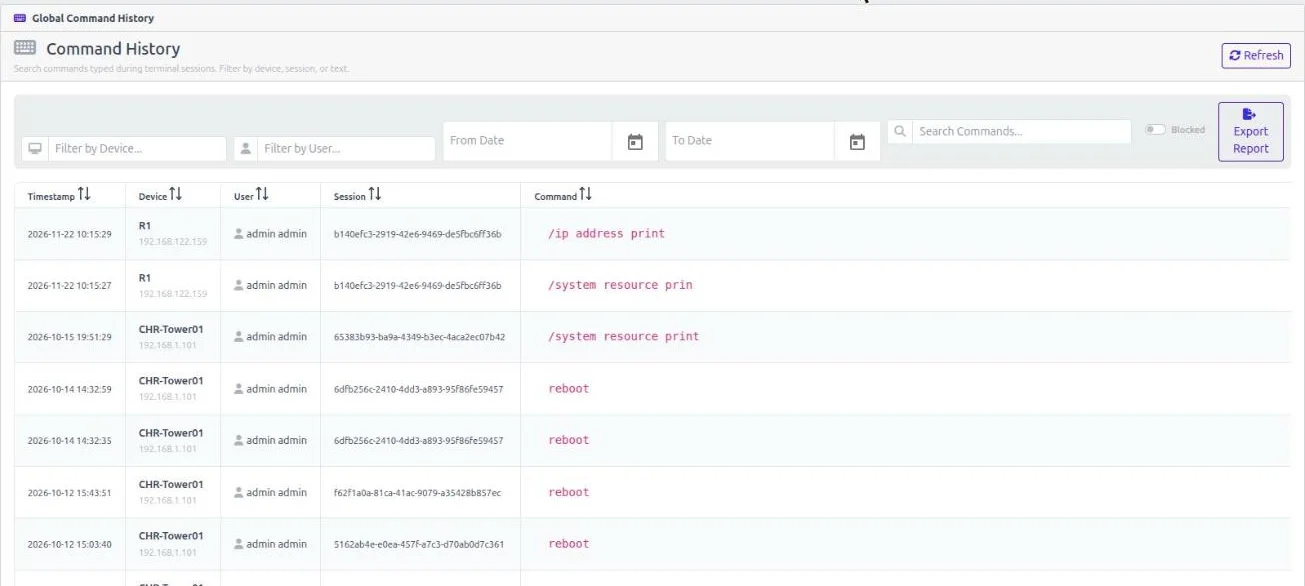
- Filter by device, user, date range or text.
- Switch on Blocked to see only commands your policy stopped, for example attempts to run
/system reset-configuration. - Export Report downloads the list.
The same list for one session is on the session’s Commands tab in Session history, and for one device in the Connection Manager right-click menu.
Examples #
- Who changed the OSPF settings? Filter by device and search
ospf. - Is anyone trying blocked commands? Turn on Blocked for the last week.
- Audit evidence: export the commands of all sessions on your firewalls for a month.
Commands typed vs. commands run by MikroWizard #
Command history is about people in sessions. Commands MikroWizard runs itself (backups, snippets, sequences) are in Executions.


