
 MikroWizard
Table of Contents
Pro
What it is #
Sharing invites another person into a running session, to watch or to type, with a password or your approval.
Example uses
- Bring a senior engineer into a session during an outage.
- Let a vendor’s expert watch while you run their commands.
Pro Included in MikroWizard Pro. Live session sharing with roles and approval.
Share a running session with a colleague or an outside expert: they see the same screen, and may type if you let them.
Before you start #
- Sharing needs Write on Privileged Sessions in admin permissions.
- Invites to internal users are sent by email: set up SMTP.
Share a session #
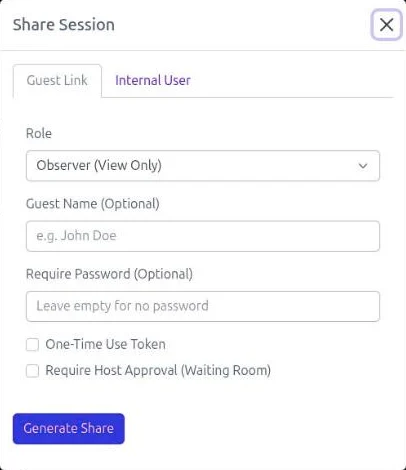
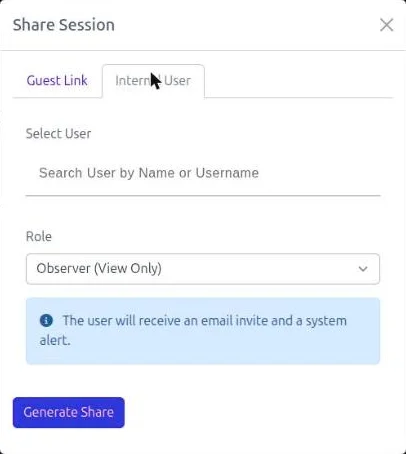
Click Share Session in a session toolbar, or Share in Active sessions.
| Tab | Use |
|---|---|
| Guest Link | Anyone with the link. Optional guest name. |
| Internal User | A MikroWizard user. They get an email and a system alert, and you must approve them when they join. |
Role: Observer (View Only) or Collaborator (Can Type).
Security rules #
- A guest link needs a password or Require Host Approval (Waiting Room); otherwise MikroWizard refuses to create it.
- An internal user always waits for your approval.
- One-Time Use Token makes the link work only once.
- A share link must be opened within 5 minutes of creating it.
- Everyone who joins is listed with name, role, IP address and browser on the session in Active sessions and later in Session history.
Example: vendor support on a firewall #
- Open an SSH session to the firewall.
- Share Session › Guest Link, role Observer, with a password, one-time token on.
- Send the link and the password to the vendor’s engineer by separate channels.
- When you want them to type a command themselves, create a new link with role Collaborator.
The recording of the session shows exactly what was done.
Common problems #
| Problem | Cause and fix |
|---|---|
| The link no longer works | It was not opened within 5 minutes, or it was a one-time link already used. Create a new one. |
| The internal user gets no email | SMTP isn’t set up. They still get the system alert. |
| Generate Share is refused | Set a password or turn on host approval. |


