
 MikroWizard
Pro
What it is #
A sequence runs a snippet, reads the output, and reacts: raise or clear an alert, or run another snippet. It turns routine checks into automatic monitoring and fixes.
Example uses
- Alert when a router’s NTP is not synchronised.
- If an interface is disabled, run a snippet that re-enables it and alert the NOC.
Pro Included in MikroWizard Pro. Automate checks and follow-up actions without writing scripts.
A sequence starts with a source snippet. MikroWizard checks the output with conditions and runs actions on match. Use it for checks that RouterOS or other devices don’t alert on by themselves.
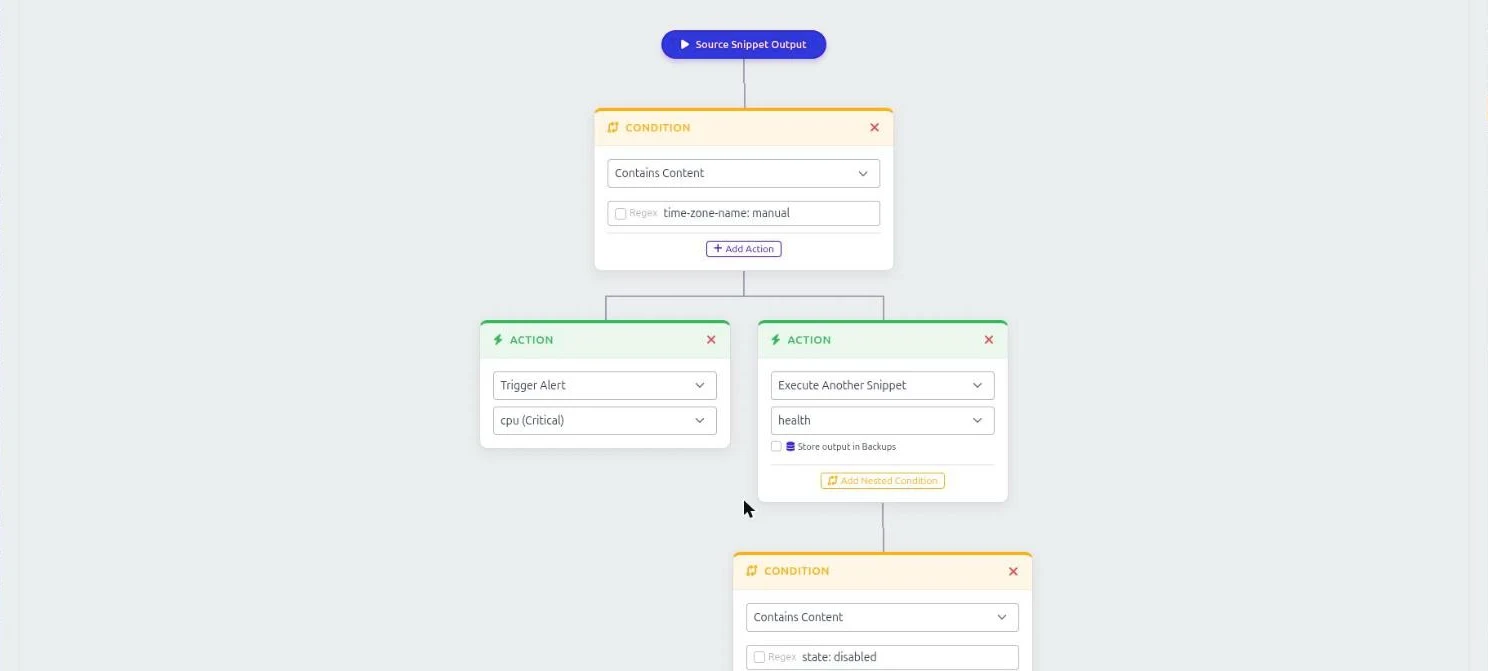
Create a sequence #
- Go to Sequences and click Create Sequence.
- Enter a Sequence Name and select the Source Snippet (Entry Point).
- Options: Sequence Active, Store Execution History, Store Entry Output in Backups.
- Click Add Root Condition and choose:
- Contains Content or Does Not Contain, with the text to look for. Tick Regex to use a regular expression.
- Under the condition, click Add Action:
- Trigger Alert or Clear Alert with an alert definition.
- Execute Another Snippet (optionally storing its output in Backups). Its output can be checked by a nested condition.
- Save.
Alerts #
Manage Alerts defines alert names with a severity: Warning, Error or Critical. A triggered alert becomes an open device event; Clear Alert fixes it. Like all events, it shows on the Monitoring Wall and the map, and is sent by matching alert rules.
Run it #
- Now: the run button, then choose devices or groups and Execute.
- On a schedule: a Task Planer task of type Alert Sequence.
The history button shows each run per device, with a trace of which conditions matched. Failed runs are kept for 90 days.
Example: NTP not synchronised #
- Snippet ntp-status:
/system ntp client print. - Sequence: source ntp-status, condition Does Not Contain
synchronized. - Action Trigger Alert NTP not synced (Warning).
- Second condition Contains Content
synchronized, action Clear Alert NTP not synced. - Task Planer: Alert Sequence, every hour, group All routers.
Example: re-enable a disabled uplink #
Source snippet /interface print where name=ether1. Condition Contains Content with Regex \d+\s+X (the X flag means disabled), actions Execute Another Snippet /interface enable ether1 and Trigger Alert Uplink was disabled.
Common problems #
| Problem | Cause and fix |
|---|---|
| A condition never matches | Look at the real output in the run history; RouterOS output differs between versions. Use Regex for flexible matching. |
| The alert never clears | Add a condition with Clear Alert for the good case. |


