
 MikroWizard
Table of Contents
Pro
What it is #
Speed test servers are the targets for bandwidth tests from routers and from the customer portal. Use your own servers so results reflect your network.
Example uses
- Run tests from each router to a server in your core.
- Give customers a test server close to them.
Pro Included in MikroWizard Pro. Run speed tests from routers and from the customer portal to servers you choose.
Settings › Speed Test Servers.
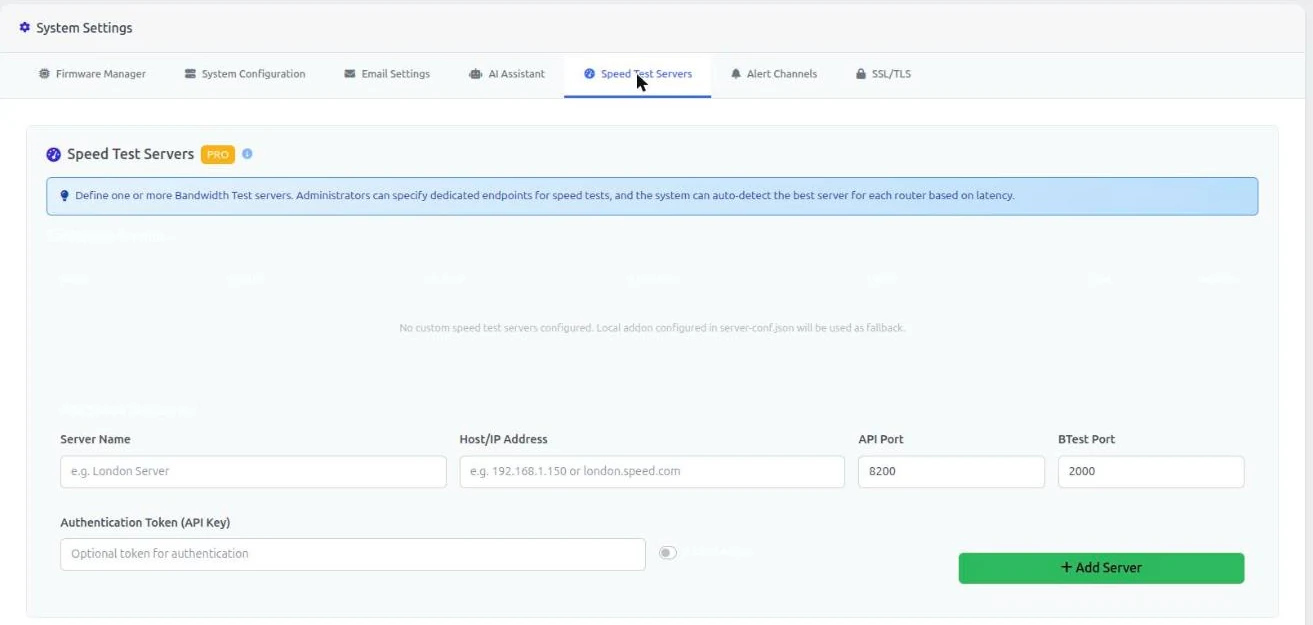
If no server is listed, the local MikroSpeed addon configured on the MikroWizard server is used.
Add a server #
- Enter Server Name, Host/IP Address, API Port (default 8200) and BTest Port (default 2000).
- Optionally enter an Authentication Token (API Key).
- Turn on Is Local Addon if the server runs on the MikroWizard host.
- Click Add Server, then Save System Settings.
MikroWizard can pick the best server for each router by latency. To set up a server, see Install the MikroSpeed addon/a>.


