
 MikroWizard
Table of Contents
Pro MikroTik only
What it is #
This is where you choose the AI provider, key and model used by the admin and customer assistants, and how they behave.
Example uses
- Use your company’s OpenAI or Anthropic key for the assistant.
- Set temperature 0 for strict, repeatable network diagnostics.
Pro Included in MikroWizard Pro. An AI assistant that can check MikroTik routers and answer questions, for staff and customers.
Settings › AI Assistant.
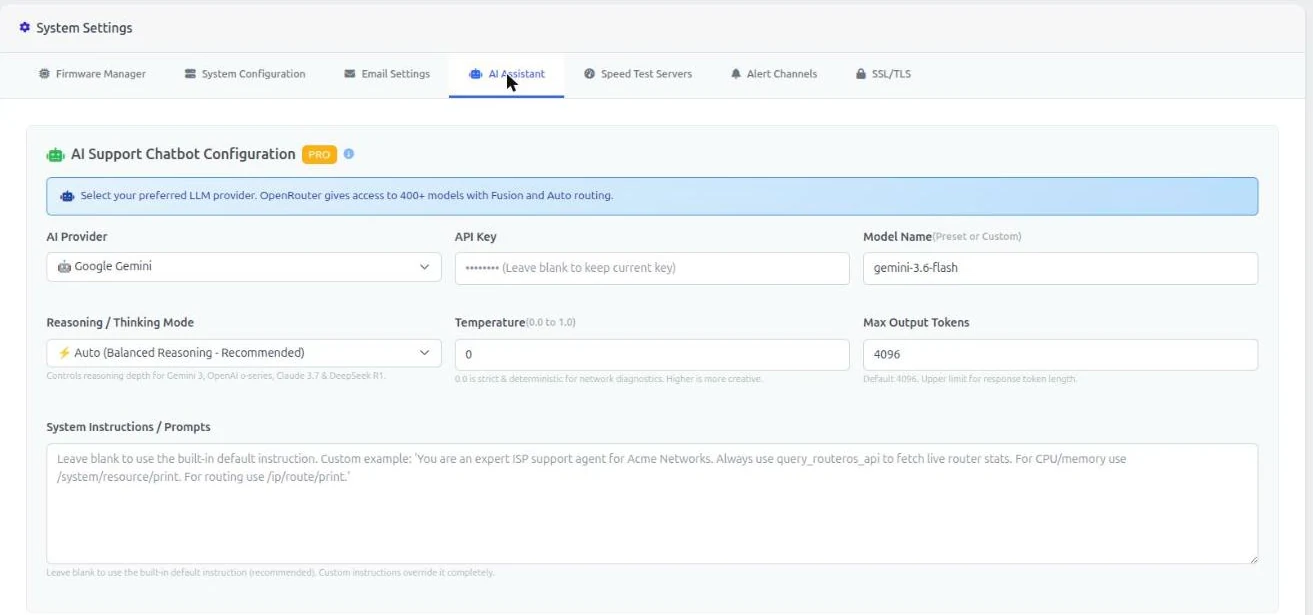
| Field | What it does |
|---|---|
| AI Provider | Google Gemini, OpenAI, Anthropic Claude, DeepSeek or OpenRouter (access to many models, with Fusion and Auto routing). |
| API Key | The provider’s key. Leave blank to keep the current key. |
| Model Name | Pick a preset or type a model name. Fetch Models loads the provider’s list. |
| Reasoning / Thinking Mode | How much the model reasons before answering; Auto is recommended. |
| Temperature | 0.0–1.0. 0 gives strict, repeatable answers for network diagnostics. |
| Max Output Tokens | Upper limit for answer length (default 4096). |
| System Instructions / Prompts | Optional. Leave blank to use the built-in instructions; custom text replaces them completely. |
With OpenRouter, Fusion lets you combine several models.
Click Save System Settings. Every conversation is kept in AI Chat Audit Logs.


