
 MikroWizard
Table of Contents
Free Pro
What it is #
MikroWizard manages devices from many vendors, not only MikroTik. Other switches, routers, firewalls and servers are reached over SSH or Telnet with connection templates; Windows and Linux desktops over RDP or VNC with Pro.
Example uses
- Back up the configuration of Cisco and Huawei switches every night.
- Give engineers recorded SSH access to Linux servers (Pro).
MikroWizard manages devices from many vendors over SSH or Telnet using connection templates (see Brands / Templates). Windows and Linux desktops over RDP or VNC are part of PAM and need Pro.
Steps #
- Go to Devices and click Add Device.
- Choose Other Brands & Servers.
- Pick the Connection Protocol: SSH (22), Telnet (23), RDP (3389, Pro) or VNC (5900, Pro).
- Fill in the fields:
| Field | What to enter |
|---|---|
| Device Name | A name, e.g. Core-Switch-01. |
| IP Address | The device address. Several devices behind NAT can share one IP with different ports. |
| Brand / Device Type | Cisco, Huawei, ZTE, Juniper, Linux, macOS, FreeBSD, Fortinet, HP, Dell, Aruba, Palo Alto Networks, Ubiquiti, VyOS and many more, or Generic. |
| Connection Template | The template that knows the device’s prompts and commands. [SSH/TELNET] Generic Device works for most CLIs. |
| Port | Defaults to the protocol’s port. |
| Device Model | Optional, for your inventory. |
| Username / Password | Login for the device. |
| SSH Login Mode | Password or SSH Key. |
| Agent Mode Override | For PAM command policies: Policy Default, No Agent, Strict Mode, Strict + Compatible (Pro). |
| Assign to Device Groups | Optional. |
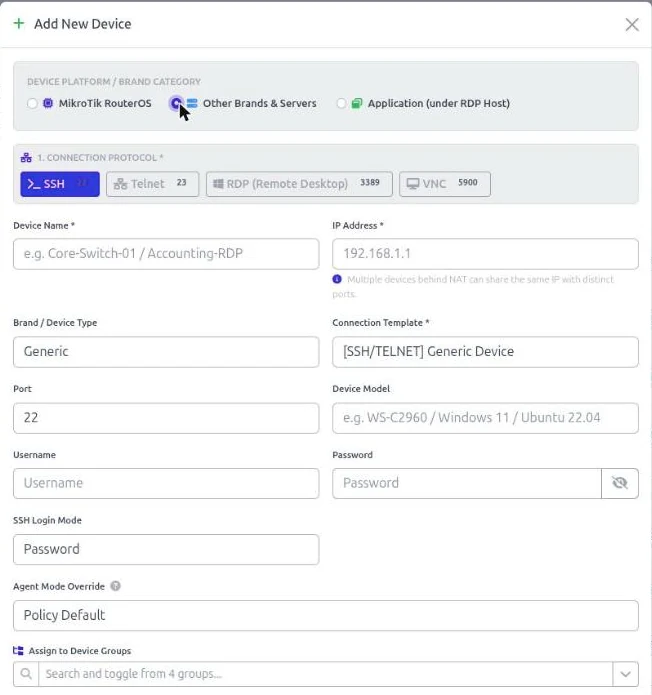
- Click Add Device.
The device appears in the Other Brands tab with its protocol badge (for example SSH:22).
What you can do with it #
- Backups and diffs of the running configuration (Free).
- Run snippets and commands on it (Free).
- Open a recorded web terminal through PAM (Pro).
Pro Do more with Pro
- Web SSH/Telnet, RDP and VNC sessions with recording, policies and sharing.
Example: a Cisco core switch #
| Field | Value |
|---|---|
| Device Name | Core-Switch-01 |
| IP Address | 10.0.0.2 |
| Brand / Device Type | Cisco |
| Connection Template | a Cisco IOS template, for example Cisco IOS – SSH – Enable |
| Protocol / Port | SSH, 22 |
| Username / Password | a read-write account on the switch |
MikroWizard can now back up its running configuration on a schedule, run snippets on it and, with Pro, open a recorded web SSH session.
Common problems #
| Message or problem | Cause and fix |
|---|---|
| Endpoint already exists with IP … and Port … | A device with this address and port is already in MikroWizard. Behind NAT, use the forwarded port of this device. |
| Backups or commands fail on the device | The template doesn’t match the device’s prompts or paging. Pick the brand’s template, or adjust it in Brands and connection templates. |
| RDP or VNC isn’t offered | RDP and VNC are Pro. |


