
 MikroWizard
- 1. Overview & Purpose of Terminal Policies
- 2. The Access Policies Management
- 3. General Policy Settings (Field-by-Field Reference)
- 4. Defense Levels & Shell Bypass Protections
- 5. Strict Mode Protections & Blocked Binaries
- 6. OS-Specific Agent Enforcement Modes
- 7. Defining & Managing Command Rules
- 8. Auto-Execute Policy Mode
- 9. Command Expansions Tab (Shorthands & Aliases)
- 10. Verifying Created Policies in the Inventory
1. Overview & Purpose of Terminal Policies #
The Terminal Policies is the central security control plane in MikroWizard for governing privileged CLI access across network devices (MikroTik RouterOS, Cisco IOS, Huawei, Juniper,linux host) and host operating systems (Linux, macOS, BSD).
Unlike traditional consoles that only log commands after execution, MikroWizard Terminal Policies enforce zero-trust, pre-execution command inspection.
Every keystroke and command token submitted in an TTY session is evaluated against active policy rules, defense heuristics, and kernel system-call traps before being forwarded to the target device shell.
- Human Error Prevention: Blocks catastrophic accidental commands such as
/system reset-configuration,reboot, orrm -rf /. - Privilege Escalation Control: Prevents unauthorized users from spawning subshells or dumping unmasked credential exports.
- Multi-Vendor Syntax Normalization: Applies vendor-specific or brand-agnostic rules across mixed infrastructure.
- Audit Binding: Links every evaluated command directly to tamper-evident audit logs in the compliance repository.
2. The Access Policies Management #
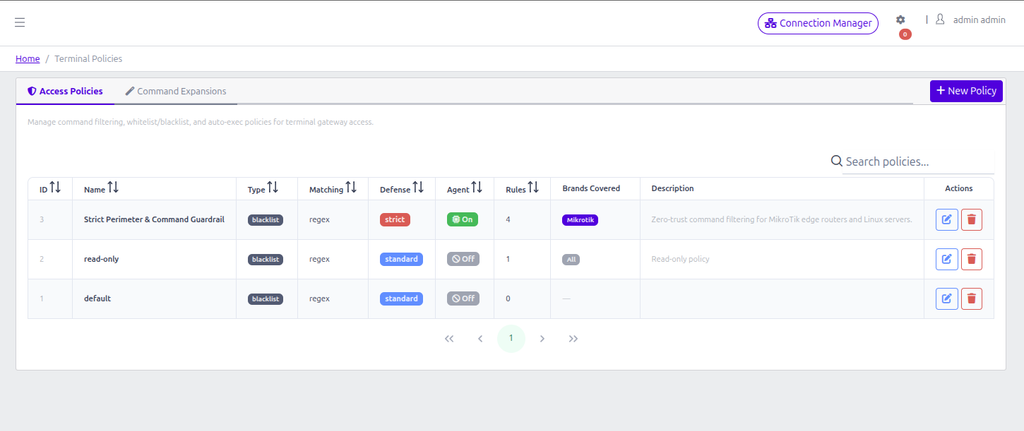
Navigating to Terminal Policies in the left navigation sidebar displays the primary Access Policies table.
3. General Policy Settings (Field-by-Field Reference) #
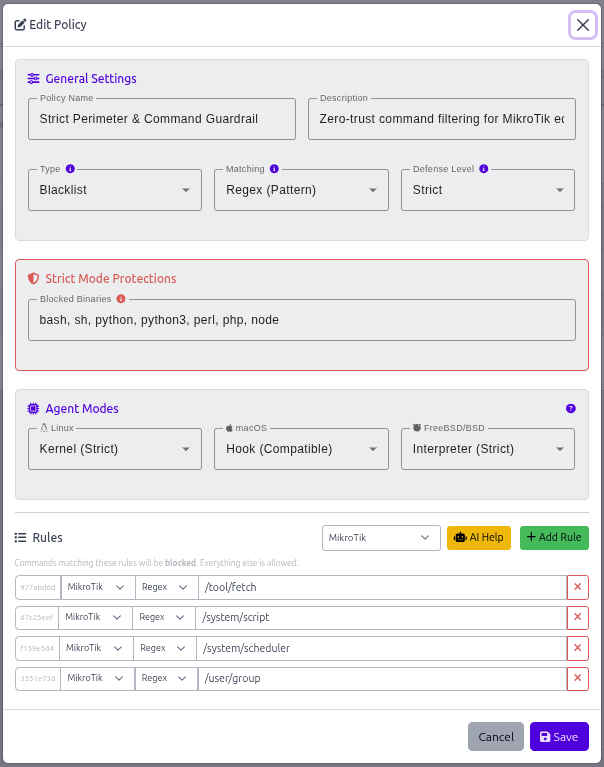
Clicking the blue + New Policy button opens the New Terminal Policy modal dialog. The modal is organized into three distinct cards: General Settings, Strict Mode Protections, and Agent Modes.
Field Specifications: #
- Policy Name (Required):
Effect: Sets the human-readable identifier. This name appears in Device Group dropdowns when assigning policies to router pools (e.g.,Default NOC Guardrails,Strict L1 Operator Filter). - Description (Optional):
Effect: Provides operational documentation visible in the policy summary table. - Type (Required):
Controls the global default evaluation logic for commands:- Blacklist (Default Allow): Permits all commands by default. Commands that match defined rules are intercepted and blocked. Ideal for general engineering staff where only dangerous or destructive commands must be restricted.
- Whitelist (Default Deny): Blocks all commands by default. Only commands explicitly matching defined rules are allowed to execute. Recommended for junior technicians, external contractors, and read-only auditing roles.
- Auto-Execute: Switches the policy into non-interactive automation mode. Executes a predefined batch of diagnostic commands automatically upon session connection and streams output.
- Matching (Available for Blacklist & Whitelist):
Defines the default string evaluation strategy:- Token (Exact): Compares command words token-by-token. For example, a rule for
show versionmatches any command starting with those exact tokens. Faster and immune to regex syntax errors. - Regex (Pattern): Evaluates commands against PCRE regular expressions. Allows sophisticated wildcard matching, alternatives (e.g.
/system (reboot|reset-configuration).*), and flag detection.
- Token (Exact): Compares command words token-by-token. For example, a rule for
4. Defense Levels & Shell Bypass Protections #
In standard web terminals, malicious actors or careless users can easily bypass basic string blacklists by using subshell evaluations, backticks, or variable expansions whyle this worked perfect for normal network equipment but it is diffrent when it comes to servers/linux hosts.(e.g. typing $(echo rm) -rf / instead of rm -rf /).
The Defense Level setting configures the gateway’s heuristic pre-parser:
| Defense Level | Heuristic Checks Enforced | Recommended Use Case |
|---|---|---|
| Relaxed | Direct rule matching only. No shell syntax heuristic checks. | Lab environments, trusted automation scripts, or pure network routers with restricted CLIs. |
| Standard | Blocks command substitution ($(cmd), `cmd`) and unescaped subshells. | Standard enterprise production networks for L2/L3 engineers. |
| Strict | Standard + Blocks command chaining (&&, ||, ;), parameter expansion (${VAR}), base64 decoder pipes (base64 -d | sh), /dev/tcp socket redirection, and enforces the Blocked Binaries list. | High-security zero-trust zones, contractor access, and PCI-DSS/ISO 27001 compliance environments. |
| Custom | Enables granular selection of specific heuristic filters via configuration API. | Specialized DevOps workflows with tailored CI/CD runner requirements. |
5. Strict Mode Protections & Blocked Binaries #
When Defense Level is set to Strict, the Strict Mode Protections configuration card becomes active:
Blocked Binaries Input Field: Enter a comma-separated list of executable binary names (e.g. bash, sh, python, python3, perl, php, node, zsh, ruby). The policy engine intercepts any execution of these binaries at both the AST parser level and the kernel syscall boundary, preventing users from spawning unrestricted subshells to evade command filtering.
6. OS-Specific Agent Enforcement Modes #
For target devices running general-purpose operating systems (Linux servers, macOS management stations, FreeBSD bastions), MikroWizard provides tailored OS enforcement agents configured in the Agent Modes card:
| Operating System | Available Modes | Technical Mechanism & Protection Level |
|---|---|---|
| Linux | None | Kernel (Strict) | Kernel Mode: Uses Linux seccomp-bpf and ptrace to intercept every execve system call before execution begins. Immune to shell aliases, custom scripts, and binary renames. Provides a native, full-fidelity PTY. |
| macOS | None | Hook (Compatible) | Interpreter (Strict) | Hook Mode: Injects Bash DEBUG-trap / Zsh preexec with continuous SHA-256 rc-file checksums and heartbeat monitoring.Interpreter Mode: Launches a hardened Go shell interpreter that blocks shell builtins ( eval, exec, source, trap). |
| FreeBSD / BSD | None | Hook (Compatible) | Interpreter (Strict) | Provides either native shell hooks with anti-tamper heartbeat alarms or full Go interpreter mediation for BSD hosts. |
7. Defining & Managing Command Rules #
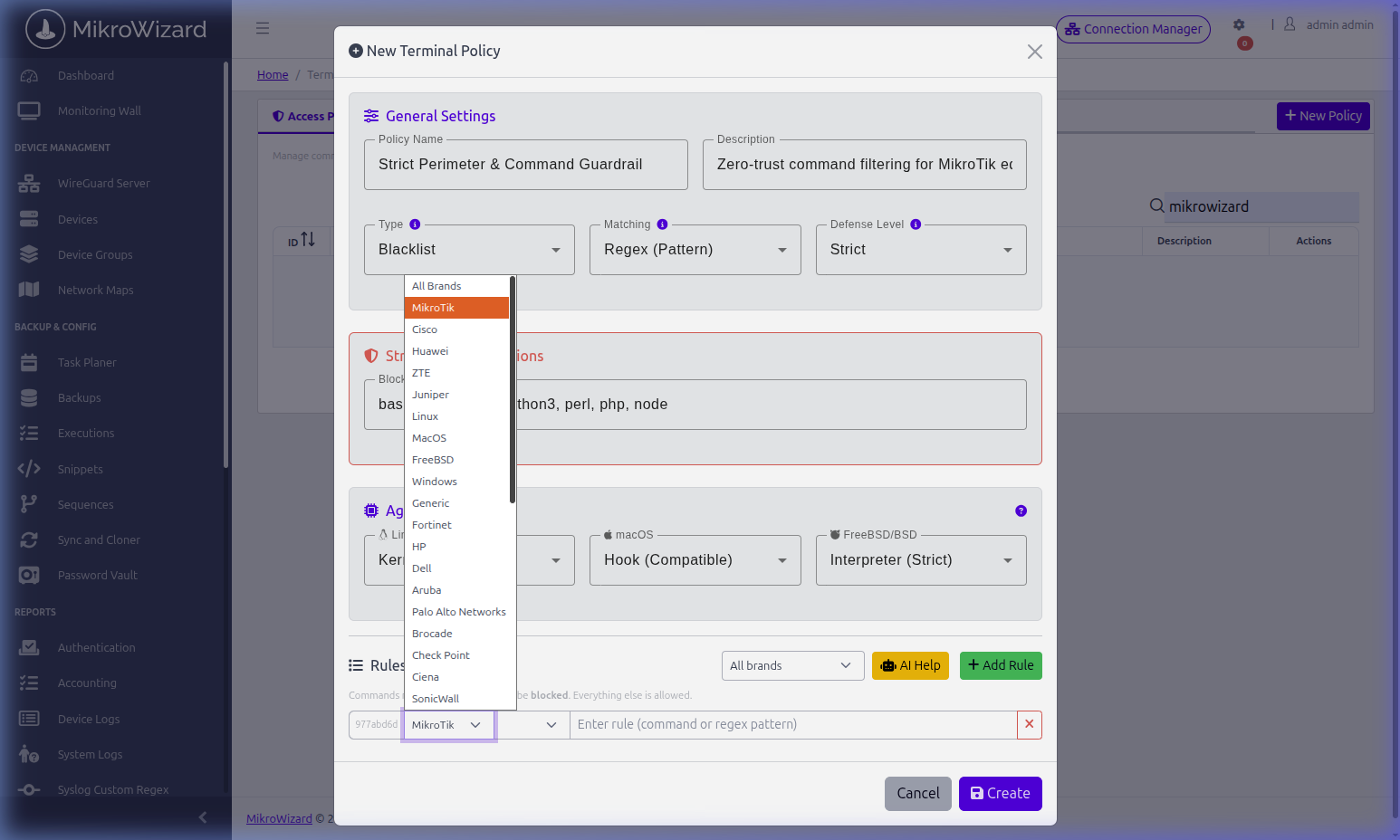
The Rules section at the bottom of the modal allows defining granular command patterns:
- Brand Coverage Dropdown: Select whether a rule applies to
All Brandsor a specific vendor operating system (MikroTik,Cisco,Huawei,ZTE,Juniper,Linux,Windows,Fortinet,Darwin,FreeBSD). - Rule Matching Override: Choose
Policy Default,Token, orRegexfor that specific rule row. - Rule Input Field: Enter the exact command or PCRE regular expression pattern.
- AI Help Button (): Moves to chatgpt to help generate verified regular expressions from natural language prompts (e.g. “Block all factory reset commands and password changes on RouterOS”).
Practical Command Rule Examples: #
| Target Brand | Rule Matching | Rule Expression | Security Objective |
|---|---|---|---|
| MikroTik | Regex | /system (reset-configuration|reboot).* | Prevents router reboot or factory wipe. |
| MikroTik | Regex | export (?!.*hide-sensitive).* | Blocks unmasked credential exports. |
| Cisco | Regex | (reload|erase startup-config|format.*) | Prevents Cisco device reload or memory format. |
| Linux | Regex | rm -rf (/|/\*|/etc|/var).* | Prevents critical system filesystem deletion. |
| All Brands | Token | shutdown | Blocks system shutdown command across all hosts. |
8. Auto-Execute Policy Mode #
When Policy Type is set to Auto-Execute, the policy switches from interactive filtering to non-interactive diagnostic automation:
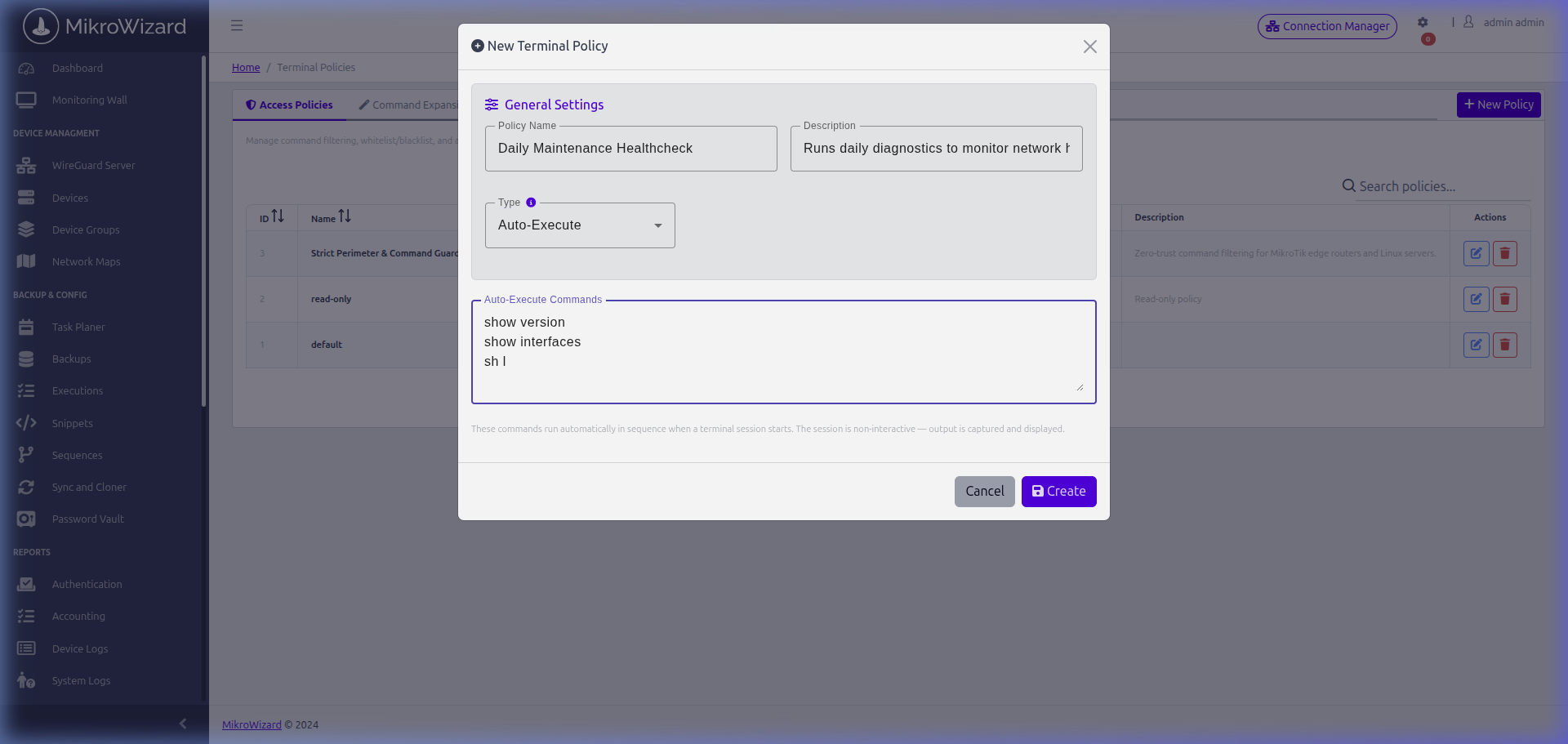
In the Auto-Execute Commands textarea, enter diagnostic or audit commands separated by newlines (e.g. show version, /system resource print, /interface print brief). When an operator connects using an Auto-Execute policy, the Terminal Gateway executes the commands sequentially, streams real-time output, and closes the session without granting an interactive prompt.
9. Command Expansions Tab (Shorthands & Aliases) #
Network engineers frequently use CLI abbreviations (e.g., typing sh ip int br instead of show ip interface brief or wr m instead of write memory). If a policy rule only checks full command strings, abbreviations could bypass filters or fail to trigger whitelists. The Command Expansions tab solves this by canonicalizing abbreviations before policy inspection.
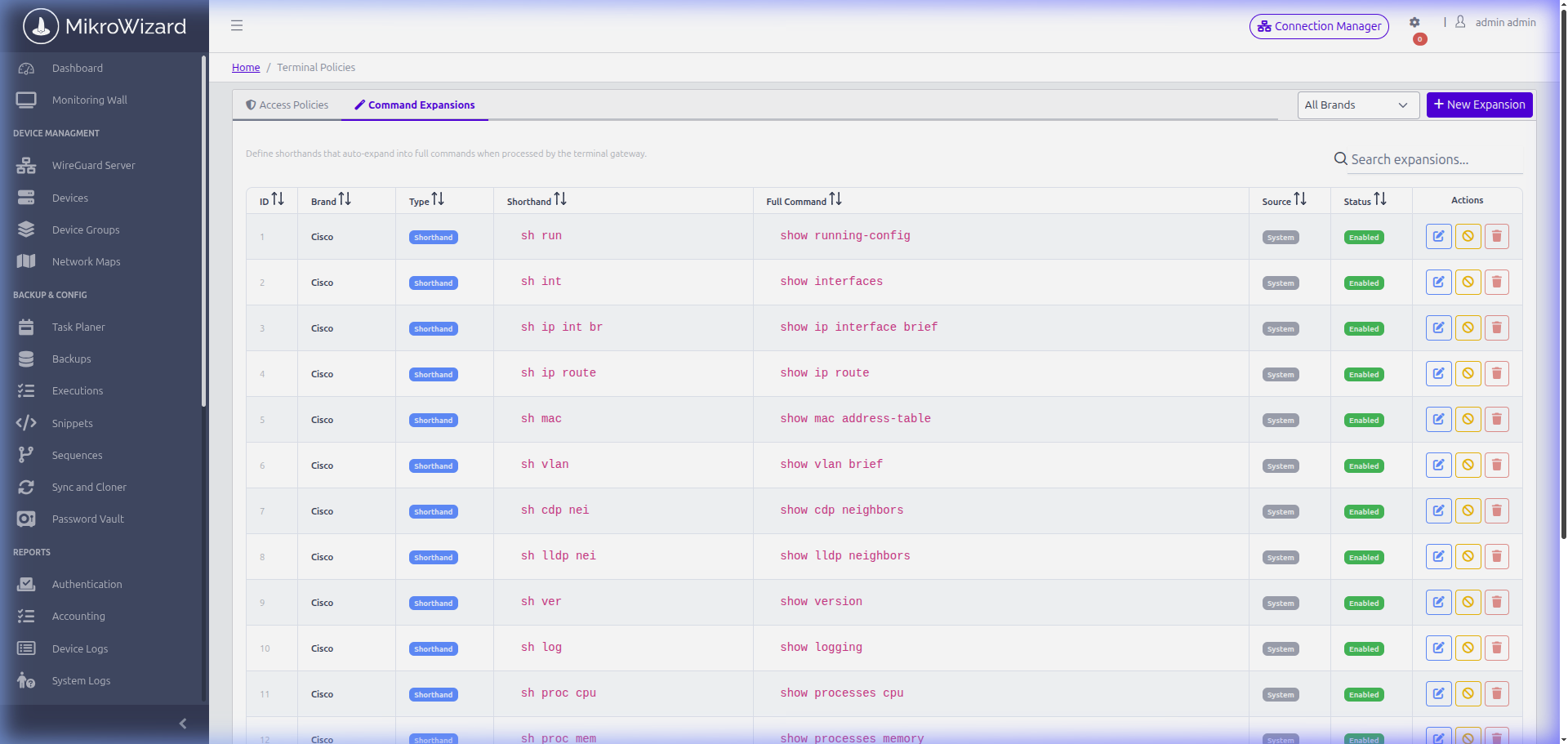
Creating a New Command Expansion: #
- Click the Command Expansions tab at the top of the console.
- Click the blue + New Expansion button in the top-right toolbar.
- In the modal dialog, configure:
- Brand: Select target operating system (e.g.
Cisco,MikroTik, orGeneric). - Expansion Type: Choose
Shorthand (Expand alias to full)orFull Command (Exact matching only). - Shorthand: Enter the abbreviated alias (e.g.
sh l). - Full Command: Enter the expanded canonical command (e.g.
show lldp neighbors).
- Brand: Select target operating system (e.g.
- Click Save to register the expansion.
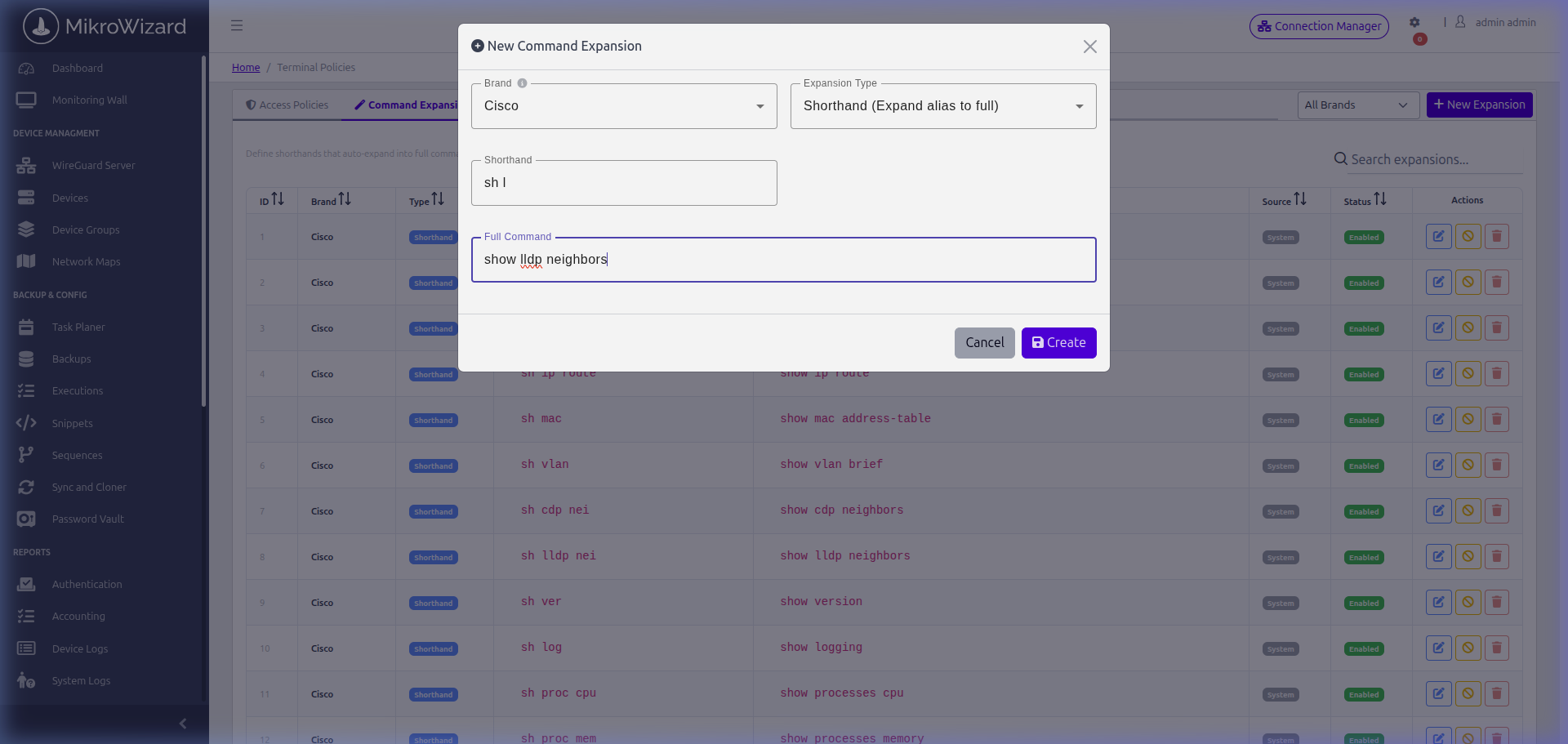
10. Verifying Created Policies in the Inventory #
Once saved, the new policy appears immediately in the Access Policies table with its calculated rule count, defense badges, and covered brands:
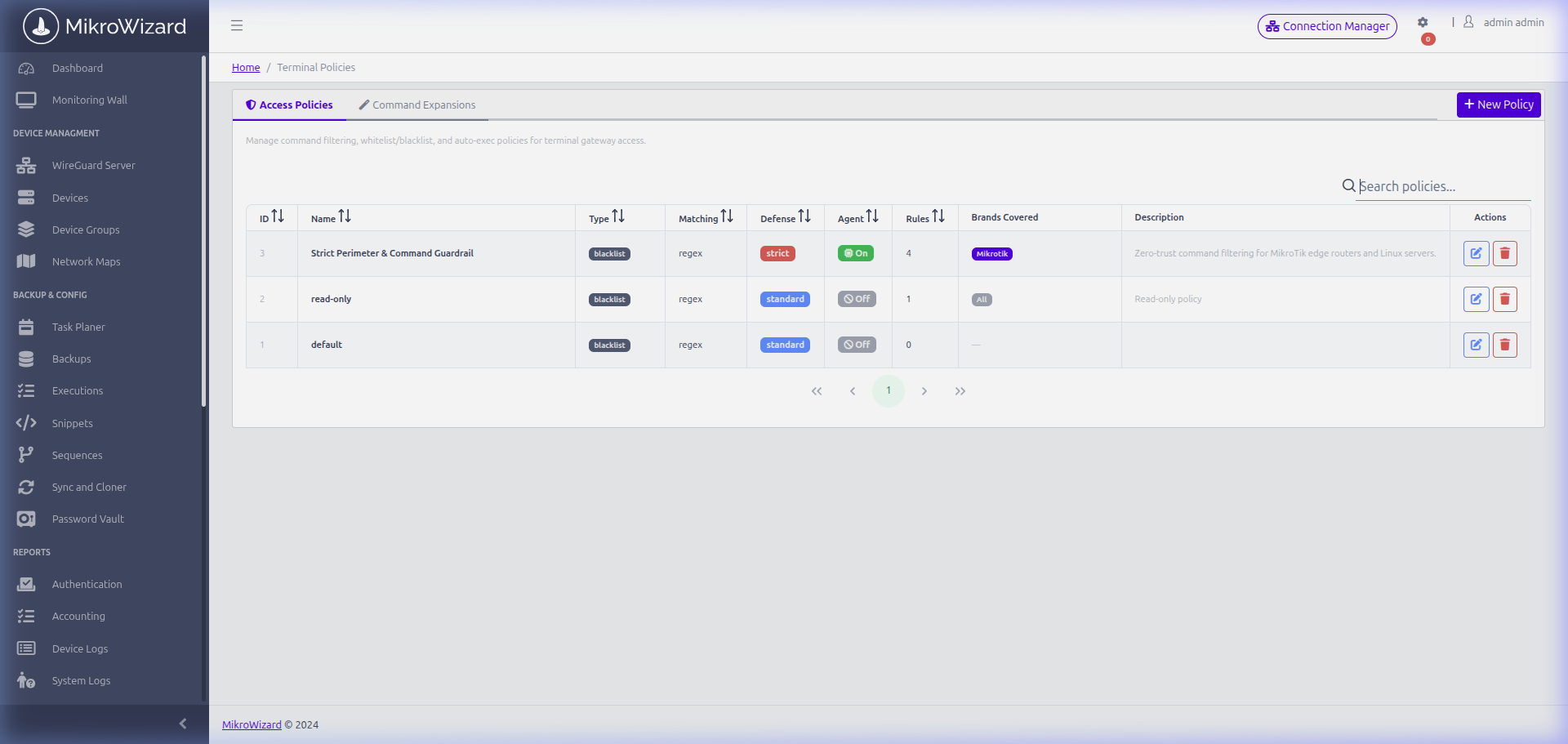
To apply this policy to your network fleet, navigate to Device Groups (or Manage Users → Device Groups tab), click the Edit button under the Terminal Policy column for your target router group (e.g. containing CHR-Tower01), and select your newly configured policy.


