
 MikroWizard
MikroWizard 2.1.1 and 2.1.2 are maintenance releases on top of 2.1.0. They harden security, fix the problems you reported, and add three features for people who run many routers. Everything below is in both Free and Pro unless it says Pro. Servers update themselves through the built-in updater, including servers still on 1.x.
Please read first: change passwords entered on 2.1.0 or earlier
Up to 2.1.0, some secrets could be written into the System Log: user passwords on create or change, non-MikroTik device passwords, enable passwords and SSH keys, the RADIUS secret and alert channel tokens. From 2.1.1 these are replaced with *** before an event is stored, and older entries are cleaned in the background after the update. If you entered any of these on 2.1.0 or earlier, we recommend changing them.
Security
- BlastRADIUS protection: every RADIUS reply to an Access-Request is now signed with a Message-Authenticator, and requests with an invalid one are dropped. Optionally MikroWizard requires it from routers and sets
require-message-authon the routers it manages (Settings › RADIUS). RADIUS login protection - Login protection: repeated failed RADIUS logins are blocked per user and per source address for a while, and failed logins to the MikroWizard panel are throttled per IP and username. Administrators unlock them under User Management › Locked Logins. Login protection and lockouts
- Sessions follow user changes: deleting or disabling a user, or changing their password, role or permissions, now applies to their open sessions at once.
- Tighter permissions: administrators without full rights can no longer create users with more rights than their own, and backups, executions and config versions respect each user’s device groups.
New features
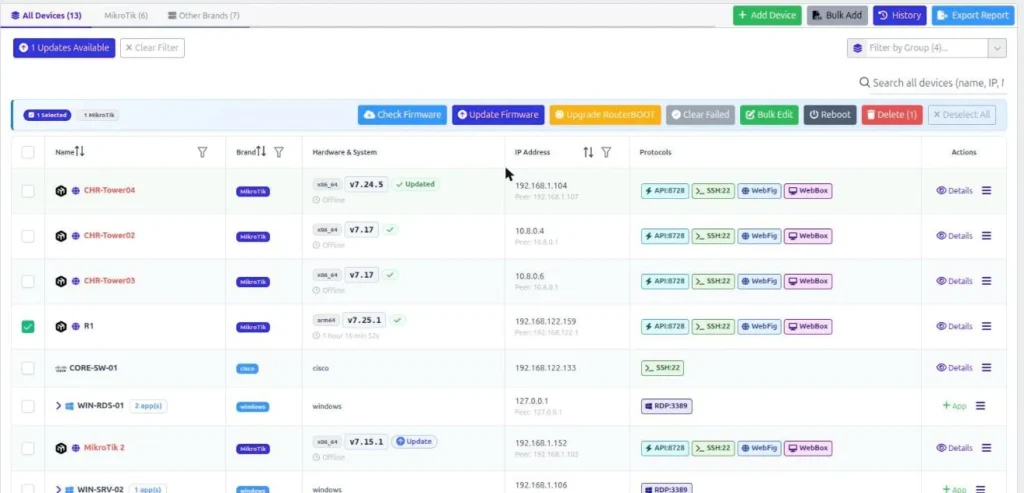
- Bulk edit for up to 50 MikroTik routers: change API-SSL, API port, SSH port, username and password at once. Optionally the change is also made on the routers: MikroWizard checks it can reconnect with the new settings and undoes the change on any router where it cannot. Each router gets its own result. Device list actions
- Router identity verification (opt-in, MikroTik): MikroWizard can remember each router’s API-SSL certificate and SSH host key and refuse the connection when they change, with a Critical event, so a device that takes over a router’s IP cannot capture its credentials. Router identity verification
- Device template updates without a release: device connection templates are now updated from signed MikroWizard updates. Templates you never edited update with one click or automatically; for templates you changed, you choose per field what to keep, and every change can be reverted. Template catalog updates
Fixes you will notice
- Snippets, executions and backups over SSH or Telnet work again on MikroTik routers with long identity names.
- Snippets that hit a device error (
failure:,bad command name,syntax errorand similar) now show as “Completed with errors” with the error lines, instead of success. - Multi-line MikroTik snippets with
{ ... },:ifand:foreachrun reliably, and a missing argument over Telnet no longer waits for the timeout. - The device list, User Management and Alerts no longer jump back to page 1 on every refresh.
- The IP range scan is back in Add Device, and every MikroTik you add gets its API, SSH or Telnet and WebFig connections right away.
- The PAM API (credentials, connections, sessions) works again, and Pro installs that started on Free open the terminal policy page without errors.
- The WireGuard “full” mode router script (Pro) keeps the tunnel and internet up, and can be run again without duplicates.
Good to know before updating
- Snippets and executions whose output contains device errors are now reported as failed or Warning.
- MikroTik backups over Telnet no longer include the echoed
/exportline, so each such router gets one new config version after the update. - Router identity verification and template updates stay switched off until their small database updates have run; everything else works as before.
Full details are in the release notes on GitHub. To update, see Upgrade MikroWizard. New to MikroWizard or last used v1? See what’s new since v1.