MikroWizard Logo MikroWizard Logo MikroWizard
  • Product
    • Zero-Trust Remote Access & PAM
    • WebBox: WinBox in the Browser
    • Browser RDP & VNC
    • Configuration Automation & Diffing
    • MikroTik Firmware Upgrades
    • NOC Wallboard & Network Map
    • WireGuard & MikroSpeed
    • 5-Tier Audit Suite & Logs
    • Subscriber Self-Service Portal
  • Solutions
    • For NOC Engineers
    • For ISPs & WISPs
    • For Security Auditors & CISOs
    • For MSPs & Multi-Tenant
  • MikroTik
  • Compare
  • Pricing
  • Resources
    • Engineering Blog
    • Documentation ↗
    • Community Forums ↗
    • Platform FAQ
    • Contact Us
  • Login
  • Register
Star on GitHub Register Serial Start Pro trial
Star GitHub Start Pro trial Register Serial Serial

Latest News & Updates

November 26, 2026

The Dude Is Discontinued: What to Use for MikroTik Monitoring and Network Maps

MikroTik lists The Dude as a discontinued legacy tool. Here is what it did, what to look for in a replacement, and how to move a MikroTik network to MikroWizard step by step.

Read Article →
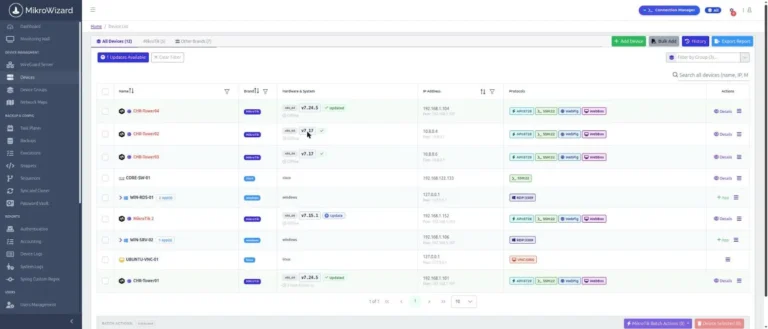
MikroWizard device list with MikroTik, Cisco, Windows and Linux devices and API, SSH, WebFig, WebBox, RDP and VNC badges
October 15, 2026

Running MikroWizard on Large Fleets: What We Changed in 2.1.0

MikroWizard 2.1.0 focuses on large fleets: automatic database connection budgeting, poller scaling, lighter router polling, a non-dropping syslog pipeline, safer background jobs and configurable data retention.

Read Article →
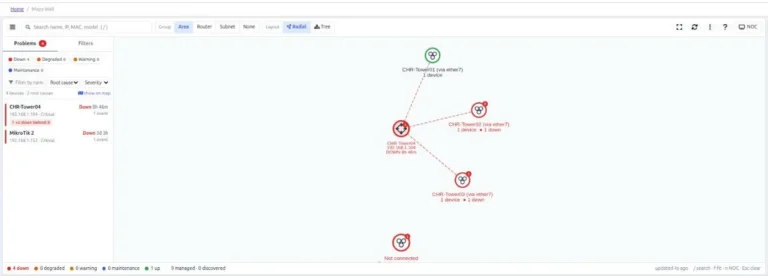
MikroWizard Network Map v2 with the Problems drawer showing the root-cause device and devices down behind it
October 15, 2026

Root Cause Analysis on the MikroTik Network Map: Find the Device That Actually Failed

When a tower goes down, everything behind it turns red. Network Map v2 in MikroWizard 2.1.0 separates the device that actually failed from the devices that are only unreachable because of it.

Read Article →
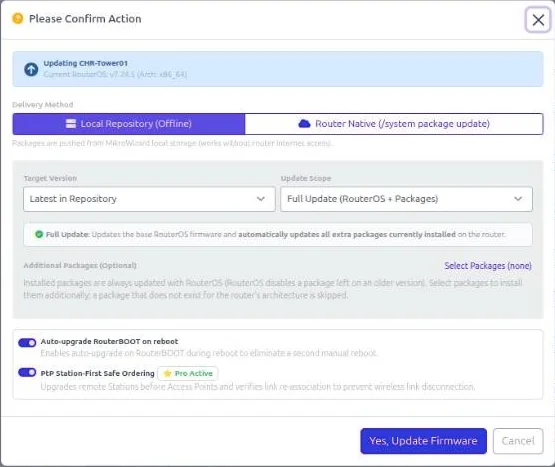
MikroWizard MikroTik firmware update dialog with delivery method, target version, update scope and PtP safe ordering
October 15, 2026

How to Upgrade a MikroTik Fleet from RouterOS v6 to v7 Safely

A practical checklist for moving a MikroTik fleet from RouterOS v6 to v7: the upgrade path, the 7.13 wireless package split, packages that don’t migrate, point-to-point links, and how MikroWizard automates it.


Read Article →
MikroWizard Logo MikroWizard Logo MikroWizard

Self-hosted PAM, centralized network management and automation for servers, multi-vendor networks and MikroTik RouterOS fleets.

v2.1.2 Production Ready

Platform & PAM

  • Zero-Trust Remote Access & PAM
  • Config Automation & Diffing
  • NOC Wallboard & Maps
  • WireGuard & MikroSpeed
  • 5-Tier Audit Suite
  • Subscriber Portal

Solutions

  • For NOC Engineers
  • For ISPs & WISPs
  • For Security Auditors
  • For MSPs & Multi-Tenant
  • MikroTik RouterOS Spotlight
  • Platform Comparison

Resources

  • Pricing Calculator
  • Engineering Blog
  • Documentation ↗
  • Community Forums ↗
  • Platform FAQ
  • Contact Us

© 2026 MikroWizard. All rights reserved. Built for MikroTik RouterOS v6 & v7 fleets.

Privacy Policy EULA Sales Agreement Return Policy

Product Screenshot Inspection

Screenshot Zoom Preview