
 MikroWizard
Moving a fleet from RouterOS v6 to v7 is not one click per router. The upgrade path, the 7.13 wireless package split and a few packages that don’t migrate are what turn a routine update into a truck roll. Here is a practical checklist, and how MikroWizard automates it.
1. Upgrade to the latest v6 first
MikroTik’s own guide to upgrading to v7 starts from the latest v6 release. A router running an old 6.x build should be brought to the latest 6.49.x before it moves to v7. MikroTik’s check-for-updates also only offers 7.12.1 to v6 devices, so v7 is reached in steps, not in one jump.
2. Go through 7.12.1 before 7.13 or newer
RouterOS 7.13 changed how wireless drivers are packaged. The legacy wireless package was split out of the bundle, and wifiwave2 was split into wifi-qcom (802.11ax) and wifi-qcom-ac (802.11ac wave2, ARM only). The automatic conversion happens when upgrading from 7.12, so routers below 7.12 should pass through 7.12.1 first.
- If you upload packages manually, the upload must include the right driver package for the router.
- The legacy
wirelesspackage andwifi-qcom/wifi-qcom-accan’t be active at the same time. - A driver package left on the old version is disabled by RouterOS, and the wireless links go down with it.
3. Check for packages that don’t migrate
Some v6 features are not converted automatically on the way to v7. The two that catch most teams are the multicast package and user-manager. If a router uses either, plan the migration of that configuration by hand before upgrading it.
4. Protect the far end of every wireless link
On point-to-point links, upgrade the station before the access point. If the access point reboots into a version the station can’t associate with, the far end drops off the network and you lose management access to it.
5. Verify every package and leave room on flash
- Download packages from MikroTik and check them against the SHA256 hashes MikroTik publishes.
- Check free storage on the router before uploading, especially on small-flash devices.
- Take a configuration backup before the update.
- Upgrade RouterBOOT after the new RouterOS version is running.
How MikroWizard automates the checklist
MikroWizard 2.1.0 has a rewritten firmware engine. Parts of the checklist run in every edition, and the v6 to v7 rules are part of Pro.
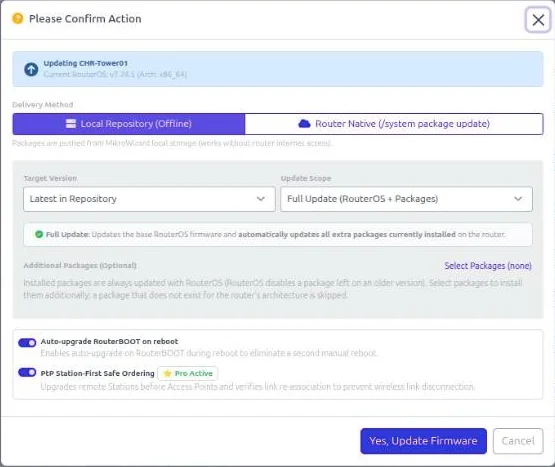
| Step | Free | Pro |
|---|---|---|
| SHA256 verification against MikroTik’s published hashes | ✓ | ✓ |
| Free-storage check before upload | ✓ | ✓ |
| Configuration backup before update (configurable) | ✓ | ✓ |
| RouterBOOT upgraded after the OS | ✓ | ✓ |
| Restart-safe progress and Maximum Update Retries (1–5, default 2) | ✓ | ✓ |
| Multi-step path: latest v6 → 7.12.1 → 7.13+ | — | ✓ |
| wifi-qcom / wifi-qcom-ac handling across the 7.13 split | — | ✓ |
| Refuse automatic v6 → v7 when multicast or user-manager is installed | — | ✓ |
| PtP safe ordering (stations before access points) | — | ✓ |
| Latest Cloud channel (stable, long-term, testing, development) | — | ✓ |
Upgrades run from a single router, a device group or a scheduled task. The device list shows Updating, Rebooting, Updated and Failed badges, with inline Retry and a Failed filter, so you can follow a rollout across the whole fleet.
A rollout plan that works
- Pick a few representative routers per model and architecture as a pilot group.
- Upgrade the pilot group, check services, then widen to one site or tower at a time.
- Schedule the rest of the fleet in the task planner for your maintenance window.
- Watch the Failed filter and retry or investigate before moving on.
MikroTik, RouterOS and WinBox are trademarks of MikroTik SIA. MikroWizard is not affiliated with MikroTik.