
 MikroWizard
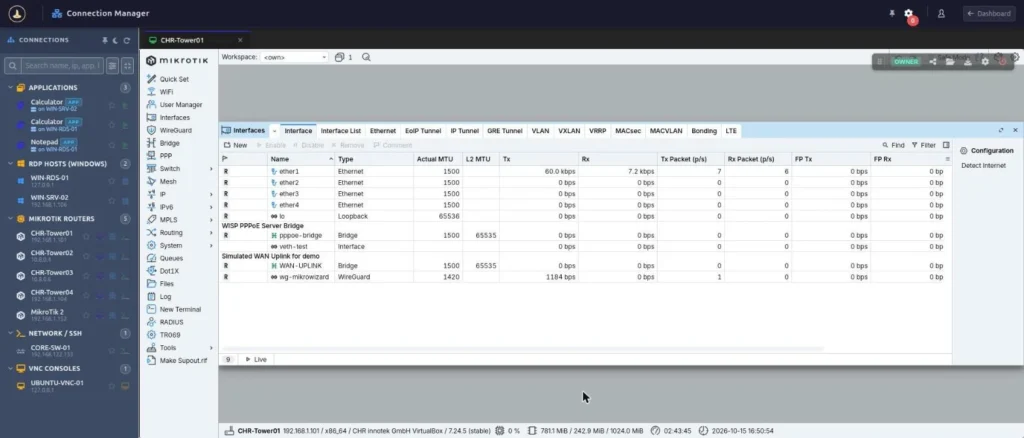
MikroWizard 2.1.0 brings browser-based RDP, VNC and WebBox (WinBox in the browser) to our Privileged Access Management, rebuilds the Network Map with root cause analysis, and replaces the MikroTik firmware upgrade engine with a safer, multi-step one.
MikroWizard is one platform with independent modules: PAM & remote access for any server or network device, central management & automation for multi-vendor fleets, and a deep MikroTik toolset. You can use all of them, or only the ones you need. Version 2.1.0 improves all three, and adds a workspace mode switcher (MikroTik, PAM or All) so your menus and device views show only the module you are working in.
Below is what is new, split into Pro features and improvements that ship in both Free and Pro.
1. RDP, VNC and WebBox in the browser (Pro)
Until now, the MikroWizard Terminal Gateway covered SSH, Telnet and the WebFig proxy. In 2.1.0 it becomes a full remote access gateway. Windows RDP and VNC desktops open in the Connection Manager next to your SSH and WebFig sessions, rendered in HTML5 with nothing to install on the operator’s computer.
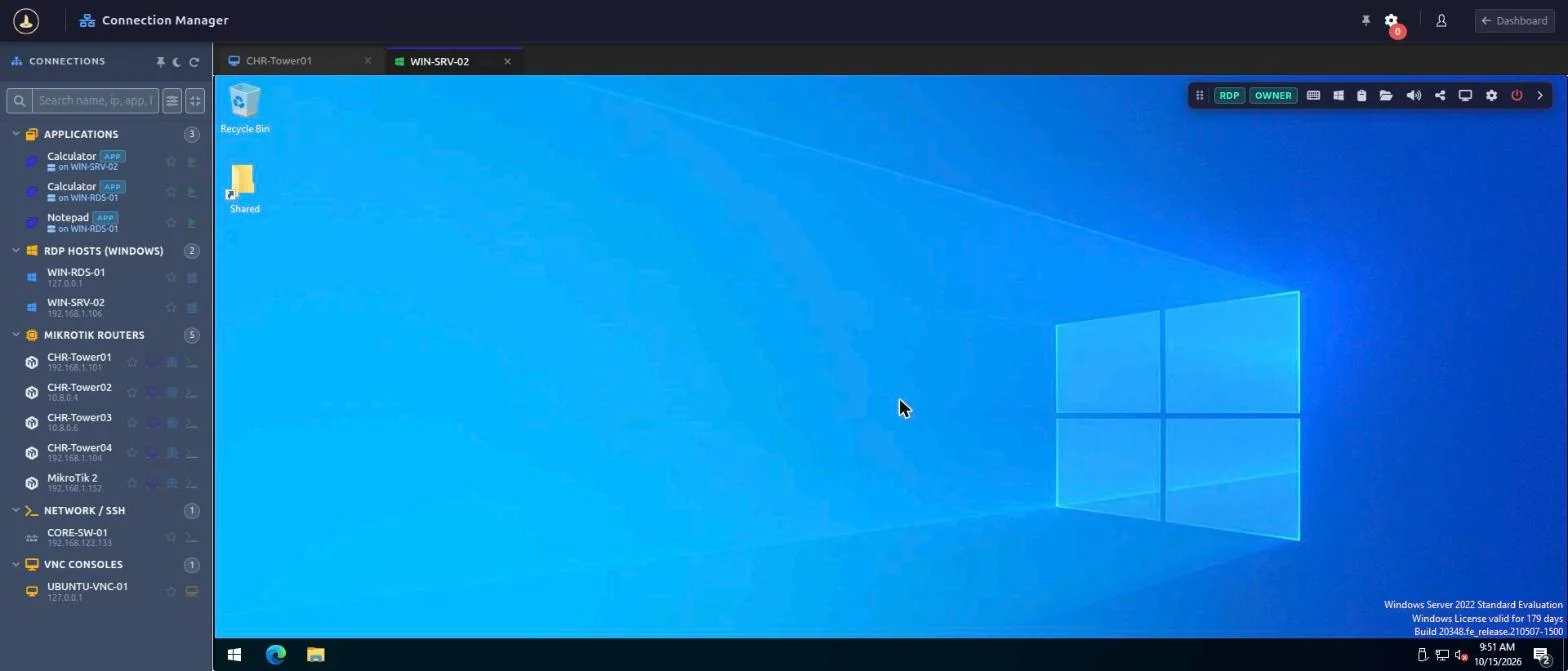
WebBox: WinBox in the browser
WebBox is built for MikroTik teams. The gateway runs MikroTik’s own WinBox 4 for Linux inside an isolated sandbox and streams it to your browser. You get remote WinBox access without installing WinBox locally, without exposing port 8291, and with the same audit trail as every other session:
- Launch WebBox from the Connection Manager, the device list, the device tree or the Network Map. MikroWizard checks gateway availability first.
- Every WebBox session is recorded as MP4 video with seeking, and can be watched live or shared like a terminal session.
- Each session gets its own isolated, temporary drive.
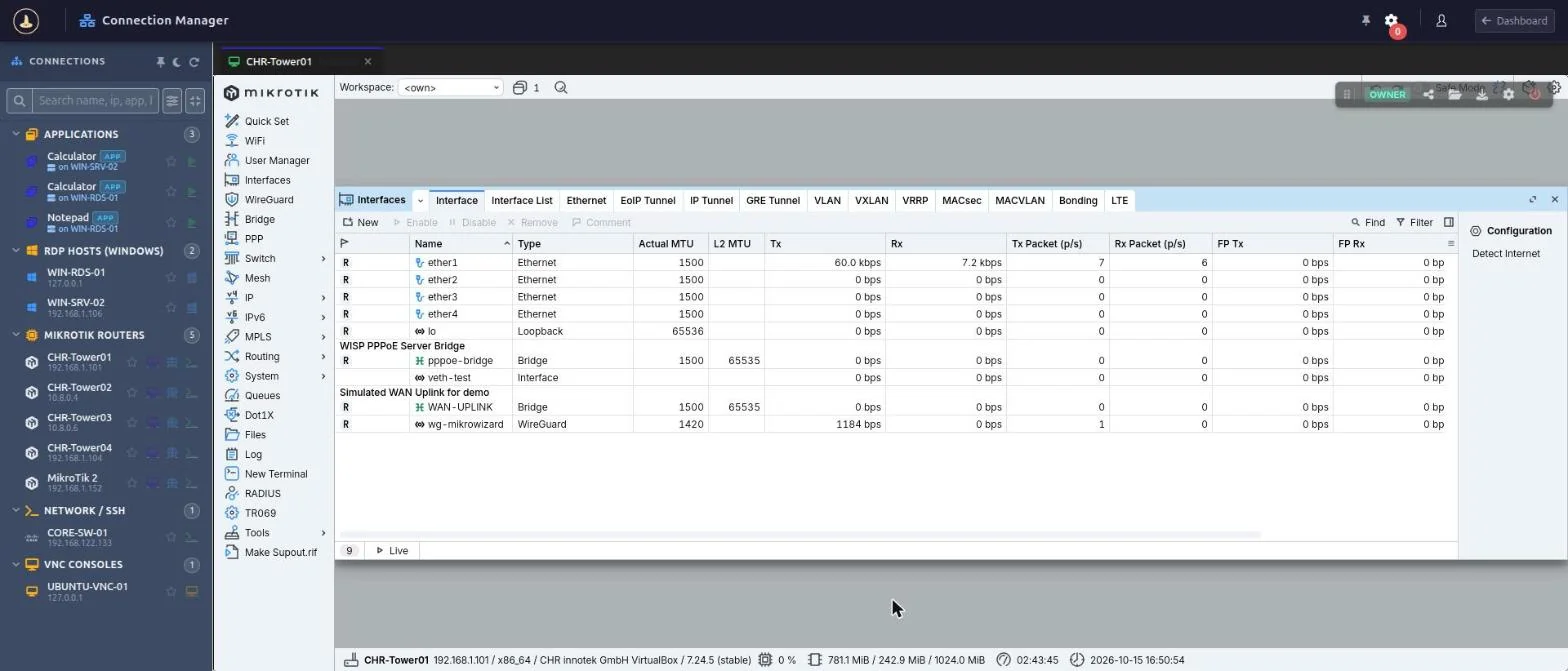
RemoteApp publishing
Publish single applications from an RDP host instead of the full desktop. Published apps appear as child entries nested under their server and inherit its IP address.
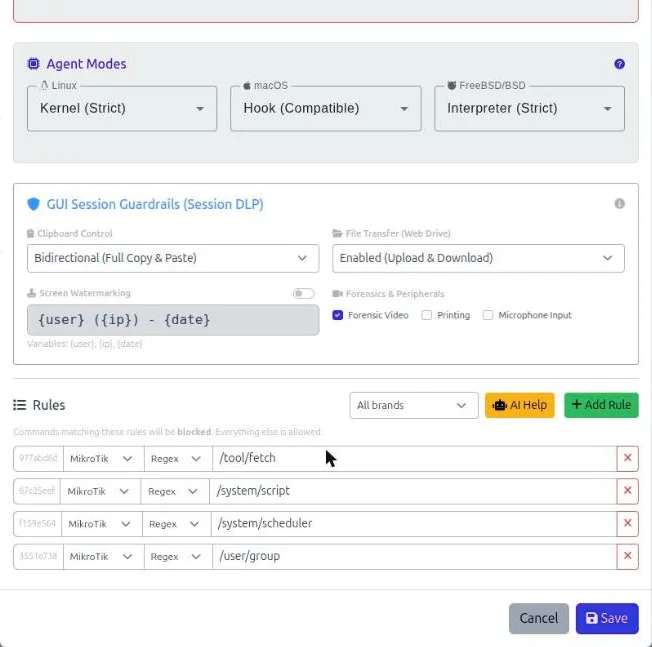
Templates, session options and DLP policies
- Separate CLI, RDP and VNC templates, each with its own protocol, display and acceleration settings.
- Four-tier session options: settings resolve from the template, then the host, then the published app, then the DLP policy.
- Session DLP policies control clipboard, file transfer, watermarking and forensic recording per policy.
Recording and collaboration for every protocol
- RDP and VNC sessions are recorded and replayed in the browser. WebBox uses MP4 video. Ended WebFig proxy sessions now also appear in session history.
- RDP, VNC and WebBox sessions can be watched or shared like terminal sessions. The Session Manager shows a protocol badge for each one.
- Join and guest links are bound to the signed-in user, which blocks link spoofing.
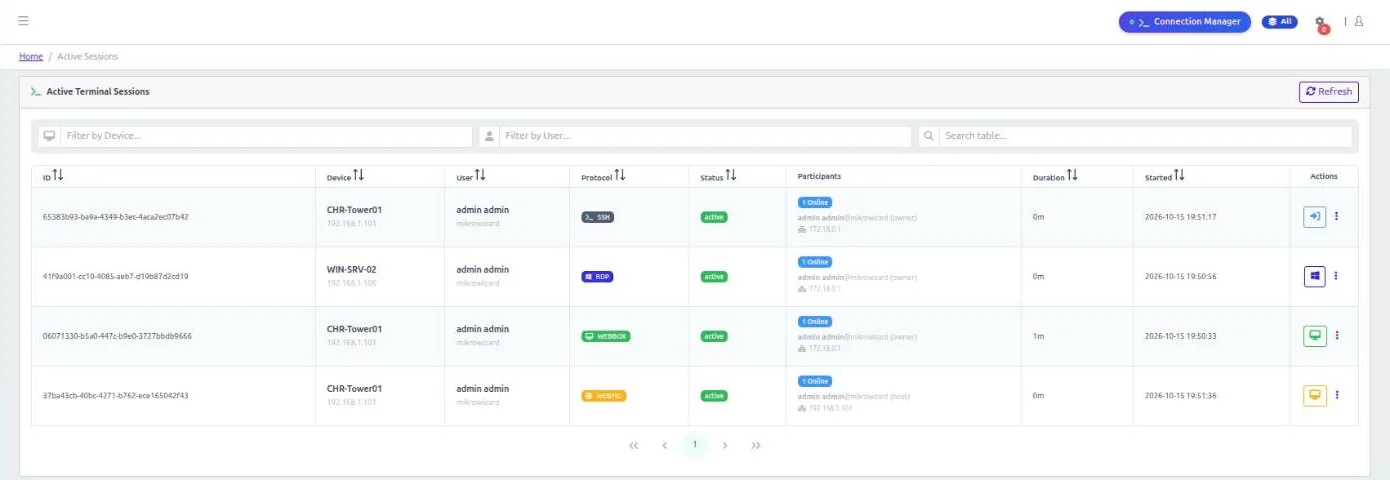
RDP, VNC and WebBox need the Terminal Gateway addon v1.3.0. WebBox and WebFig proxy are for MikroTik devices. RDP and VNC work with any Windows or Linux host.
2. Network Map v2 with root cause analysis (Pro)
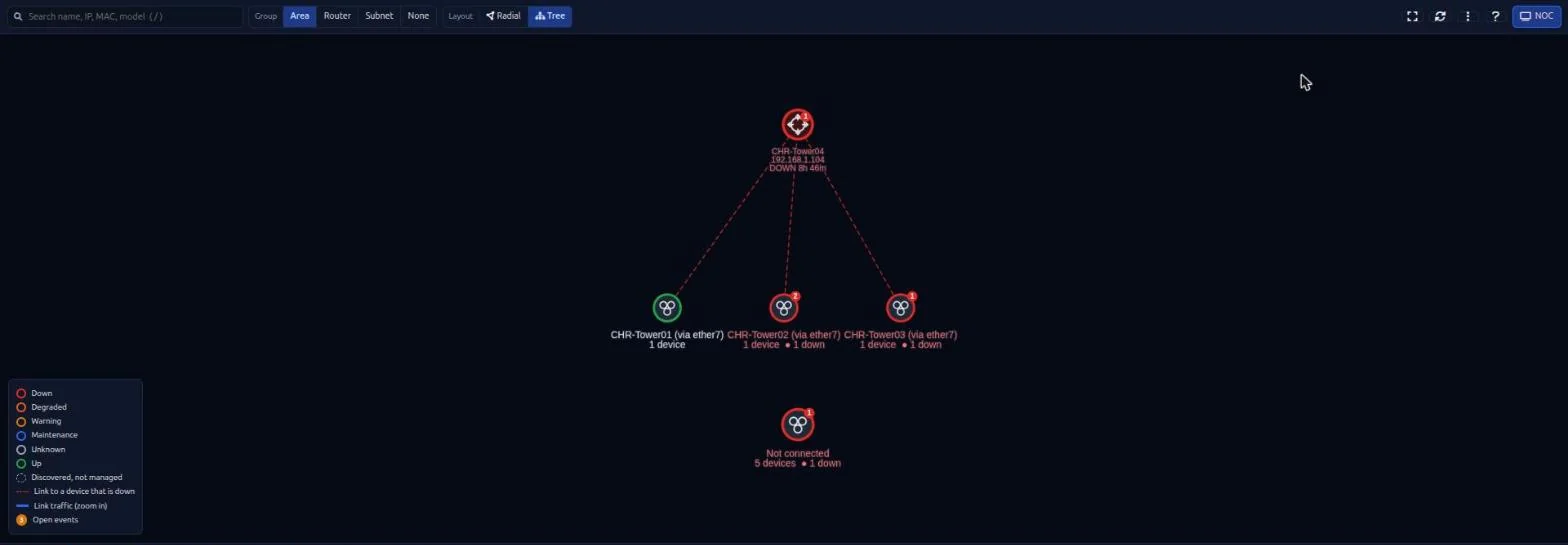
The MikroTik network map has a new topology engine. When a site goes down, the Problems drawer separates the device that actually failed from the devices that are only unreachable because of it, so your NOC starts with the root cause.
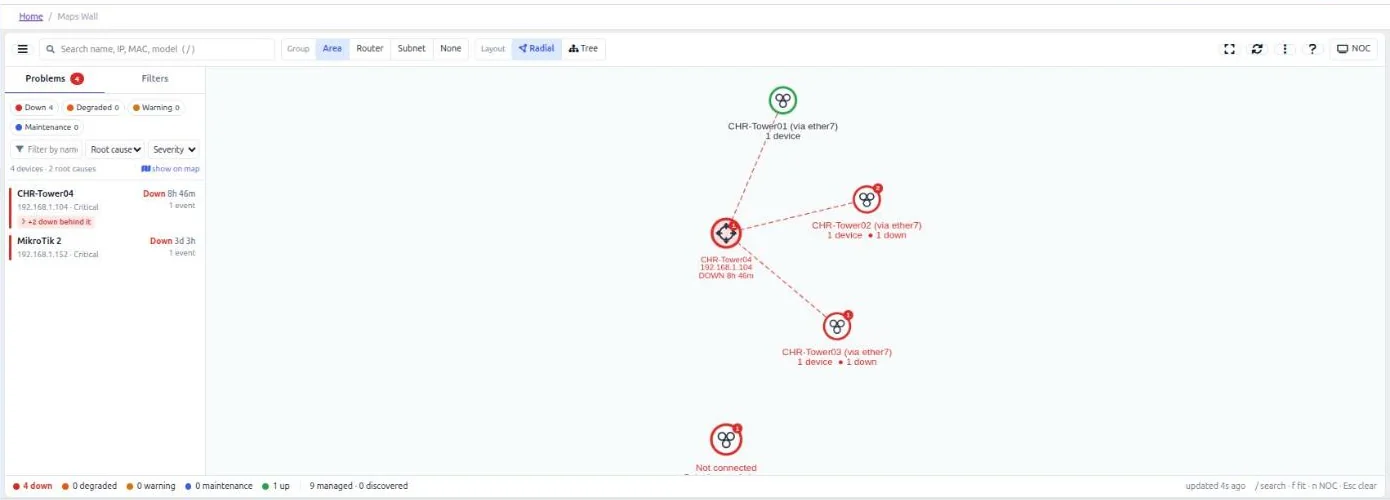
- Radial and hierarchical tree layouts, path finding, and node positions saved per user.
- Fast SVG icons with live state rings, link traffic rates, and light and dark theme support.
- NOC full-screen mode, search across the map, PNG export and CSV export of the device inventory.
- A device inspection drawer and admin-assigned aliases for neighbours.
- Recognises unmanaged peers by router identity (all interface MACs and IPs), classifies APs and CPEs, and supports bridge ports and RouterOS 7 link-local neighbours.
- Each user only sees the devices they are allowed to see.
3. A rewritten MikroTik firmware upgrade engine
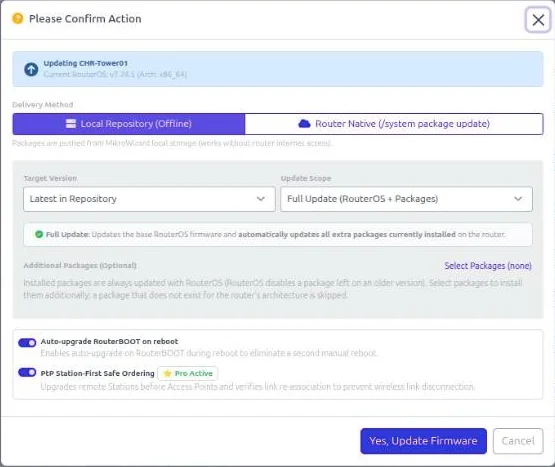
Upgrading hundreds of MikroTik routers is where things go wrong: a missed intermediate version, a corrupted download, or a full flash. The firmware engine was rewritten to prevent these problems. Free and Pro:
- Checked packages: package names are checked per architecture, and the result is confirmed after the reboot.
- Integrity and delivery checks: packages are verified against MikroTik’s official SHA256 hashes, and the router’s free storage is checked before upload. RouterBOOT is upgraded after the OS.
- Restart-safe: progress is stored per device, so a service restart never loses track of an upgrade or leaves a router halfway.
- Update modes: full (OS + RouterBOOT), OS only, packages only, or bootloader only.
- Version sources: your server repository, MikroTik’s servers directly, a specific version, or Auto-Pilot latest.
- Maximum Update Retries (1–5, default 2) prevents reboot loops.
- Live Updating, Rebooting, Updated and Failed badges, inline Retry and Clear, and a Failed quick filter.
- Device group upgrades have the same options as single devices. Upload concurrency scales from 8 to 35 parallel transfers to protect your WAN link.
Pro adds:
- Multi-step upgrade planner: older routers follow a safe path (latest v6 → 7.12.1 → 7.13+).
- Latest Cloud channel: upgrade to the newest release on the stable, long-term, testing or development channel, from single devices, device groups or scheduled tasks.
- PtP safe ordering: on point-to-point wireless links, stations are upgraded before their access points so the remote end never loses its link.
- Safety rules: automatic v6 → v7 upgrades are refused when packages that do not migrate (for example multicast or user-manager) are installed. The right wireless packages (
wifi-qcom,wifi-qcom-ac) are installed across the 7.13 package split.
4. Central management and automation improvements (Free and Pro)
- Workspace modes: switch between MikroTik, PAM or All. Navigation, device tabs and actions adapt to the mode, which is shown as a pill in the header.
- NATed and multi-endpoint devices: several devices can share one public IP on different ports, for example several RDP hosts behind one NAT. Devices are unique by IP and port, and badges show the real port (e.g.
RDP:3390). - Multi-vendor diff rules: built-in diff exclusion rules for 10+ vendors, so timestamps and counters do not show up as configuration changes. The Template Manager adds a live regex testing sandbox, brand management, and editors for pre-connect and post-disconnect hooks.
- Connection Manager: custom categories for the device tree (synced to the server, with JSON import and export), grouping by category, group, device type or a flat list, plus search and favourites.
- Backups: identical configurations are stored once, and each backup links to the execution that created it.
5. Built for large fleets (Free and Pro)
- Automatic database connection budgeting sizes each process’s pool from PostgreSQL’s real
max_connections. This removes “too many clients” errors. - Poller scaling: 15 to 120 workers depending on fleet size, optional splitting across multiple pollers, and a hard deadline per cycle. Large fleets are polled in roughly 30–45 seconds.
- Lighter polling: interface rates come from 64-bit counters, and rarely-changing data is cached.
- Syslog pipeline: a separate UDP reader feeds a pipeline that does not drop messages.
- Fast SSH commands on MikroTik run in about 0.1 s.
- Safer background jobs: Stop lets running tasks finish their current device. Critical tasks (firmware, scan, download, vault) cannot be force-killed. Per-device locks stop two operations hitting the same router, and duplicate requests are queued instead of dropped.
6. Monitoring, logs and data retention (Free and Pro)
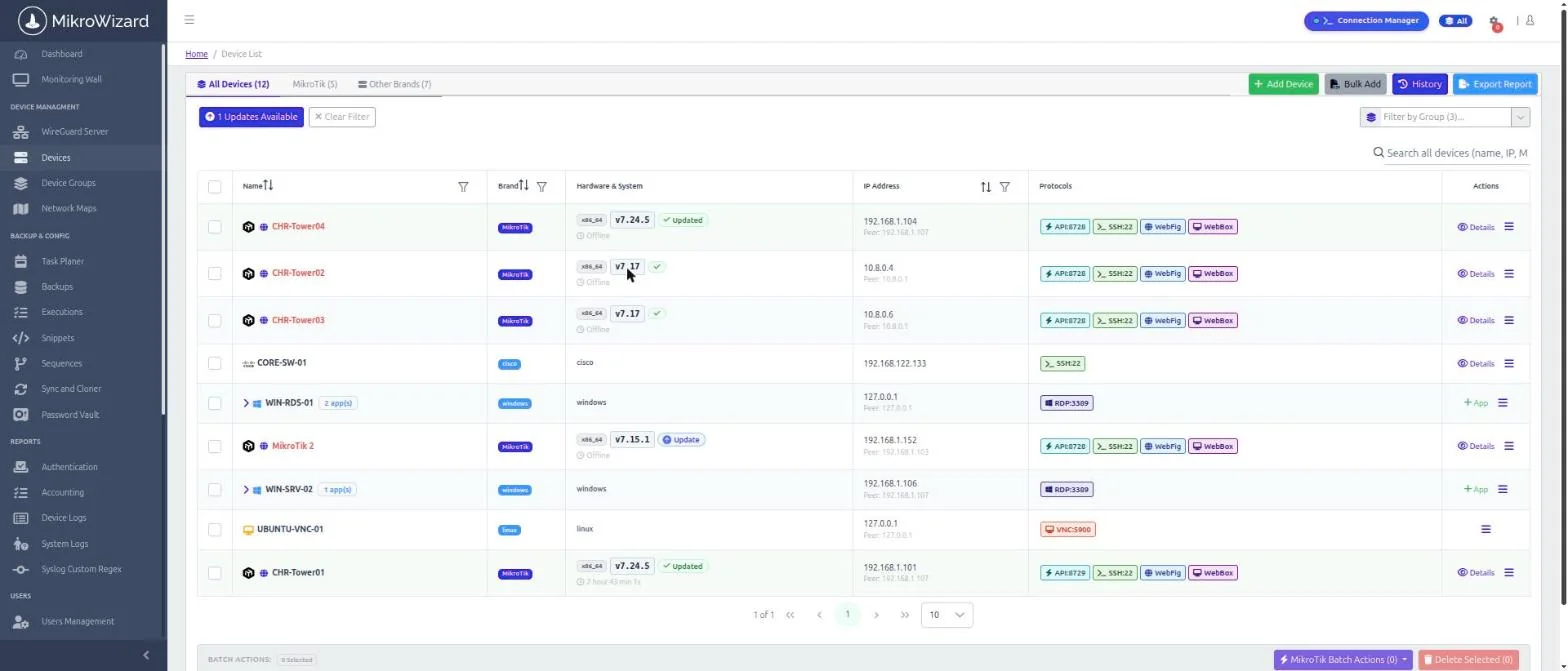
- The device list shows unreachable routers as Offline and a live uptime for online ones.
- Reboot detection reads the cause from RouterOS logs. Unreachable alerts are suppressed while a device is updating or rebooting.
- RADIUS
Accounting-On/Offcloses stale login sessions when a router restarts. - Authentication and Accounting logs open straight from the Connection Manager context menu.
- Configurable data retention runs daily (default 365 days). Unresolved events and logins with recordings are always kept.
At a glance: Free vs Pro in 2.1.0
| New in 2.1.0 | Free | Pro |
|---|---|---|
| RDP, VNC and WebBox (WinBox in the browser) | — | ✓ |
| RemoteApp publishing, session DLP, 4-tier session options | — | ✓ |
| Recording and sharing for RDP, VNC and WebBox | — | ✓ |
| Network Map v2 with root cause analysis | — | ✓ |
| Safer firmware engine: SHA256 checks, storage check, update modes and retries | ✓ | ✓ |
| Multi-step v6 → 7.12.1 → 7.13+ planner, Latest Cloud channel, PtP safe ordering, v6 → v7 safety rules | — | ✓ |
| Workspace modes | ✓ | ✓ |
| NATed multi-endpoint devices | ✓ | ✓ |
| Multi-vendor diff rules and regex sandbox | ✓ | ✓ |
| Large-fleet performance, job control and data retention | ✓ | ✓ |
Upgrading to 2.1.0
- This release runs database migrations 058–064. On large installations, migration 064 can take several minutes. Do not interrupt the upgrade while migrations run.
- To use RDP, VNC and WebBox, update the Terminal Gateway addon to v1.3.0. See the documentation for the gateway update guide.
- The full changelog, including bug fixes, is in the release notes.
MikroTik, RouterOS and WinBox are trademarks of MikroTik SIA. MikroWizard is not affiliated with MikroTik. WebBox runs MikroTik’s WinBox 4 application inside the MikroWizard Terminal Gateway.