Persona 2 • ISP & WISP Operations Blueprint

Subscriber Self-Service Portal &
High-Speed CPE Automation

Automated remote CPE management for ISPs and WISPs: Empower subscribers with a branded self-service portal, automate Tier-1 router diagnostics, safely manage NAT port forwarding without remote Winbox exposure, and benchmark throughput with MikroSpeed.
Subscriber Self-Service Portal
Subscriber Portal

White-Label Customer Self-Service Portal

Empower end-customers with a branded self-service portal while retaining strict governance over accessible features.
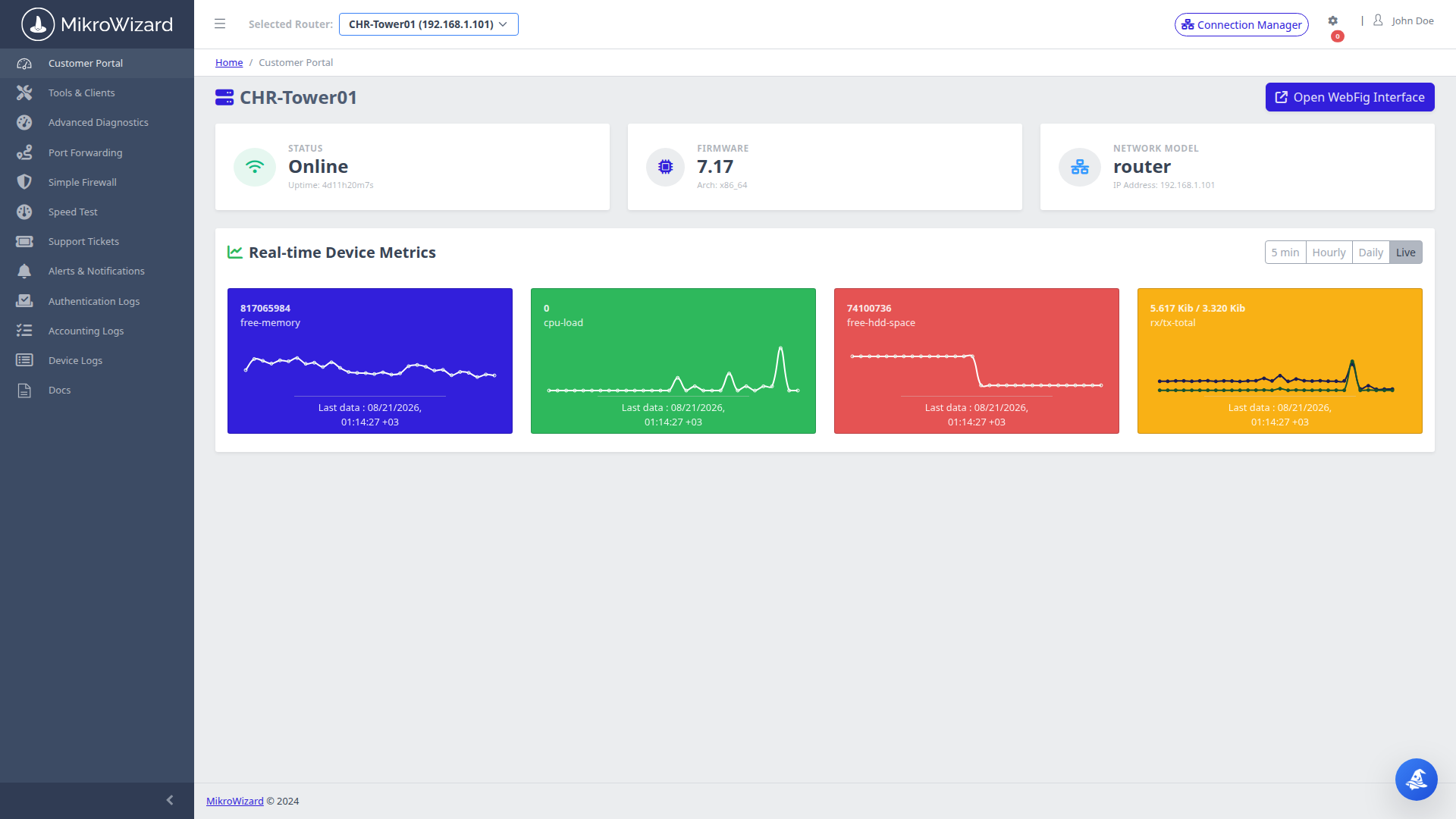
  • ✓ Subscriber Telemetry View: Displays assigned router uptime, public WAN IP, RouterOS version, and live throughput graphs.
  • ✓ Granular Tab Governance: ISP admins control exactly which tabs (Diagnostics, WiFi, NAT, Simple Firewall) each customer sees.
🔍 Inspect Screenshot →
Automated Diagnostics
1-Click Diagnostics

1-Click Automated Subscriber Diagnostics

Drastically reduce ISP Tier-1 support call volumes by empowering customers to diagnose connectivity issues in 1 click.
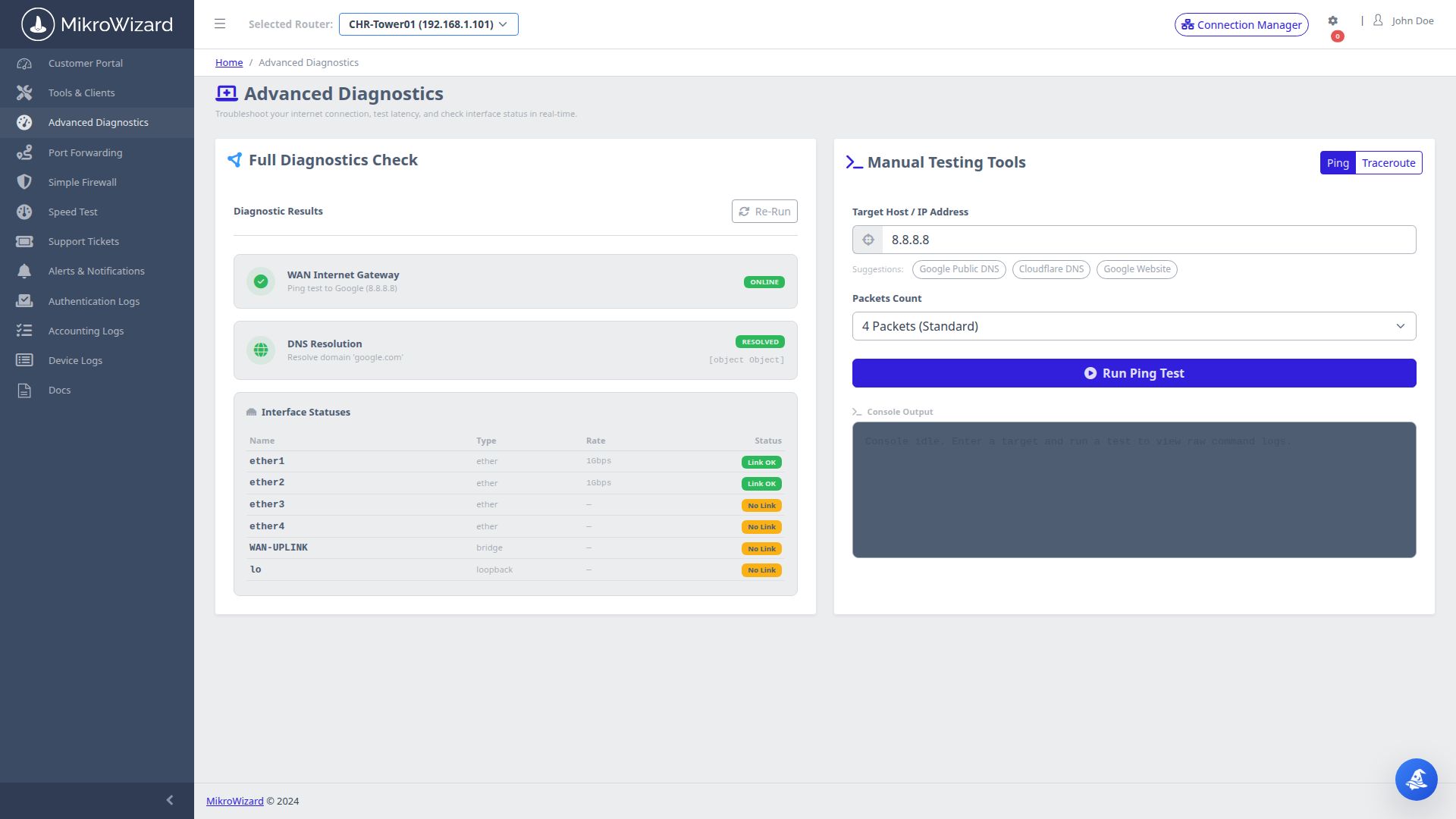
  • ✓ Automated Health Suite: Tests WAN gateway reachability, public DNS resolution (8.8.8.8, 1.1.1.1), and physical link status.
  • ✓ Interactive Utilities: Built-in ping and traceroute allow subscribers to independently verify packet loss and latency.
🔍 Inspect Screenshot →
NAT Port Forwarding
Safe NAT Forwarding

Self-Service NAT Port Forwarding with Validation

Let power users and gaming subscribers configure port forwarding safely with zero support tickets.
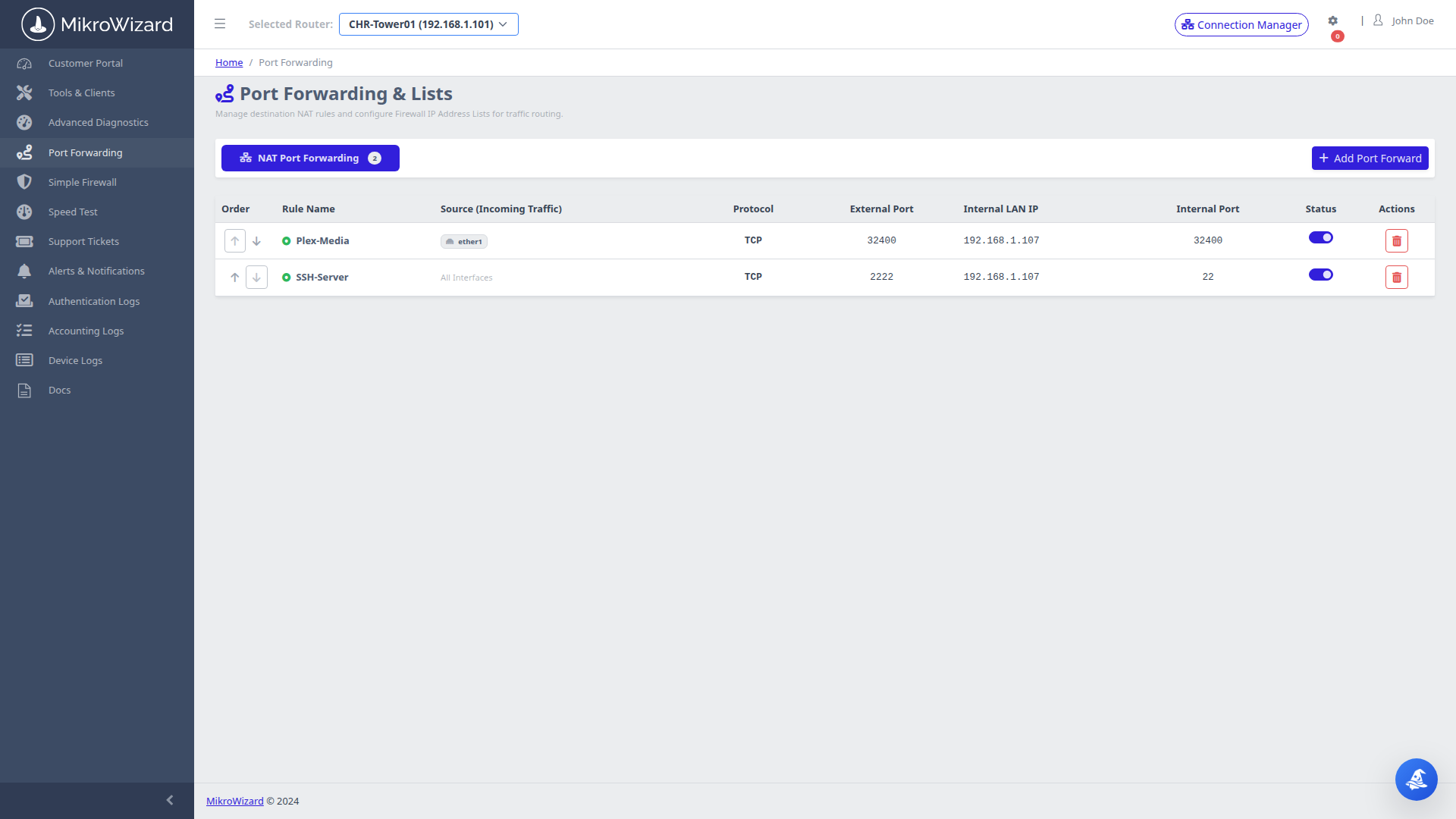
  • ✓ Conflict Prevention: Automated checks prevent overlapping external port ranges and safeguard management ports.
  • ✓ Safe Protocol Selectors: Supports TCP/UDP dst-nat rule creation directly mapped to RouterOS firewall tables.
🔍 Inspect Screenshot →
Security Presets
Firewall Presets

1-Click Router Security Presets & Blocklists

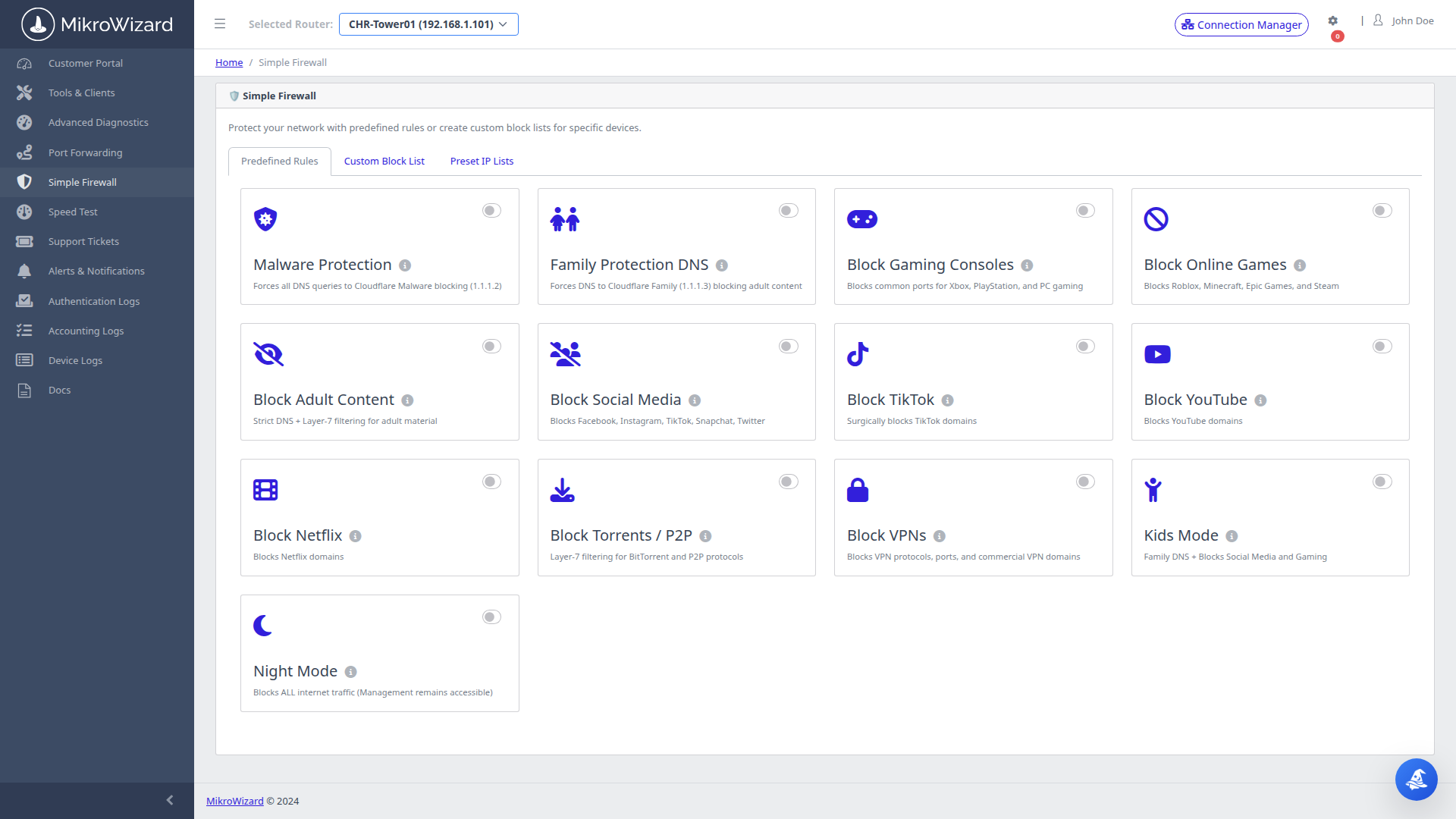
Frictionless router security presets and custom IP blocking for non-technical subscribers.
  • ✓ 1-Click Hardening: One-click toggles for Stealth Mode (Block WAN Ping), Drop Invalid Packets, and FastTrack.
  • ✓ Custom IP Address-Lists: Simple subscriber blacklisting modal mapping directly to RouterOS address-lists.
🔍 Inspect Screenshot →
WireGuard Management
WireGuard VPN

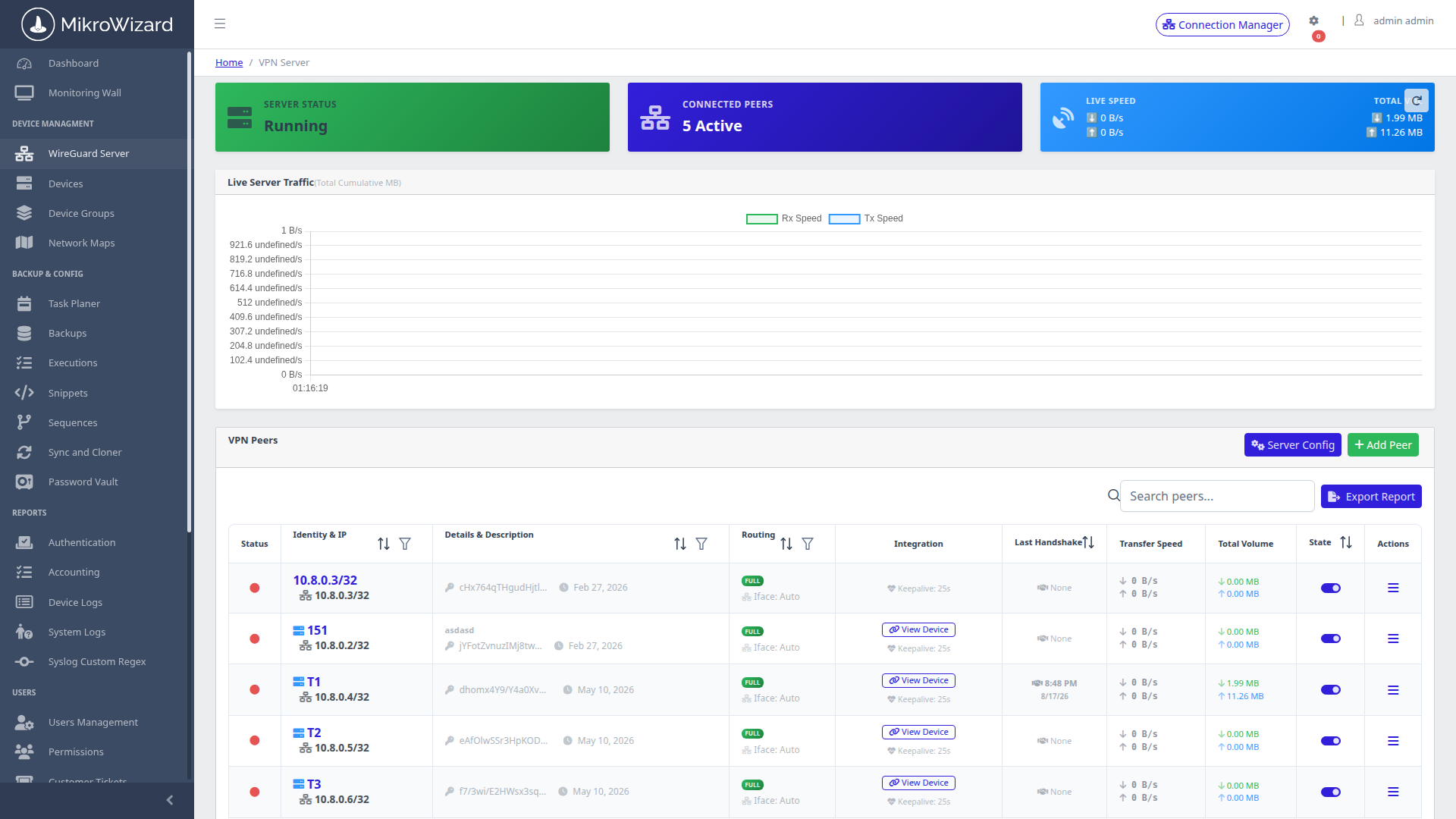
WireGuard Server & QR Code Peer Provisioning

Deploy high-speed WireGuard tunnels and onboard mobile clients with instant QR code scanning and auto-generated RouterOS scripts.
  • ✓ Automated Peer Provisioning: Dynamic IP allocation, public key handshake monitoring, MSS clamping, and live throughput meters.
  • ✓ Mobile QR Codes: Generate client configs, downloadable profiles, and QR codes for instant mobile onboarding.
🔍 Inspect Screenshot →
MikroSpeed Rust Engine
Speed Benchmarking

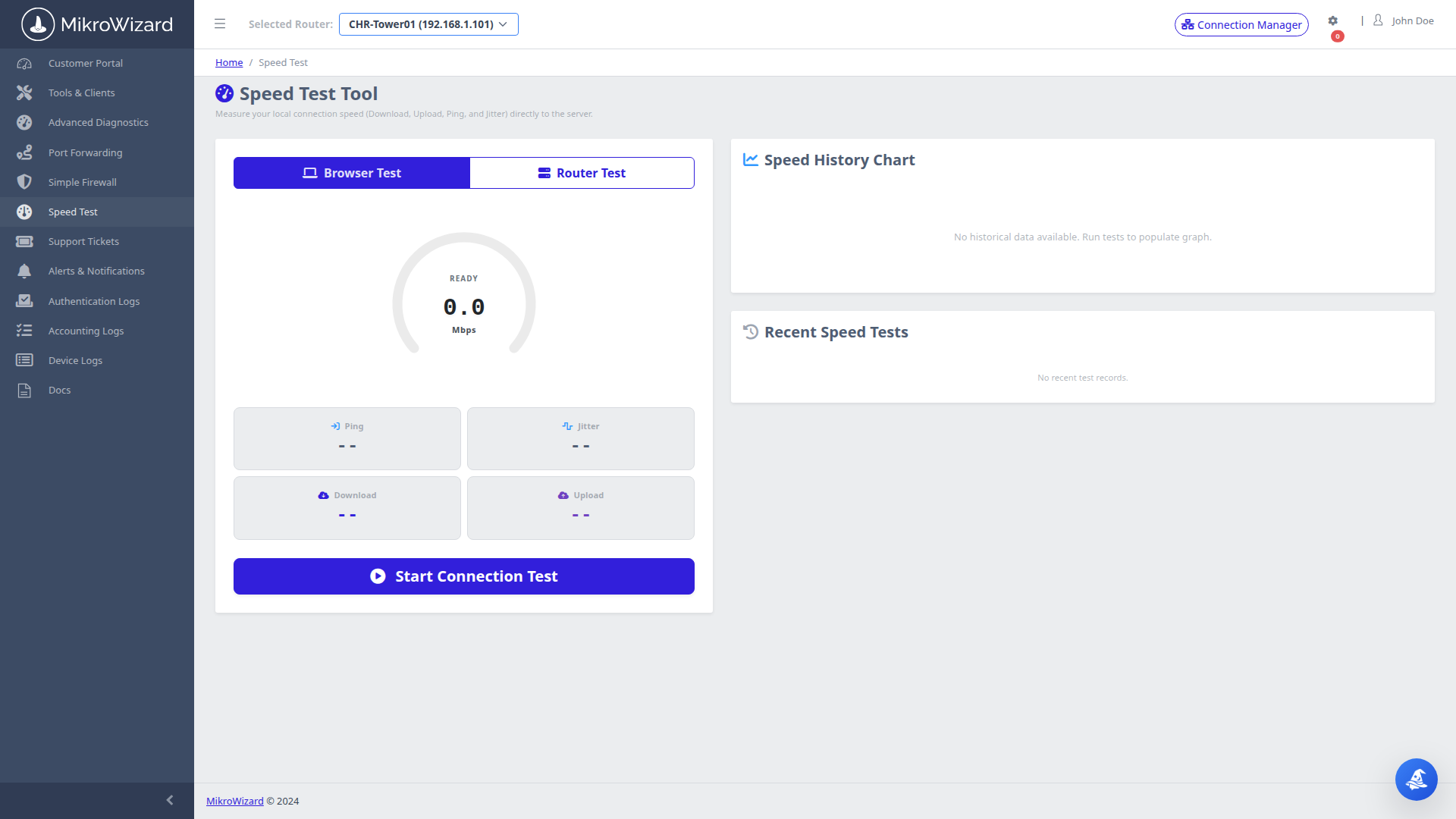
MikroSpeed: Rust-Engine Bandwidth Tester

Bandwidth benchmarking for MikroTik routers powered by a custom Rust-compiled BTest engine, with throughput limited only by your test server, router and link.
  • ✓ Rust btest-rs Engine: Benchmarks TCP/UDP throughput against RouterOS v6.43+ and v7 with modern Curve25519 EC-SRP5 auth.
  • ✓ Animated SVG Gauges: Real-time animated speedometer displaying Download/Upload Mbps, jitter, and historical logs.
🔍 Inspect Screenshot →
Golden Master CPE Cloner
CPE Cloner

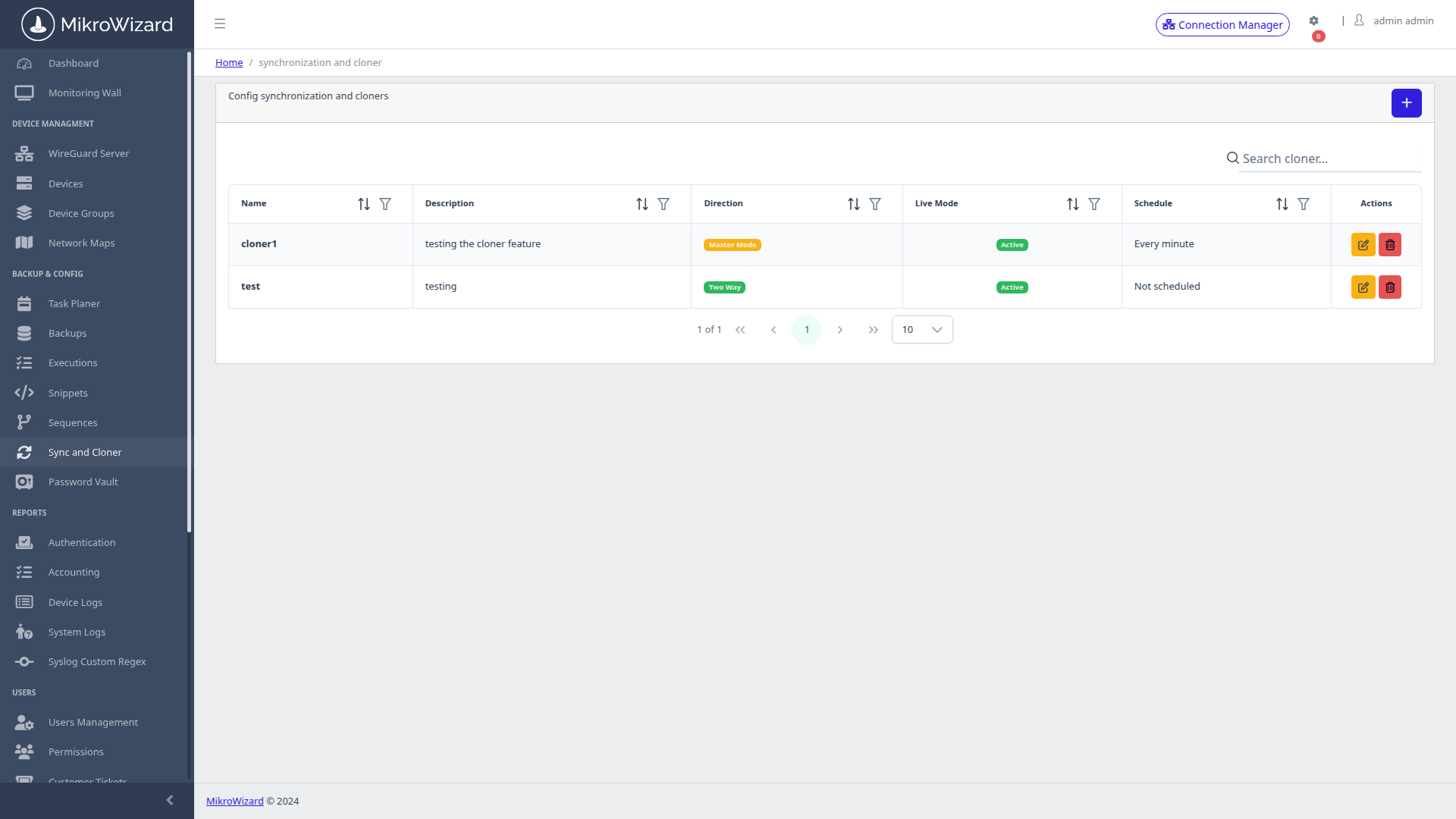
Golden Master CPE Provisioning & Cloner

Maintain 100% configuration consistency across subscriber CPEs by replicating Golden Master baselines.
  • ✓ Rapid Subscriber Onboarding: Push standardized baseline wireless, firewall, and routing configs to new CPEs in seconds.
  • ✓ Selective Sync: Replicate global firewall policies across thousands of subscriber units without affecting unique PPPoE credentials.
🔍 Inspect Screenshot →
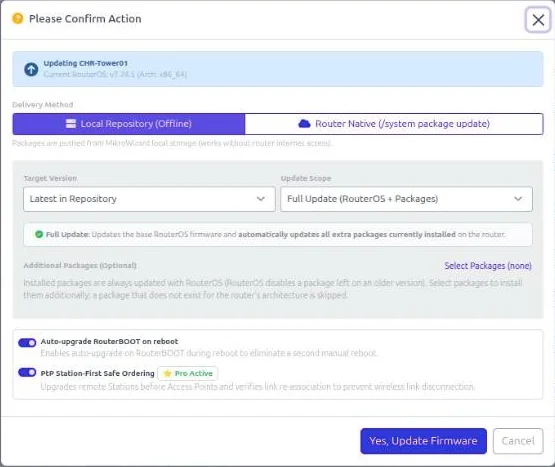
MikroWizard firmware update dialog for MikroTik RouterOS fleet upgrades with delivery method, target version, scope, RouterBOOT and PtP safe ordering options
New in v2.1.0 • MikroTik

Safe MikroTik Firmware Upgrades Across the Whole Fleet

MikroWizard v2.1.0 rewrites the firmware engine so RouterOS v6 to v7 upgrades and routine updates on towers and CPEs stop being a gamble.

  • ✓ Safe Upgrade Engine (Free & Pro): Verifies SHA256 against MikroTik's official hashes, checks free storage before upload, upgrades RouterBOOT after the OS, confirms the result after reboot and keeps restart-safe progress per device.
  • ✓ Multi-Step v6 → v7 Path (Pro): Takes older routers along latest v6 → 7.12.1 → 7.13+ and refuses automatic v6 → v7 upgrades when non-migrating packages such as multicast or user-manager are installed.
  • ✓ PtP Safe Ordering & Latest Cloud Channel (Pro): Upgrades stations before APs on point-to-point links, installs wifi-qcom / wifi-qcom-ac across the 7.13 package split, and pulls stable, long-term, testing or development builds from MikroTik.
  • ✓ Network Map v2 Root Cause Analysis (Pro): The Problems drawer separates the tower that actually failed from the sites that are only unreachable behind it.
  • ✓ NATed Multi-Endpoint Devices (Free & Pro): Several devices behind one public IP on different ports, each managed as its own device.
  • ✓ Live Sync & Clone (Pro): Changes made on a master router in WinBox, SSH, API or WebFig are replicated to members as a minimal patch, not a full overwrite.

Read the MikroWizard 2.1.0 release notes →

🔍 Inspect Screenshot →
