Pillar 2 • Automation & Configuration

Configuration Automation &
Logic-Aware Sequences

Automate nightly configuration backups, inspect drift with side-by-side visual diffing, roll back bad changes with 1 click, construct conditional logic flowcharts across thousands of devices, and clone golden master router configurations.

Repository

Centralized Backup Archive Repository

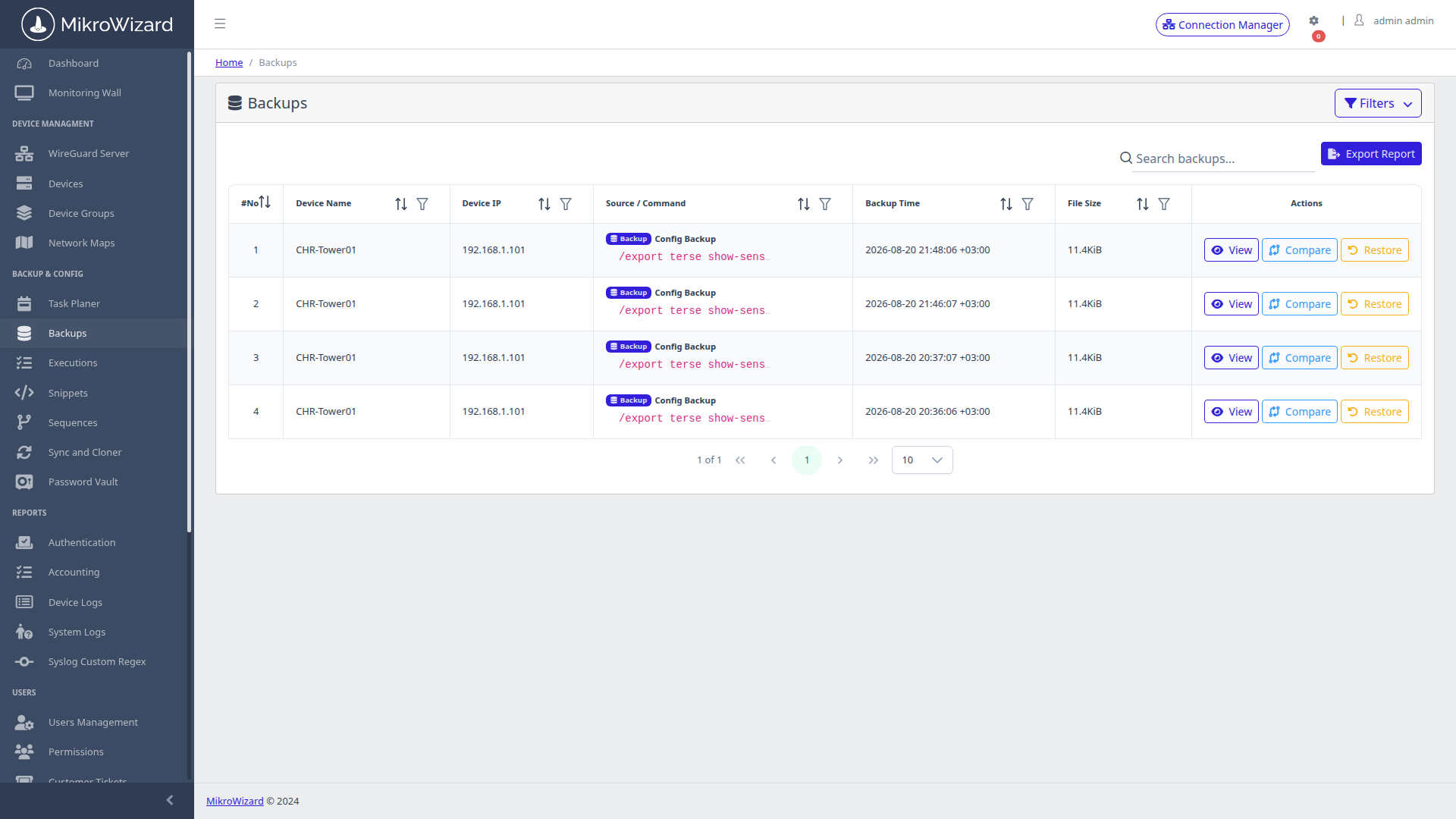
Maintain a centralised, searchable archive of all fleet configuration snapshots. Captures both RouterOS binary .backup files and human-readable .rsc script exports with origin source tagging (Scheduled, Manual, Pre-Change).
  • ✓ Automatic deduplication and multi-generation retention policies.
  • ✓ Encrypted at rest with instant single-file or bulk export capabilities.
Configuration Backup Archive
Inspect High-Res Screen

Backup Management: Multi-generation archive table with creation timestamps, device labels, and 1-click restore actions.

Side-by-Side Visual Diff
Inspect High-Res Screen

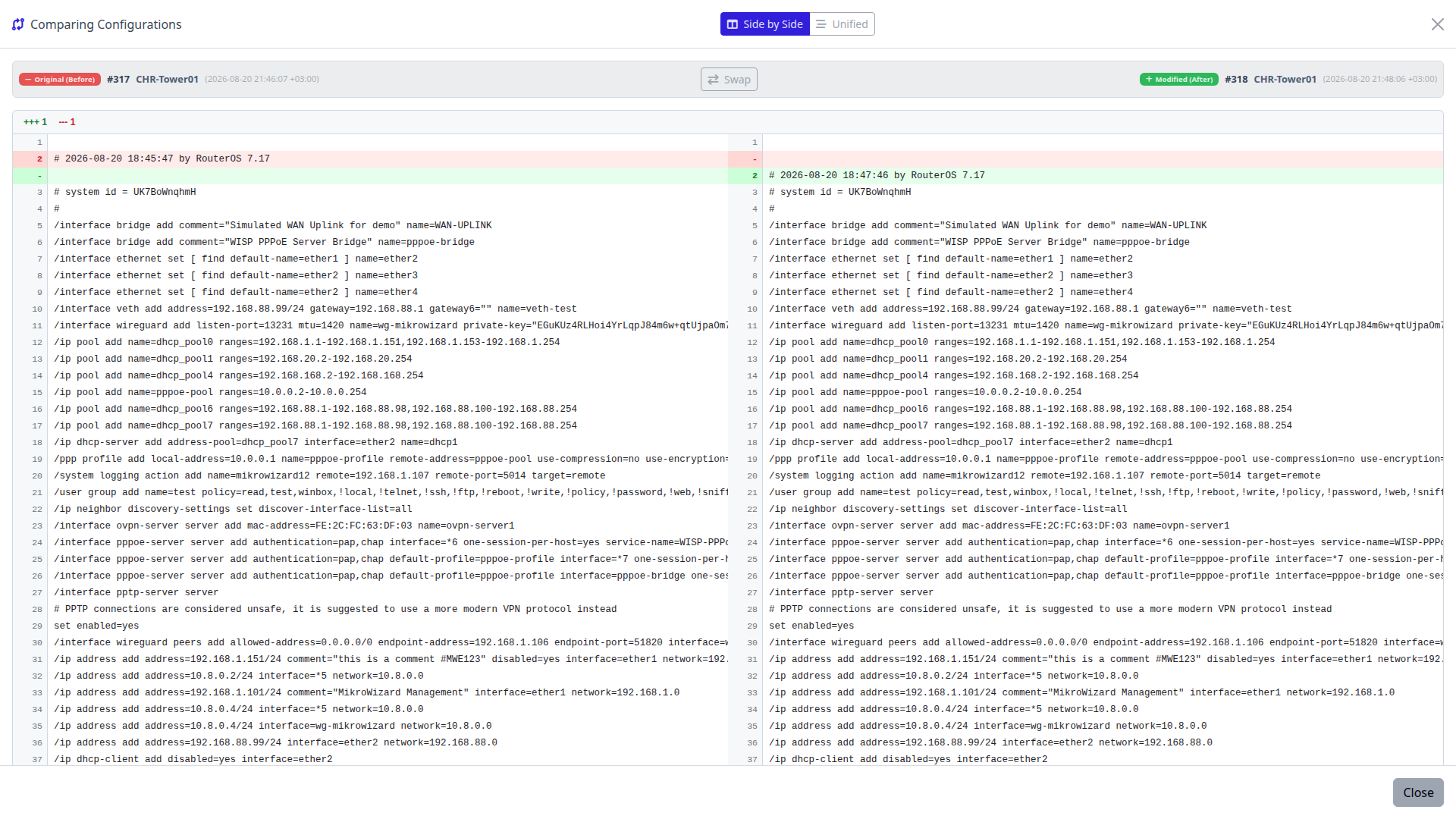
Visual Diff Engine: Color-coded side-by-side comparison modal highlighting added green rules and removed red rules.

Visual Diff

Git-Style Visual Side-by-Side & Unified Diffing

Stop manually inspecting thousands of lines of router scripts. MikroWizard integrates a color-coded ngx-diff comparison engine directly in the web panel.

  • ✓ Side-by-Side Diff: Dual synchronized scrolling columns for comparing version A vs version B.
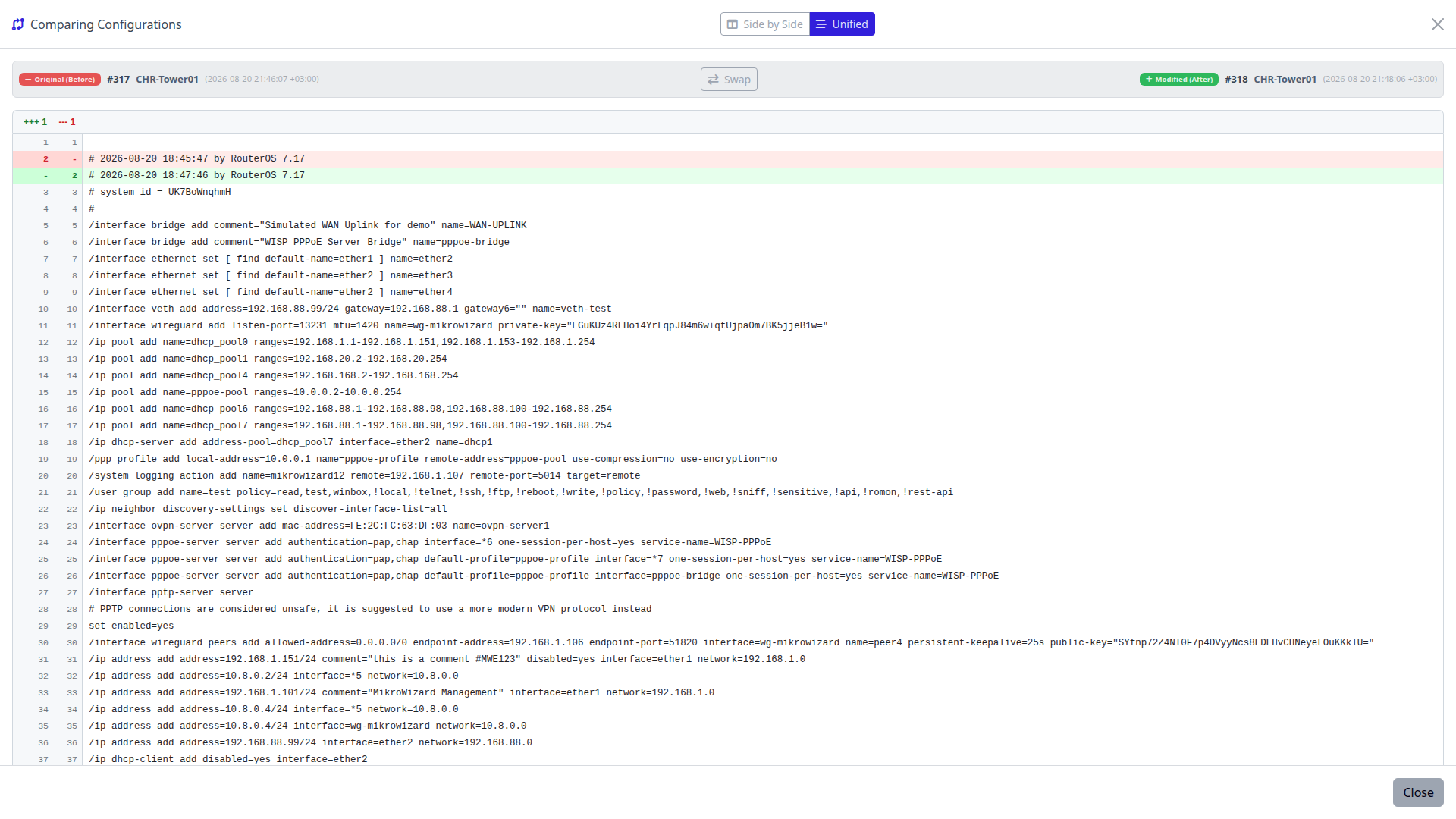
  • ✓ Unified Diff: Standard Git-like inline unified patch view with quick version swapping.
Recovery

1-Click Disaster Recovery & Rollback

When an unauthorized or erroneous configuration change creates network degradation, revert the device back to its validated state in seconds.
  • ✓ Executes safe script application or binary restore without requiring physical console cable access.
  • ✓ Automated rollback verification checks link reachability post-restoration.
Unified Patch Diff Modal
Inspect High-Res Screen

Unified Patch View: Line-by-line unified change inspection before executing 1-click restore.

Multi-vendor Free + Pro

Centralized Network Management Beyond MikroTik: Clean Multi-Vendor Diffs

Backups, snippets and the task planner work with Cisco IOS / IOS-XE / NX-OS, Juniper, Huawei VRP, Aruba, EdgeOS, Linux and custom SSH/Telnet devices, not only MikroTik.

Diff Exclusion Rules for 10+ Vendors

Built-in diff exclusion rules for more than 10 vendors keep lines you do not care about out of configuration diffs, so a diff shows the changes that matter.

Live Regex Testing Sandbox

Write your own exclusion patterns and test them live in a regex sandbox before you rely on them.

Pre-Connect & Post-Disconnect Hooks

Use pre-connect and post-disconnect hooks to run your own steps before MikroWizard connects and after it disconnects.
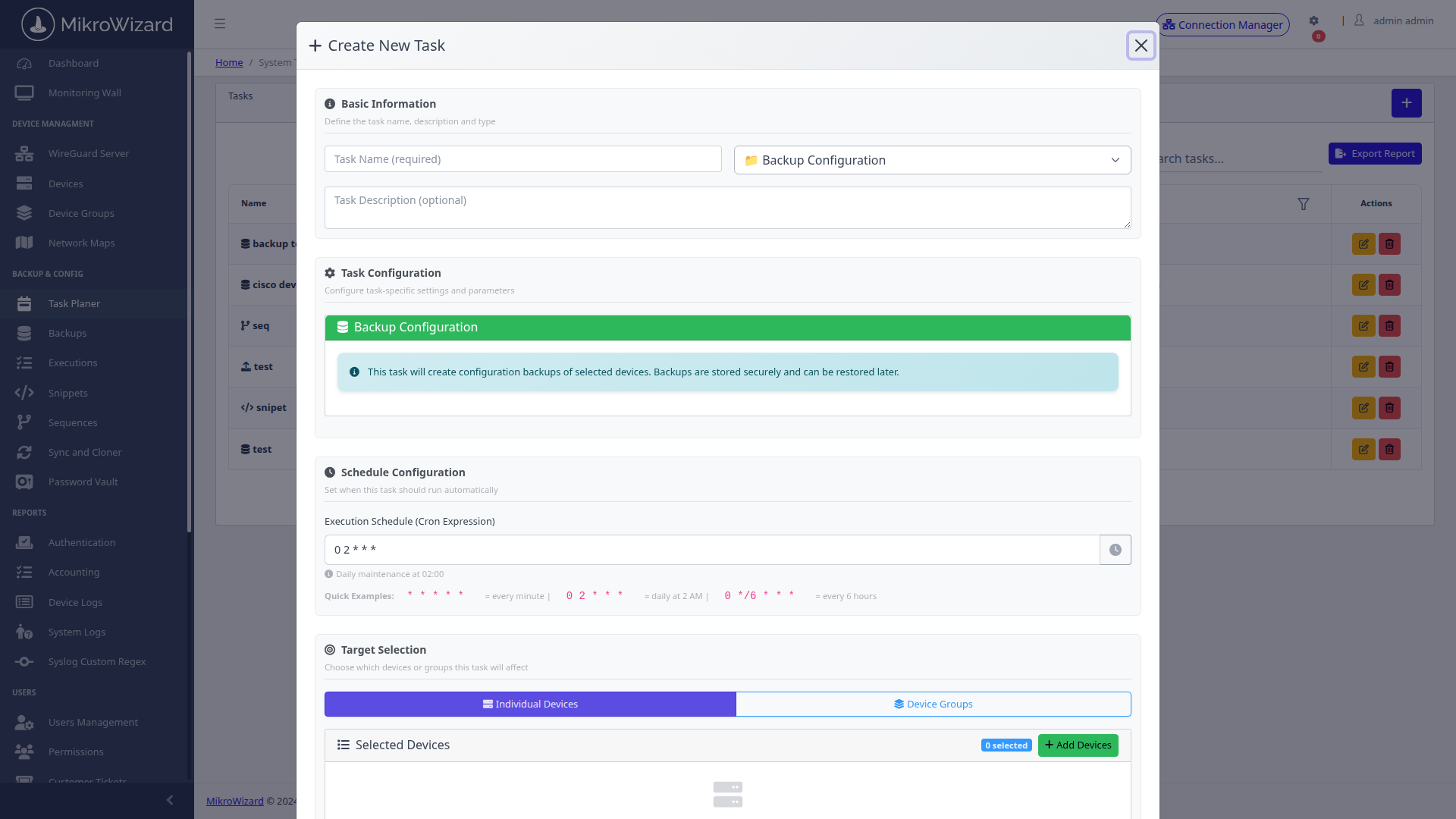
Task Planner Visual Cron Builder
Inspect High-Res Screen

Visual Cron Builder: Configure automated task execution intervals, target device groups, and task payload types.

Scheduling

Automated Task Planner & Visual Cron Builder

Construct recurring background jobs without mastering complex Linux cron syntax. Supports 4 core automation task types:

  • 1. Backup Tasks: Scheduled nightly configuration exports.
  • 2. Firmware Tasks: Automated RouterOS NPK upgrade orchestrations.
  • 3. Snippet Tasks: Fleet-wide script template executions.
  • 4. Sequence Tasks: Multi-step conditional workflow execution.
Scripting

Multi-Vendor CLI Snippets Library

Store and standardize reusable RouterOS, Cisco, and Linux CLI scripts in a centralized library. Snippets support the built-in [mikrowizard] token, which is automatically substituted with the MikroWizard server's reachable IP at execution time — enabling syslog targets, RADIUS addresses, and firmware sources without hardcoding server IPs.
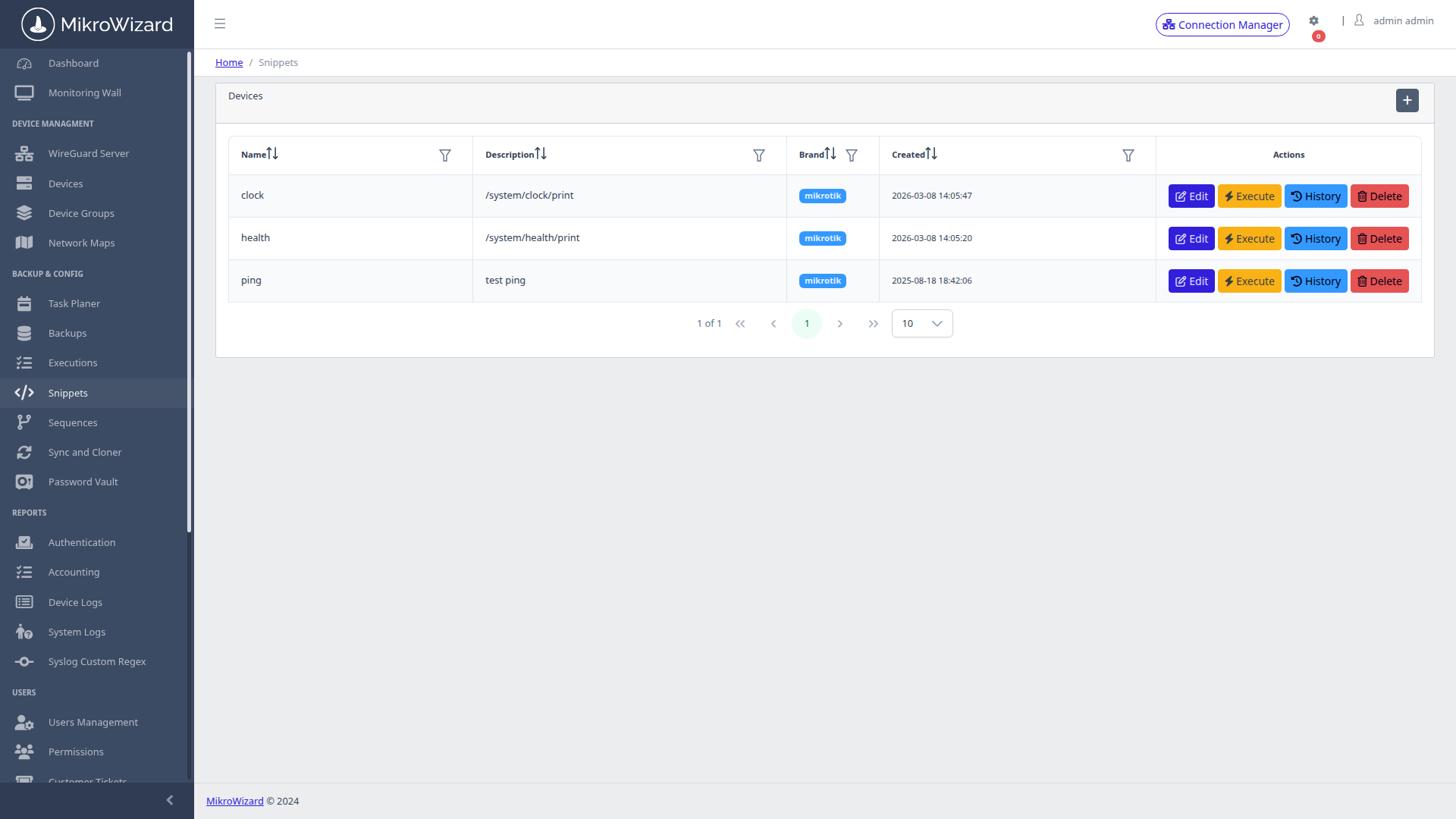
  • ✓ Built-in script editor modal with vendor targeting and configuration mode controls.
  • ✓ Target individual routers, custom tags, or entire regional device groups.
Snippets Library Console
Inspect High-Res Screen

Snippets Management: Pre-built security hardening, OSPF provisioning, and BGP filter snippet templates.

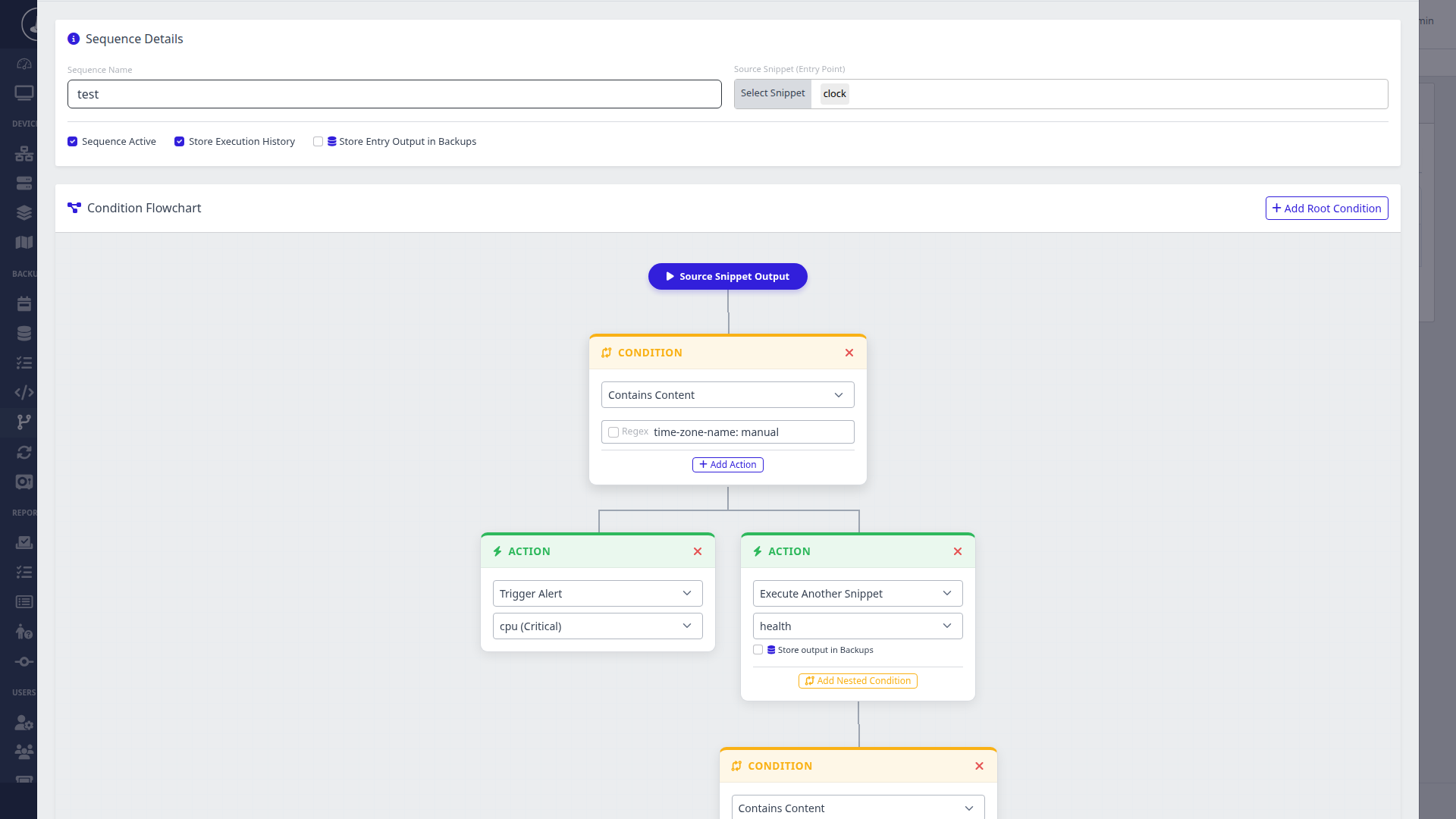
Sequences Flowchart Builder
Inspect High-Res Screen

Visual Workflow Canvas: Construct branching decision trees, regex stdout matchers, and failure abort triggers.

Workflow Automation

Visual Multi-Step Sequence Flowchart Builder

Go beyond flat sequential scripts. Sequences introduce intelligent conditional logic with real-time regular expression pattern matching on command output.

  • ✓ Conditional Regex Branching: Execute script A, evaluate CLI response, and dynamically branch to path B or C.
  • ✕ Emergency Abort: Halt entire sequence execution immediately upon matching error regexes.
Zero-Touch MikroTik Pro

MikroTik Config Sync & Clone: Golden Master Router Synchronizer

Designate a golden master router model and clone its base configuration (firewall filter chains, NAT templates, queue trees, DNS configs) across dozens of branch routers.

Pick a master router and the RouterOS config sections to sync, for example /ip address, /ip dns, /ip route, firewall and system sections. MikroWizard exports those sections, diffs them against each member's export and applies only the missing or different lines: a minimal patch, not a full overwrite.
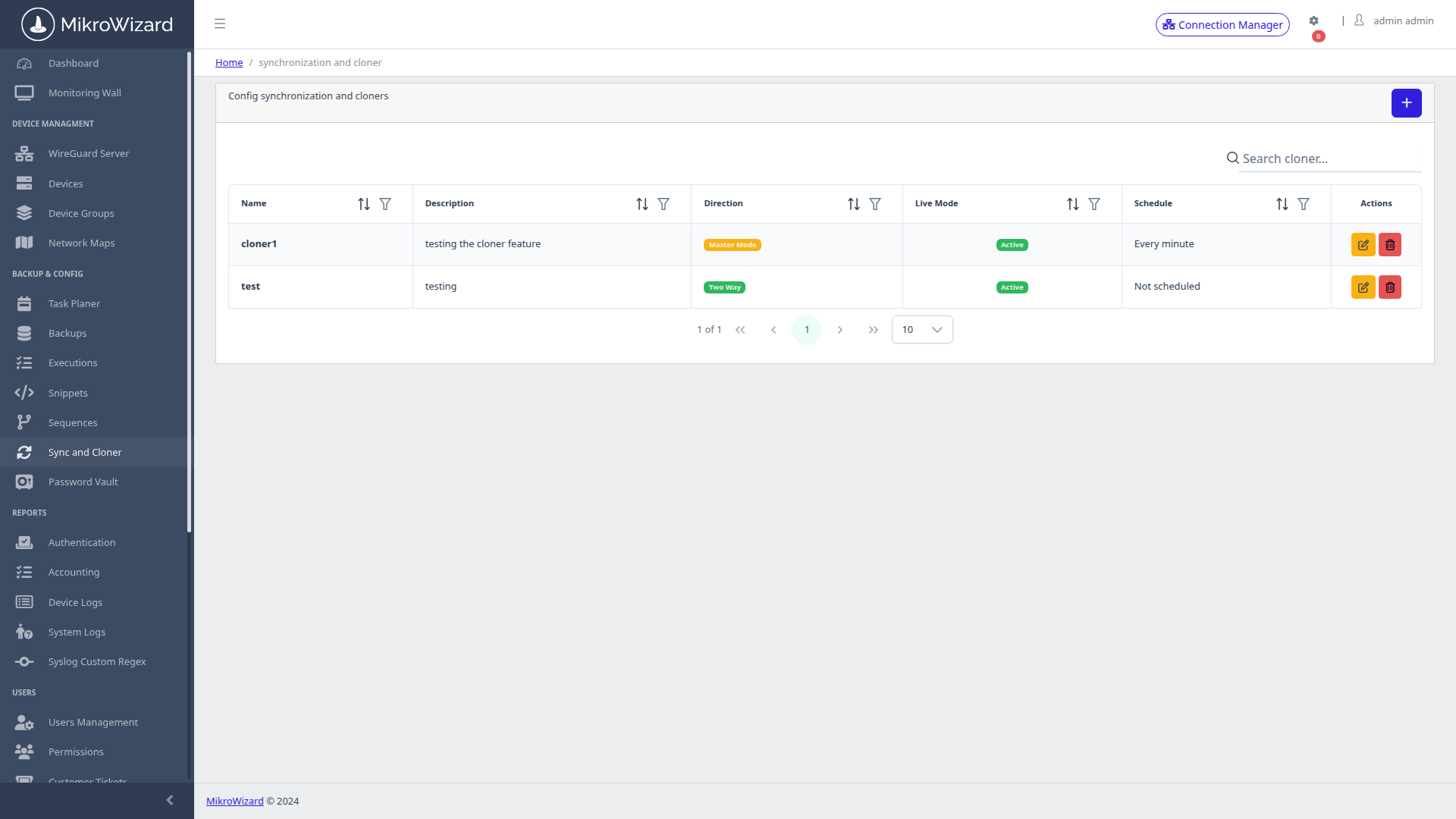
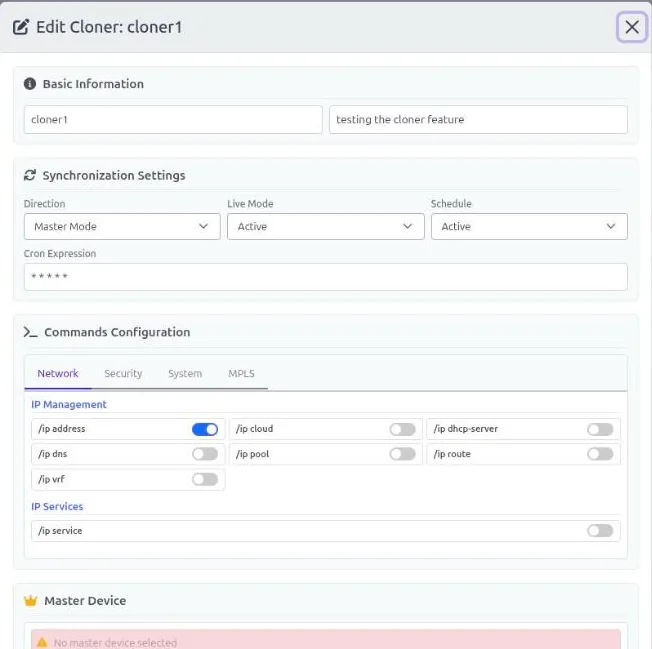
  • ✓ Two-way and master-to-target synchronization modes with dry-run diff preview.
  • ✓ Run on demand or on a cron schedule.
  • ✓ Eliminates human error during new tower or customer branch rollouts.
Golden Master Cloner Console
Inspect High-Res Screen

Cloner Overview: Master device definitions, target node assignments, and synchronization status.

MikroWizard Sync and Clone editor for MikroTik showing master mode, live mode, schedule and RouterOS config sections
Inspect High-Res Screen

Sync & Clone Editor: Master or two-way mode, live mode, schedule and the RouterOS config sections to keep in sync.

Live Sync MikroTik Pro

Live Mode: MikroTik Config Sync Triggered by Real Changes

Live mode watches RouterOS change logs. When someone changes the master in WinBox, SSH, the API or WebFig, the change is replicated to the members without waiting for the next schedule.

  • ✓ Master mode (one-way): master → members.
  • ✓ Two-way: a change on any member propagates to the others.
  • ✓ No loops: changes made by MikroWizard itself are ignored.
  • ✓ Local exceptions: lines tagged #mwe stay local to a router.
  • ✓ Synced once: a device that belongs to several groups is synced once.
Automation Execution History
Inspect High-Res Screen

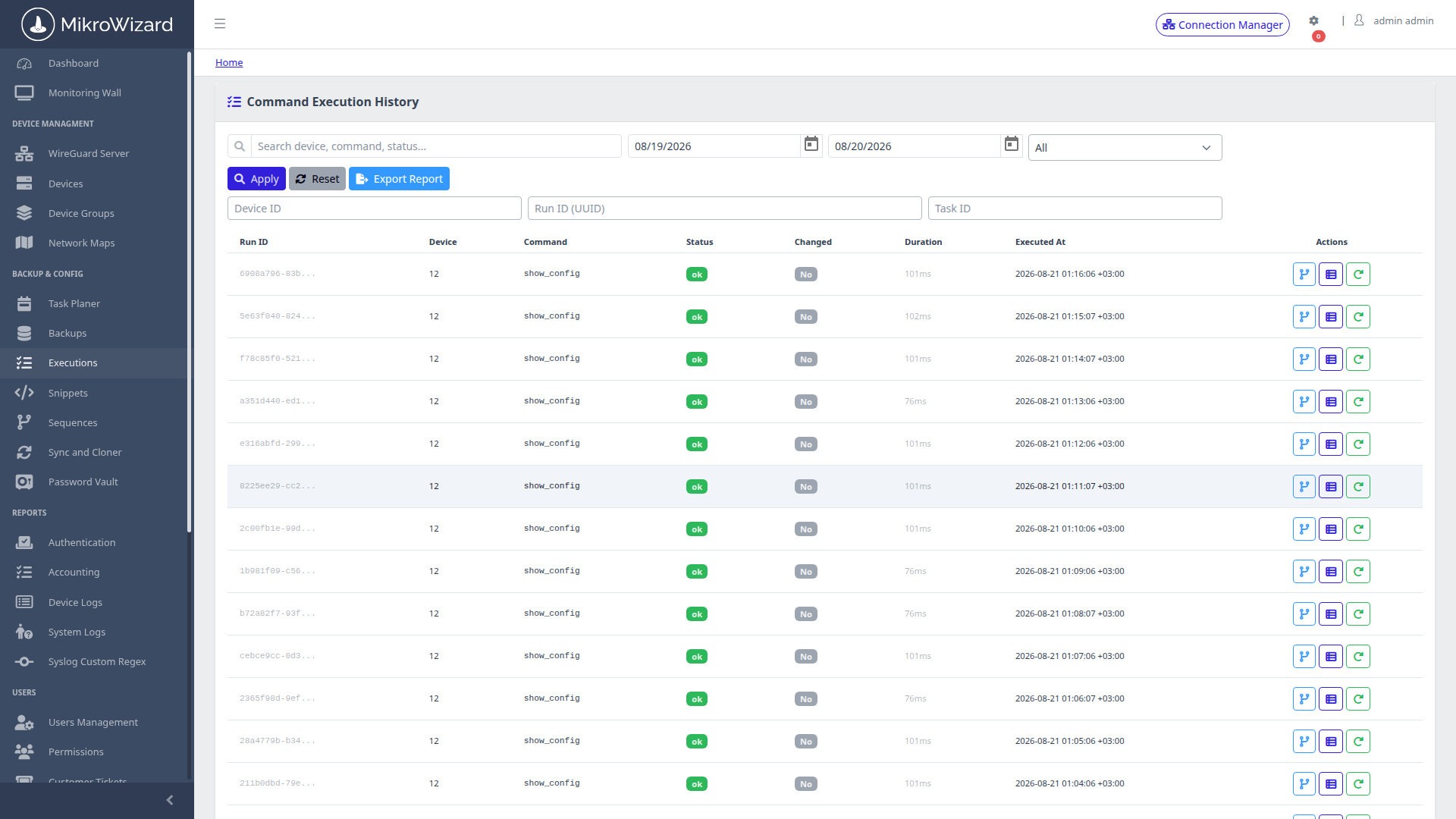
Execution Audit Log: Time-stamped execution history with exit codes, execution duration, and full stdout/stderr capture.

Auditability

Centralized Automation Execution History

Never wonder what a script did or why a cron task failed. MikroWizard captures complete execution metrics for every batch task and sequence run.

  • ✓ Full stdout and stderr text logs preserved for compliance review.
  • ✓ Filter by status (Success, Failed, Partial), target device, or operator name.
Firmware Engine MikroTik Free + Pro

MikroTik Firmware Upgrade Engine: Safe RouterOS v6 to v7 Upgrades

The firmware engine was rewritten in MikroWizard 2.1.0. Package names are checked per architecture, every package is verified, and the result is confirmed after the reboot. In Pro, a multi-step planner also takes older routers along the RouterOS v6 to v7 path: latest v6 → 7.12.1 → 7.13+.
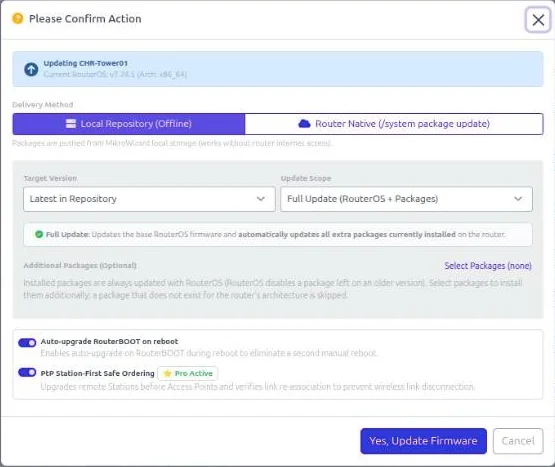
  • ✓ Verified packages: SHA256 checked against MikroTik's official hashes, and free storage checked before upload.
  • ✓ RouterBOOT after OS: the bootloader is upgraded once the new RouterOS version is running.
  • ✓ Restart-safe: progress is stored per device, so a restart never loses track or leaves a router halfway.
  • ✓ Modes: full (OS + RouterBOOT), OS only, packages only, or bootloader only.
  • ✓ Sources: the server repository (offline/local), MikroTik servers directly (router native), a specific version, or Auto-Pilot latest.
  • ✓ Retries & live status: Maximum Update Retries 1–5 (default 2); live Updating / Rebooting / Updated / Failed badges with inline Retry and Clear, plus a Failed quick filter.
  • ✓ Groups and scale: group upgrades offer the same options as a single device; uploads run 8–35 parallel transfers.
MikroWizard firmware update dialog for MikroTik routers showing delivery method, target version, upgrade scope, RouterBOOT and PtP options
Inspect High-Res Screen

Firmware Update Dialog: Delivery method, version, upgrade scope, RouterBOOT and PtP ordering in one place.

Latest Cloud Channel Pro

Upgrade to the latest release of the stable, long-term, testing or development channel, from the device list, from groups or from scheduled tasks.

PtP Safe Ordering Pro

On point-to-point wireless links, MikroWizard upgrades the stations before their APs, so the upgrade order follows the link.

v6 → v7 Safety Rules Pro

MikroWizard refuses a v6 → v7 upgrade when packages that do not migrate (for example multicast or user-manager) are installed.

wifi-qcom Handling Pro

Installs wifi-qcom / wifi-qcom-ac across the RouterOS 7.13 package split. Read the 2.1.0 release notes →

Lifecycle MikroTik

Offline Firmware Repository & NPK Manager

Perform coordinated RouterOS firmware upgrades without depending on remote MikroTik download servers during maintenance windows.

  • ✓ Host versioned .npk package bundles locally inside MikroWizard.
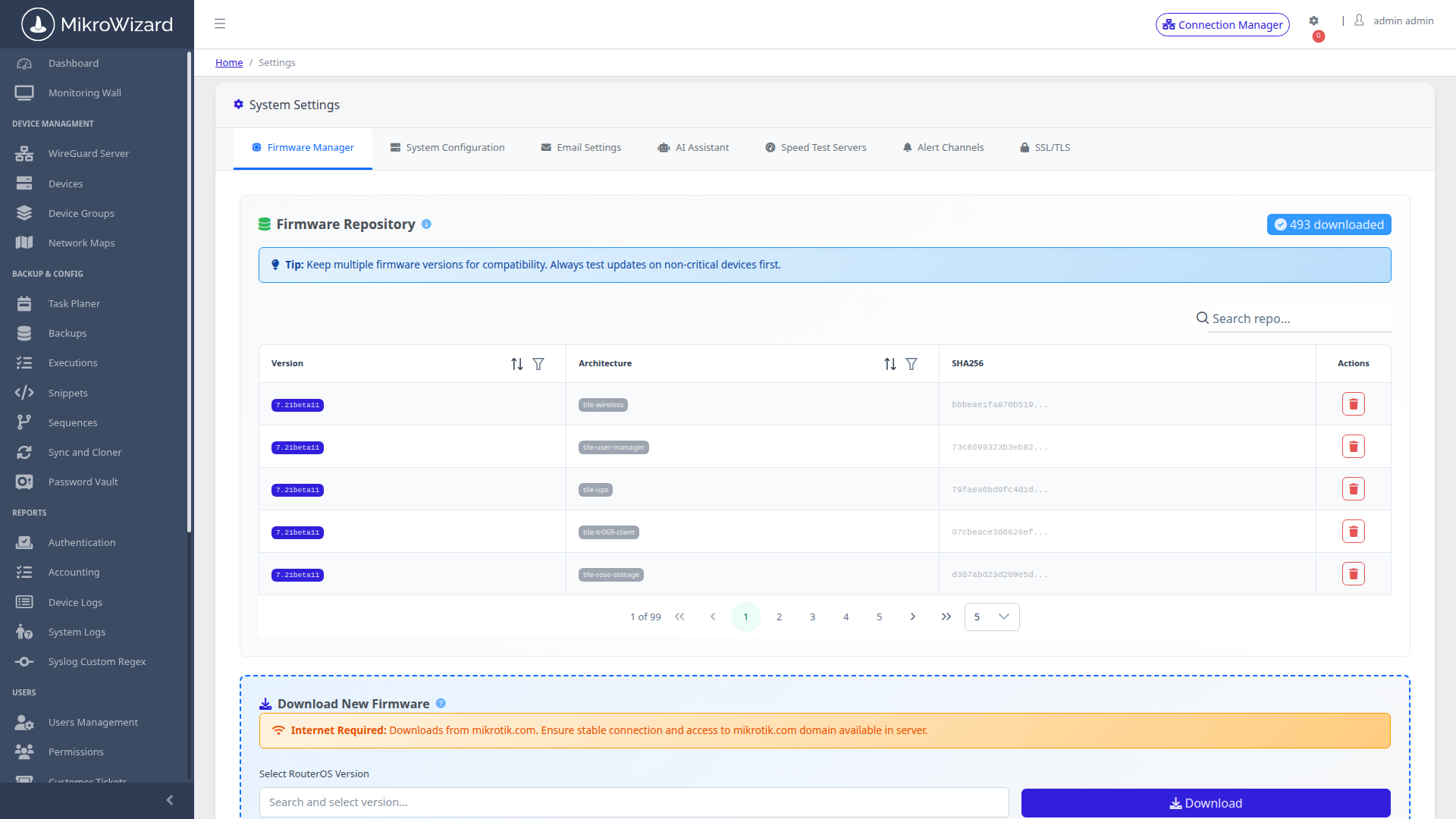
  • ✓ Orchestrate staged rolling upgrades across test batches before fleet-wide rollout.
Firmware Repository Manager
Inspect High-Res Screen

Firmware Repository: Local package storage with RouterOS architecture matching (ARM, ARM64, MMIPS, TILE, x86).

Autonomous Operations

Take Total Control of Network Configuration Drift

Deploy MikroWizard on-premises. Automate backups, diff changes visually, construct logic flowcharts, and eliminate human error.


Request Live Architecture Demo Explore Pricing Plans